


Power BI developer vs data engineer: who comes first


The project has been stuck for two weeks. The Power BI developer is hired, the kick-off call is done, credentials are shared — but there are no dashboards. In the weekly standup someone says: "he's not doing anything." Management is frustrated. The developer looks lost.
If you recognise this situation, the hiring decision was probably fine — the sequencing wasn't. This article walks through the real functional boundary between a Power BI developer and a data engineer, explains why the wrong order stalls projects before they start, and gives you a four-question checklist to run before any BI hire.
A Power BI developer specialises in visualisation, data modelling inside Power BI, and report logic. They do not build data pipelines or transform raw data from complex sources. Without a clean, prepared data layer in place, there is nothing for them to work with — and no amount of experience changes that constraint. The decision that determines project success is not who you hire, but what is already ready when they start.
Two different jobs that are constantly confused
Companies often request Power BI consulting services with a single brief: "we need dashboards." Behind that brief sit two distinct jobs, done by two different specialists.
A Power BI developer is the person who turns prepared data into reports and visualizations: they build data models inside Power BI Desktop, write DAX measures, configure interactive dashboards, and publish to Power BI Service. The operative word there is "prepared." They arrive at a table that's already been set.
A Data Engineer sets that table. They collect data from various sources — CRM, ERP, databases, APIs — clean it, transform it, load it into a warehouse, and keep the pipeline running. They don't build dashboards; they make sure there is something worth building dashboards from.
What each role actually does
The table below maps out the division of responsibilities between the two roles — no simplifications, no exaggerations.
One nuance worth noting: some Power BI developers can handle basic Power Query transformations and may be able to clean data at a simple level. But the moment data arrives from multiple systems, involves non-trivial deduplication logic, or requires incremental loads — that's a pipeline problem, not a Power BI problem.
Why a Power BI developer can't just "connect and go"
This question comes up often. The answer depends entirely on the state of your data.
If you have one well-structured database with clean, clearly labelled tables — a Power BI developer genuinely can connect directly and start building reports without a separate pipeline. That scenario exists, but it's the exception.
In most real companies the picture is different. Data is scattered across CRM, ERP, Google Sheets, multiple databases, and legacy systems. Each source has its own logic, formats, duplicates, and gaps. Power BI was not designed to sort through that mess — according to the Microsoft Power BI Dataflows documentation, the data preparation tools inside Power BI are built for business analysts working with already-reasonably-clean data, not for industrial integration across heterogeneous systems.
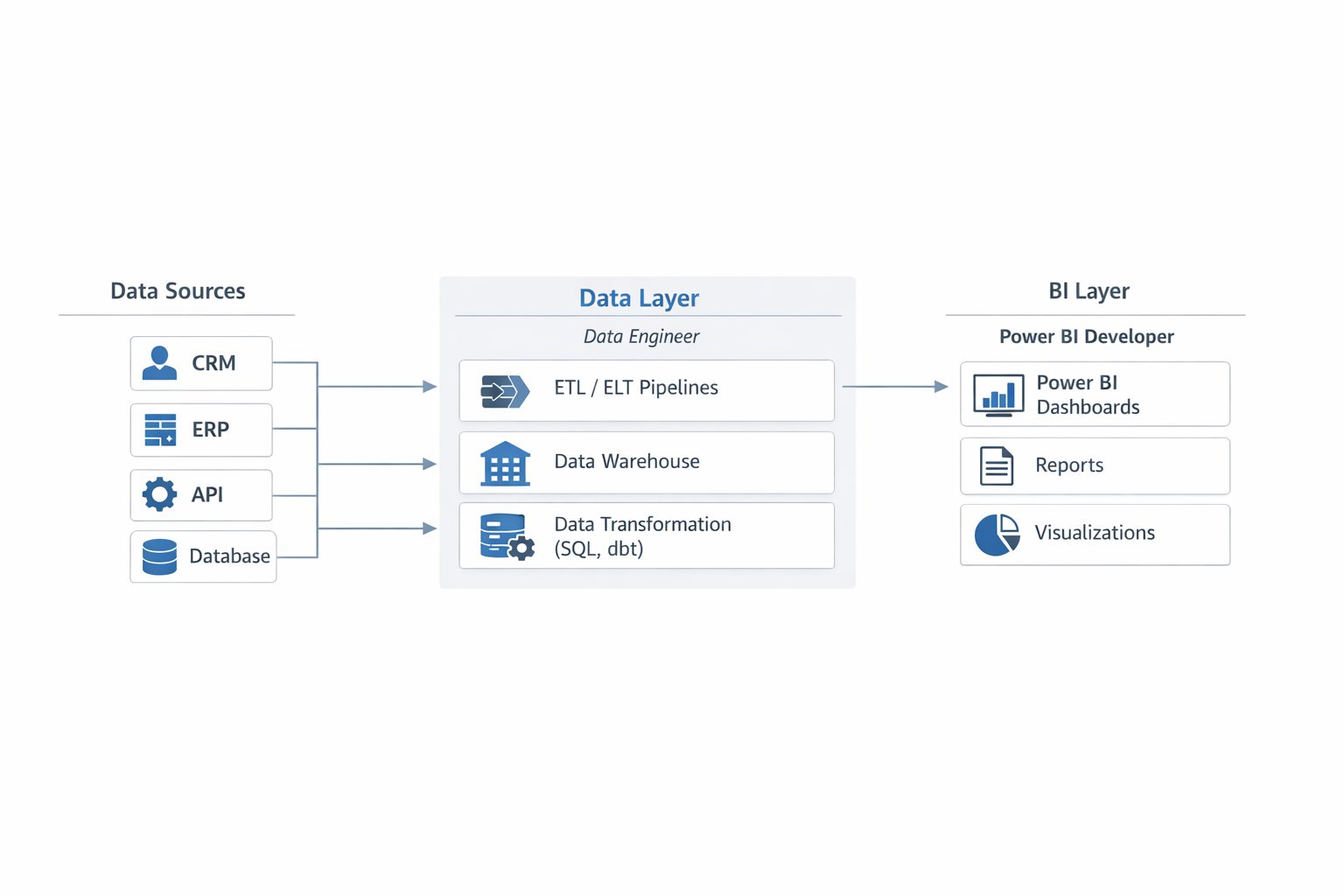
Typical BI architecture: raw data flows through a dedicated data layer before reaching Power BI for reporting.
What happens when there is no pipeline
The Power BI developer gets access to the source tables and finds: field names differ across systems, there are duplicates, sales figures for the same month don't match between two sources, and it's unclear which number to trust. They can spend weeks patching this manually in Power Query — but that's a temporary fix that will break at the next data refresh.
Sometimes the developer stops and says honestly: "I need a proper data source." The client reads this as a refusal to work. It's actually a correct diagnosis.
The Microsoft Azure Data Architecture Guide describes the data layer as a separate tier between source systems and data consumers. That's precisely why building it is a standalone task that must precede any visualization work. This isn't convention or over-caution — it's an architectural requirement.
If your BI project has already stalled — or you're planning a launch — a 30-minute technical consultation will identify which specialist you need first and what's already in place in your infrastructure. Talk to our team before signing any contract.
Signals that you need a Data Engineer first
There are clear indicators that tell you the project won't move without a Data Engineer — even if the Power BI developer is experienced and motivated.
- Your data lives in multiple systems with no automatic synchronisation between them. Each system is a separate pipeline that someone has to build.
- There is no central data warehouse or storage layer. Power BI does not replace a warehouse — it reads from one.
- Reports are currently built manually in Excel and updated by hand each week. This means the transformation logic doesn't exist anywhere except in people's heads.
- Different departments see different numbers for the same metric. That's the classic symptom of a missing or poorly built data layer.
- There are legacy systems where data is exported as CSV files or through non-standard APIs. A Power BI developer cannot set up that kind of connector reliably at scale.
If at least two of these points describe your situation, the data quality rules for mid-market BI make the consequence clear: without a standardised data layer, even a well-designed dashboard becomes a source of distrust rather than decisions. People stop believing it — and go back to Excel.
When it makes sense to start with a Power BI developer
There are scenarios where starting with visualization is the right call. If you already have: one structured SQL source or Data Warehouse with relatively clean data, an internal team that maintains the pipeline and can answer schema questions, and specific reports with clearly defined requirements — then a Power BI developer can hit the ground running from day one.
Four questions to ask before starting any BI project
These four questions replace an hour of preliminary audit. The answers determine who needs to come first and what architecture the project needs at the outset.
- Question 1: Where does your data actually live right now?
If the answer is "in different systems," "partly in Excel," or "we have a CRM and a few other databases" — you need a Data Engineer first. A single source with a clear structure — you can start with Power BI.
- Question 2: Do you have a data warehouse or a single analytical store?
If no — a Power BI developer cannot work at full capacity. They can build a prototype, but not a product that refreshes and scales.
- Question 3: Who is responsible for data accuracy and freshness?
If the answer is "nobody" or "sometimes someone from IT" — the pipeline hasn't been built yet. You have sources, but no one owns their quality or continuity.
- Question 4: What exactly do you want to see in the reports, and where should that data come from?
If the answer is vague — "we want analytics" or "we need to see all the metrics" — you need not just a Data Engineer but also an analyst or BI architect to formalise requirements. Without a clear specification, no specialist can move quickly.
A more detailed approach to assessing readiness is covered in BI readiness: governance and data lineage. ETL and real-time architectures covers the technical options for building pipelines across different data types and load profiles.
The right sequence saves time and budget
The most expensive path: hire a Power BI developer, stall after two weeks because the data isn't ready, then find a Data Engineer, wait for the pipeline to be built, and only then return to Power BI. You pay twice — for the standstill and for the second onboarding.
The cheaper path: run a technical consultation before the project starts, assess the data landscape, and bring in the right specialist first. Gartner's Business Intelligence research identifies poor data quality and availability as one of the primary causes of low BI tool adoption in organisations — not issues with the tools themselves.
Bluepes builds data engineering and analytics either as part of a dedicated team or as a standalone project block. If a pipeline is needed — we lead with a Data Engineer. If the data is already in good shape — we bring in the Power BI developer immediately. The decision is based on an audit, not a price list.
Key takeaways
- A Power BI developer and a Data Engineer do fundamentally different work: one builds reports, the other builds the pipeline and data layer.
- A Power BI developer cannot work productively without a prepared data source.
- If data is spread across multiple systems or there is no data warehouse, a Data Engineer must come first.
- The four pre-project questions let you identify the right sequence in fifteen minutes.
- Hiring in the correct order reduces project timelines and eliminates the cost of downtime.
Conclusion
A stalled BI project is almost always an architecture problem, not a people problem. Power BI developer vs data engineer is not a question of "who is better" — it's a question of sequence. Both roles are necessary, and each one enters the project at the right moment.
If you're planning a BI project or you're already in a situation where the developer "isn't doing anything" — talk to engineers who have been through this dozens of times. A short technical conversation before the project starts will give you a clear picture: who is needed, in what order, and what is already in your infrastructure.
Book a technical consultation before your BI project begins — and get specific answers instead of guesswork.
Summarize with AI
 ChatGPT
 Claude
 Gemini
 Grok
Grok Perplexity
FAQ











Interesting For You



Reporting workflows for business analysts in 2026
Reporting workflows give business analysts a controlled path from request intake to published dashboard. The workflow defines who owns the metric, which dataset is trusted, how changes reach the semantic model, what validation happens before publishing, and how refresh or access issues are tracked after release.
Read article



Predictable BI Costs Start in the Semantic Model Layer
Predictable BI costs come from controlling the semantic layer. The duplicated logic that makes two dashboards disagree is the same duplication that makes a platform refresh and store the same data several times over, and that repeated work is what lands on the bill. Aligning measures and models tends to steady the numbers and the spend at once.
Read article


Power BI vs Amazon Quick Suite: a 2026 platform decision
Power BI suits organizations whose data, identity, and productivity already sit inside Microsoft 365 and Azure, with teams that model in DAX and consume through Excel-based workflows. Amazon Quick Suite (rebranded from QuickSight on October 9, 2025) suits AWS-native stacks where dashboards reach large viewer populations or get embedded inside customer-facing applications. The cost shape is different too — per-user heavy for Power BI, viewer-economical for Quick Suite — and the gap compounds with team size.
Read article