


Reporting workflows for business analysts in 2026


A reporting request often starts cleanly: Finance needs a margin dashboard, Operations wants daily fulfilment visibility, Product asks for cohort reporting, and leadership wants one set of numbers for the next steering meeting. The difficulty appears later, when several dashboards use similar metrics with different filters, refreshes fail after a source-system change, and no one can say which KPI definition is current.
Reporting workflows give business analysts a controlled path from request intake to published dashboard. The workflow defines who owns the metric, which dataset is trusted, how changes reach the semantic model, what validation happens before publishing, and how refresh or access issues are tracked after release.
For BI teams using Power BI Fabric, Amazon Quick Suite, or both, the BA role has moved closer to governance and delivery coordination. The analyst no longer only gathers requirements and prepares visuals. The analyst helps protect metric meaning, dataset readiness, stakeholder approval, and release discipline so that reporting remains usable when more teams depend on shared dashboards.
Updated in May, 2026
Why reporting workflows break as BI usage grows
Reporting workflows break when dashboard production grows faster than ownership, validation, and change control. The first symptoms usually look small: two teams calculate “active customers” differently, a dashboard refresh fails after a CRM field changes, or a business user exports data because they no longer trust the published report.
A reporting workflow is the repeatable process that moves a BI request through intake, definition, dataset preparation, model update, validation, release, and review. Without that process, business analysts spend more time reconciling numbers than improving reporting quality.
The common failure pattern is duplicated decision-making. Finance defines revenue one way, Operations defines order completion another way, and Product uses a separate customer activity filter. Each dashboard may be reasonable alone, but the company loses alignment when those reports reach leadership together. The structural causes of KPI misalignment usually sit deeper than dashboard design: unclear ownership, weak semantic models, and uncontrolled changes to shared data assets.
The BA workflow has to catch these issues before visuals are built. If the analyst starts with chart layout while metric definitions remain unstable, the team only makes unreliable numbers easier to consume.
What BA-owned governance should cover before dashboards are built
BA-owned governance should cover metric definitions, data sources, ownership, access rules, and change impact before a dashboard reaches stakeholders. This does not require a heavy approval process. It requires enough structure to prevent hidden assumptions from becoming production reporting logic.
The first asset is a metric definition record. A useful definition includes the business meaning, formula, owner, source tables, filters, refresh expectation, known exclusions, and example calculations. If “monthly active customer” excludes test accounts, inactive contracts, or trial users, that rule needs to live in a shared place before the dashboard is published.
The second asset is a dataset readiness checklist. Business analysts do not need to own all engineering work, but they should confirm whether the data grain, joins, field types, date logic, and source-system dependencies match the reporting question. A dashboard that mixes order-level facts with customer-level attributes without clear grain rules will produce totals that look credible and still be wrong.
The third asset is change ownership. When a field changes in CRM, ERP, billing, or a data warehouse, the reporting workflow needs a named owner who checks which dashboards, semantic models, and downstream calculations are affected. This is where lightweight data governance for BI teams matters: ownership, lineage, and data contracts help teams control reporting changes without blocking normal delivery.
This split keeps the BA close to business meaning while engineering protects the technical path that makes the reporting dependable.
Where Power BI Fabric and Amazon Quick Suite change the BA workflow
Power BI Fabric and Amazon Quick Suite change the BA workflow because reporting assets now sit inside broader data and analytics platforms, not isolated dashboard tools. Business analysts need to understand how semantic models, refresh modes, dataset permissions, and AI-assisted analytics affect the lifecycle of a report.
Microsoft describes Power BI semantic models in Fabric as a logical description of an analytical domain with metrics, business-friendly terminology, facts, and dimensions. That wording matters because the semantic model becomes the shared layer between business language and analytical logic. Source: Microsoft Fabric Power BI semantic models.
AWS documentation currently describes Amazon Quick as the broader platform and Amazon Quick Sight as the BI visualization component within it. The same documentation states that existing QuickSight APIs, SDKs, and integrations continue to work. Source: Amazon Quick documentation. For Bluepes content and service navigation, Amazon Quick Suite analytics delivery remains the relevant commercial page because that is how the service is currently positioned on the website.
The workflow implication is clear. A BA working across these platforms has to document more than a dashboard request. The request must specify whether the metric belongs in a shared semantic model, whether the dataset needs imported storage or direct query behavior, whether SPICE capacity or Fabric capacity affects refresh expectations, and whether access controls differ by department.
In Amazon Quick, Enterprise Edition supports row-level security for datasets, and AWS documents rules for restricting which rows readers can see. Source: Amazon Quick row-level security. AWS also documents column-level security for restricting access to selected dataset columns. Source: Amazon Quick column-level security. These controls belong in the reporting workflow because access decisions affect what each stakeholder sees and whether totals match across departments.
For Power BI Fabric, semantic model ownership needs similar care. If every department creates its own measures independently, the reporting workflow will produce dashboard volume without metric control. Power BI consulting services are relevant when teams need help designing semantic models, KPI governance, and reporting delivery patterns that internal analysts and engineers can maintain after launch.
How semantic models turn reporting requests into governed assets
Semantic models turn reporting requests into governed assets by placing shared business logic in one controlled layer instead of repeating calculations across dashboards. For business analysts, the semantic model is where requirements become reusable reporting structure.
A good BA workflow separates three levels of work. The business requirement explains the question: “Which customers are active this month?” The metric definition explains the rule: “Count distinct customer IDs with qualifying activity in the selected period, excluding test and suspended accounts.” The semantic model implements the reusable calculation so that reports do not recreate the same logic in separate files.
This separation reduces rework. When the definition changes, the team reviews the semantic model and affected dashboards instead of searching through report-level measures. It also makes stakeholder conversations cleaner because the BA can show where the business decision sits and where the technical implementation sits.
The trade-off is that semantic models require ownership discipline. If a BA asks engineering to add every requested measure immediately, the model becomes cluttered. If engineering controls the model without BA review, business meaning drifts. The workflow needs a gate for proposed measures: owner, definition, source fields, expected users, affected dashboards, and validation examples.
A reporting request should move through this path:
- request intake with business purpose and decision context;
- KPI definition with owner, formula, filters, and exclusions;
- dataset readiness check for grain, joins, field types, and refresh expectations;
- semantic model update with review from BA and engineering;
- dashboard validation against known reference values;
- release notes and post-release monitoring.
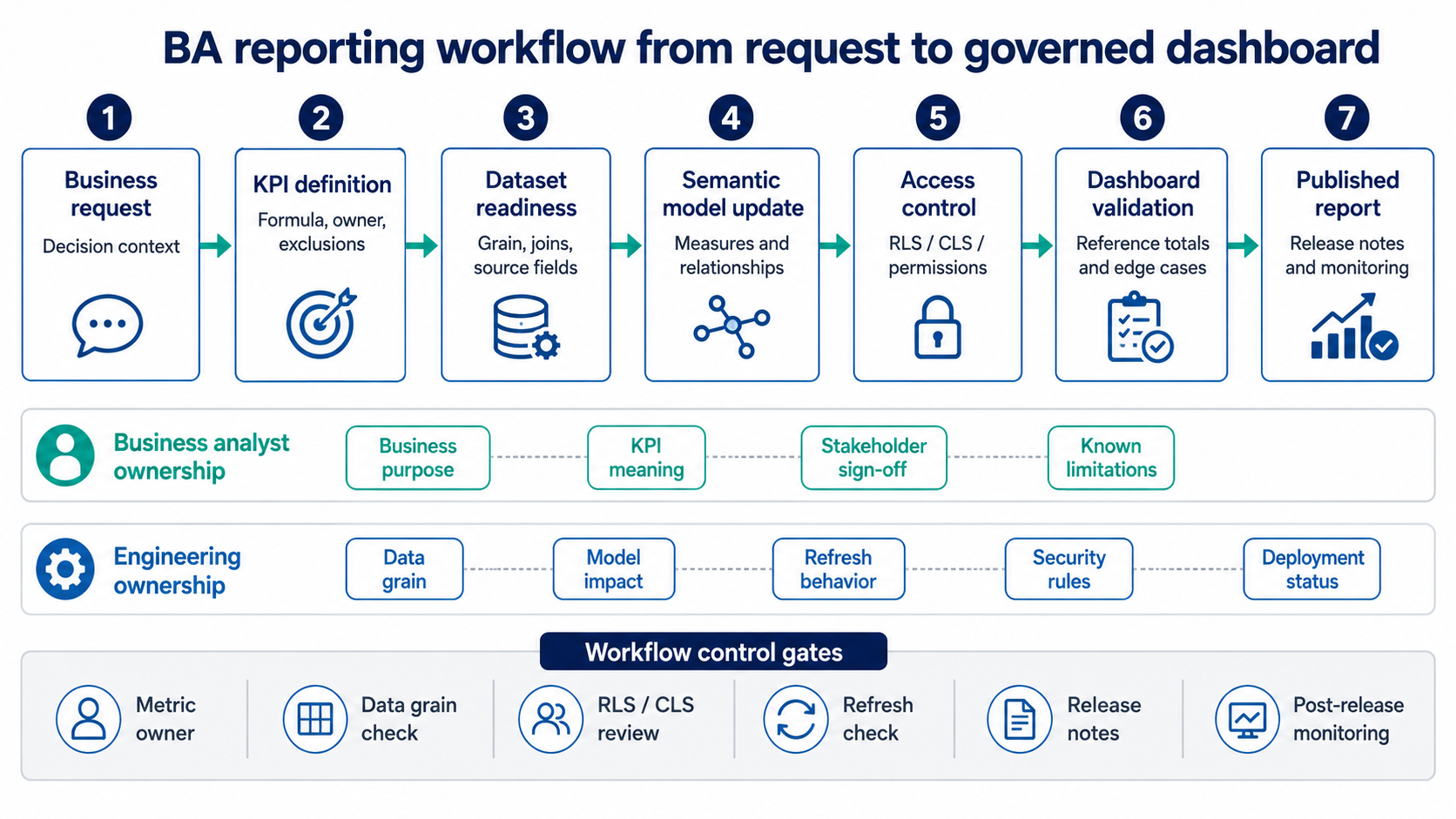
A reliable reporting workflow separates BA ownership of business meaning from engineering ownership of data grain, semantic model changes, access rules, refresh behavior, and deployment stability.
How to manage reporting changes without slowing delivery
Reporting changes should move through a lightweight review path that identifies affected metrics, datasets, dashboards, access rules, and refresh schedules before anything is deployed. The goal is to protect shared reporting assets without turning every small dashboard update into a committee process.
The mistake is treating all changes equally. A title update, visual layout adjustment, or tooltip edit should move quickly. A KPI formula change, source-field replacement, security rule update, or semantic model relationship change needs review because it can alter numbers across multiple reports.
Business analysts should classify changes before sending work to engineering. A simple classification is enough:
This classification gives business users a predictable answer. Small requests can move fast. Risky changes receive a controlled path because they affect trust in published numbers.
If your analysts spend too much time reconciling dashboards after changes are released, the workflow needs stronger intake, ownership, and validation gates. Bluepes can provide business analysis specialists for reporting workflows who work with BI engineers, stakeholders, and data owners to define requirements that survive delivery.
What to validate before publishing a dashboard
A dashboard should be validated against metric definitions, source totals, access rules, refresh behavior, and stakeholder expectations before publication. Visual review alone is too weak because attractive dashboards can still contain wrong calculations, hidden filters, or incomplete data.
The BA should run validation with both business and technical checks. Business validation confirms that the dashboard answers the intended question and uses agreed definitions. Technical validation confirms that the dataset, semantic model, access controls, and refresh process behave as expected.
Useful validation checks include:
- compare dashboard totals with a trusted source for a fixed period;
- test known edge cases, such as refunds, cancelled orders, inactive users, or duplicated records;
- verify row counts after filters and joins;
- confirm that RLS or CLS changes what each user group can see;
- check refresh logs and failure notifications;
- document assumptions that business users must understand before using the report.
The hard part is deciding what “trusted source” means. If Finance uses ERP exports, Operations uses warehouse events, and Product uses application telemetry, the dashboard may need reconciliation rules before publication. Publishing without those rules pushes the disagreement into stakeholder meetings, where BI teams lose time defending calculations instead of improving the model.
A useful release note should state what changed, which metric definitions were used, which dashboards are affected, known limitations, and who approved the release. This gives the BA a reference point when users question a number two weeks later.
How monthly reporting workflow reviews prevent drift
Monthly workflow reviews prevent drift by checking whether published reports still match source systems, business definitions, user behavior, and platform constraints. BI assets decay when teams add fields, change systems, modify processes, or create new reporting needs without revisiting the workflow.
A review does not need to be long. The BA, BI engineer, and relevant business owner should look at five areas: metric changes, source-system changes, refresh failures, access issues, and new duplicate dashboards. If the same KPI appears in three reports with different logic, the review should decide whether to consolidate it into the semantic model.
The review should also inspect usage. A dashboard with high usage and repeated questions may need better definitions or page design. A dashboard with low usage may be obsolete, too slow, or answering the wrong question. Deleting unused reports can be as useful as building new ones because it reduces the surface area for conflicting numbers.
Capacity and cost also belong in this review. Power BI Fabric and Amazon Quick environments can accumulate unused datasets, duplicated models, unnecessary refreshes, and expensive query patterns. The workflow should capture whether reports still justify their refresh frequency and storage model. For teams planning wider BI maturity work, BI readiness planning for governance, lineage, and cost control provides the broader planning context.
Key takeaways
- Reporting workflows protect BI quality by controlling intake, KPI definitions, dataset readiness, semantic model changes, validation, and release notes.
- Business analysts need ownership over metric meaning, while engineering needs ownership over data models, refresh behavior, security rules, and deployment stability.
- Power BI Fabric and Amazon Quick Suite make semantic model governance and access control more important because reporting assets sit inside larger analytics platforms.
- Dashboard validation should compare numbers against trusted reference values, test access rules, and document known limitations before publication.
- Monthly workflow reviews prevent reporting drift by catching duplicate metrics, stale datasets, refresh failures, and unused reports before they create stakeholder distrust.
Reliable reporting depends on workflow ownership
A reporting workflow is useful only when ownership is visible. Someone must own the metric definition. Someone must confirm the dataset grain. Someone must approve semantic model changes. Someone must check refresh behavior and access rules before a dashboard becomes part of the company’s decision cycle.
Business analysts sit at the center of that workflow because they understand the business question and can translate it into reporting requirements. Engineering remains essential because semantic models, data pipelines, access controls, and refresh behavior need technical design. When those responsibilities are split clearly, dashboards stop becoming isolated files and start becoming governed reporting assets.
For teams using Power BI Fabric, Amazon Quick Suite, or a mixed BI environment, the next step is to review where reporting requests currently lose control: KPI definition, source data, semantic model change, validation, or post-release ownership.
If the issues are already visible, review your BI reporting workflow with Bluepes and define a practical plan for reporting governance, BA-engineering coordination, and dashboard delivery that your internal team can maintain.
Summarize with AI
 ChatGPT
 Claude
 Gemini
 Grok
Grok Perplexity
FAQ











Interesting For You



Power BI vs Amazon Quick Suite: a 2026 platform decision
Power BI suits organizations whose data, identity, and productivity already sit inside Microsoft 365 and Azure, with teams that model in DAX and consume through Excel-based workflows. Amazon Quick Suite (rebranded from QuickSight on October 9, 2025) suits AWS-native stacks where dashboards reach large viewer populations or get embedded inside customer-facing applications. The cost shape is different too — per-user heavy for Power BI, viewer-economical for Quick Suite — and the gap compounds with team size.
Read article



Telco Power BI Model for CDR and KPI Dashboards
A reliable telco Power BI model needs clear fact-table grain, shared KPI definitions, controlled access rules, and performance design before dashboards multiply. CDRs should stay at event grain only where detail is required, while network KPIs should be pre-aggregated at time-and-location grain for operational reporting.
Read article


BI dashboard performance: modeling patterns for speed
The fastest fix is rarely a bigger warehouse or a new reporting tool. Slow dashboards usually come from avoidable design choices: unclear fact table grain, wide transactional tables reused for analytics, expensive calculations running at click time, weak filter design, and joins that multiply rows before the report even renders.
Read article