


Telco Power BI Model for CDR and KPI Dashboards


A telco Power BI model usually starts to fail during the moments when the business needs it most: incident reviews, campaign analysis, churn investigation, regional performance checks, or partner reporting. The raw data exists. The dashboards exist. The problem is that CDRs, network counters, subscriber attributes, and finance metrics often land in Power BI with mixed grains and duplicated KPI logic. Once that happens, a simple filter by region, tenant, cell, tariff, or technology can turn into a slow query or a disputed number.
A reliable telco Power BI model needs clear fact-table grain, shared KPI definitions, controlled access rules, and performance design before dashboards multiply. CDRs should stay at event grain only where detail is required, while network KPIs should be pre-aggregated at time-and-location grain for operational reporting.
The useful question is how much detail each dashboard really needs. NOC teams need fast hour-by-cell views. Finance teams need subscriber, product, and billing periods. Leadership needs ARPU, churn, usage, and service quality trends without waiting for every visual to scan raw CDR history. The model has to support all three without turning Power BI into another place where teams argue about definitions.
Updated in May, 2026
Where telecom dashboards fail first
Telecom dashboards usually fail where CDR volume, KPI grain, and business definitions meet inside one report layer. A CDR is a structured record of a chargeable telecom event; 3GPP TS 32.297 defines the technical specification for Charging Data Record file format and transfer through 3GPP Charging Data Record specifications. In analytics, CDRs are useful because they connect usage, time, service type, subscriber context, and network behavior. They are also dangerous when every dashboard tries to query them directly.
The first failure pattern is mixed grain. A CDR table may contain one row per call, session, message, or data event. A network performance feed may arrive as counters per hour, cell, site, region, or technology. A finance table may work by subscriber, billing account, tariff, and month. When these grains are joined without a clear model boundary, Power BI can still return numbers, but the numbers may be expensive to calculate and easy to misread.
The second failure pattern is duplicated KPI logic. One report defines drop rate from failed sessions. Another uses network attempts and drops. A third filters out roaming, enterprise tenants, or test subscribers. Each version can be defensible in isolation. The damage starts when NOC, finance, and commercial teams treat them as the same metric.
Bluepes works with telecom and high-load software contexts where CDR pipelines, OSS/BSS systems, and production reliability shape reporting design. The telecom software development for carriers and MVNOs page gives the broader industry context, and the MasMovil telecom platform engineering project is relevant as a published Bluepes telecom case involving platform engineering, microservices, DevOps pipelines, and CRM integration.
How to model CDRs and network KPIs without query timeouts
A telco Power BI model should separate event-level usage, aggregated network performance, subscriber context, and finance metrics into facts that match how each question is asked. This is where many telecom BI builds go wrong: they copy operational tables into Power BI and expect the semantic layer to fix the shape later.
A practical model starts with four fact families:
- fact_cdr_event — one row per chargeable event, call, session, message, or usage event, with tokenized subscriber identifiers where required.
- fact_network_kpi_hour_cell — one row per hour, cell or site, technology, and tenant/region, with attempts, successes, drops, throughput, latency, and utilization counters.
- fact_subscriber_period — one row per subscriber and period, covering active status, tariff, segment, tenure, ARPU contribution, and churn flags.
- fact_finance_period — one row per billing period, tenant, product, region, or segment, depending on finance reporting needs.
This structure keeps CDR detail available without forcing every operational dashboard to query event-level rows. The NOC does not need raw event detail on every page. It needs fast visibility into drop rate, success rate, paging success, latency distribution, throughput, and cell-level anomalies. Raw CDR pages should exist for investigation, drill-through, and reconciliation, not for every executive or operational visual.
Dimensions should stay compact and clean: dim_time, dim_cell, dim_site, dim_region, dim_technology, dim_tenant, dim_product, dim_subscriber_segment, and dim_tariff. Filter columns need normalized date, hour, region, technology, and tenant fields. Avoid forcing Power BI to extract date parts from raw timestamps inside high-traffic report queries.
For teams that need help shaping telecom-ready semantic models, Bluepes provides Power BI consulting for telecom reporting covering semantic model design, KPI governance, dashboard delivery, incremental refresh, RLS, composite models, and DAX optimization. For general performance principles that apply outside telecom as well, the related article on BI modeling patterns for faster dashboards covers star schema, pre-aggregations, and query reduction patterns.
Where CDR data should stop being raw event data
CDR data should stop being raw event data when the dashboard question does not require event-level investigation. Keeping raw CDRs available is useful. Making raw CDRs the default source for every KPI page is where performance and trust problems start.
For operational dashboards, create summary tables around the questions users actually ask. A NOC team may need hourly drop rate by cell, technology, and tenant. A regional operations lead may need daily success rate by site cluster. A commercial team may need churn and ARPU by tariff, segment, and billing period. These questions do not need the same physical table.
A workable summary structure may include:
The key decision is where detail belongs. Event-level CDR detail should remain available for investigation and reconciliation, especially when business users need to explain disputes or anomalies. Operational and executive pages should usually hit summary tables. This is how the model keeps both accuracy and usability without forcing every report interaction through the largest table.
The backend side of this topic belongs in a different article. If CDRs arrive late, duplicate, or out of order, the semantic model cannot fully hide the pipeline issue. The related Bluepes article on CDR pipeline reliability and observability in telecom microservices explains the Java and observability side: idempotency, retry handling, backlog visibility, and CDR freshness under production load.
How to keep ARPU, churn, and network KPIs trusted
ARPU, churn, and network KPIs stay trusted when each metric has one owner, one formula, and one visible scope. Telecom reporting fails quickly when financial, commercial, and network teams use the same KPI name for different calculations.
ARPU is usually a finance and commercial metric, calculated across a defined period and subscriber base. The model must make exclusions explicit: inactive subscribers, test accounts, enterprise bundles, prepaid/postpaid differences, roaming, discounts, refunds, and partner tenants can all affect interpretation. Churn needs the same discipline. A subscriber who stopped using a service, cancelled a contract, ported out, or moved between tariffs may represent different business events depending on the telecom operating model.
Network KPIs have their own definition risks. Drop rate, call setup success rate, paging success rate, throughput, p95 latency, p99 latency, and utilization can be calculated from different counter sources. If the model does not document counter origin, filter scope, and aggregation rules, disputes will continue after the dashboard is rebuilt.
A usable governance layer should include three visible elements on the report page: KPI definition, last data refresh time, and completeness status. For example, a drop-rate card should show the formula and source counter family. A churn page should state whether churn is contract-based, activity-based, revenue-based, or port-out based. A freshness block should show whether the current period is complete enough to interpret.
This does not need heavy governance. It does need ownership. The article on KPI misalignment across business teams covers the broader structural problem: different teams can work from correct local definitions and still create conflicting numbers at company level.
If your team already has several versions of ARPU, churn, or drop rate across reports, another dashboard will not fix the issue by itself. Bluepes can review the semantic model, KPI ownership, and report structure before the next build turns into another duplicate layer. Discuss your telecom BI model with Bluepes when you need an engineering and BI review before scaling the dashboard set.
How to make the model fast with incremental refresh, aggregations, and composite models
Power BI performance improves when large telecom tables are partitioned, summarized, and queried through the right storage mode for each use case. Larger capacity alone will not repair a model that scans raw event history for every visual.
Microsoft documents incremental refresh and real-time data for Power BI semantic models as a way to reduce the amount of data refreshed through automatic partition creation and management. Use Microsoft Power BI incremental refresh documentation as the reference for configuration details. For CDR and network KPI models, align partitions with ingestion and reporting patterns: recent CDR periods refresh frequently, older partitions stay stable, and historical data avoids unnecessary reprocessing.
Aggregations are the second performance layer. Microsoft states that Power BI aggregations can improve query performance over large DirectQuery semantic models by caching data at an aggregated level in memory. The detailed feature reference is available in Microsoft Power BI aggregations documentation. In a telecom model, aggregation tables at hour-by-cell, hour-by-site, day-by-region, or period-by-segment can absorb the queries that would otherwise hit raw CDR detail.
Composite models help when the reporting workload has both hot and cold data. Microsoft describes composite models as models that can combine Import and DirectQuery data sources in Power BI Desktop. See Microsoft Power BI composite models documentation for the technical scope. For telecom dashboards, a common pattern is Import mode for historical aggregates and DirectQuery for a limited hot window, such as current-day incident monitoring.
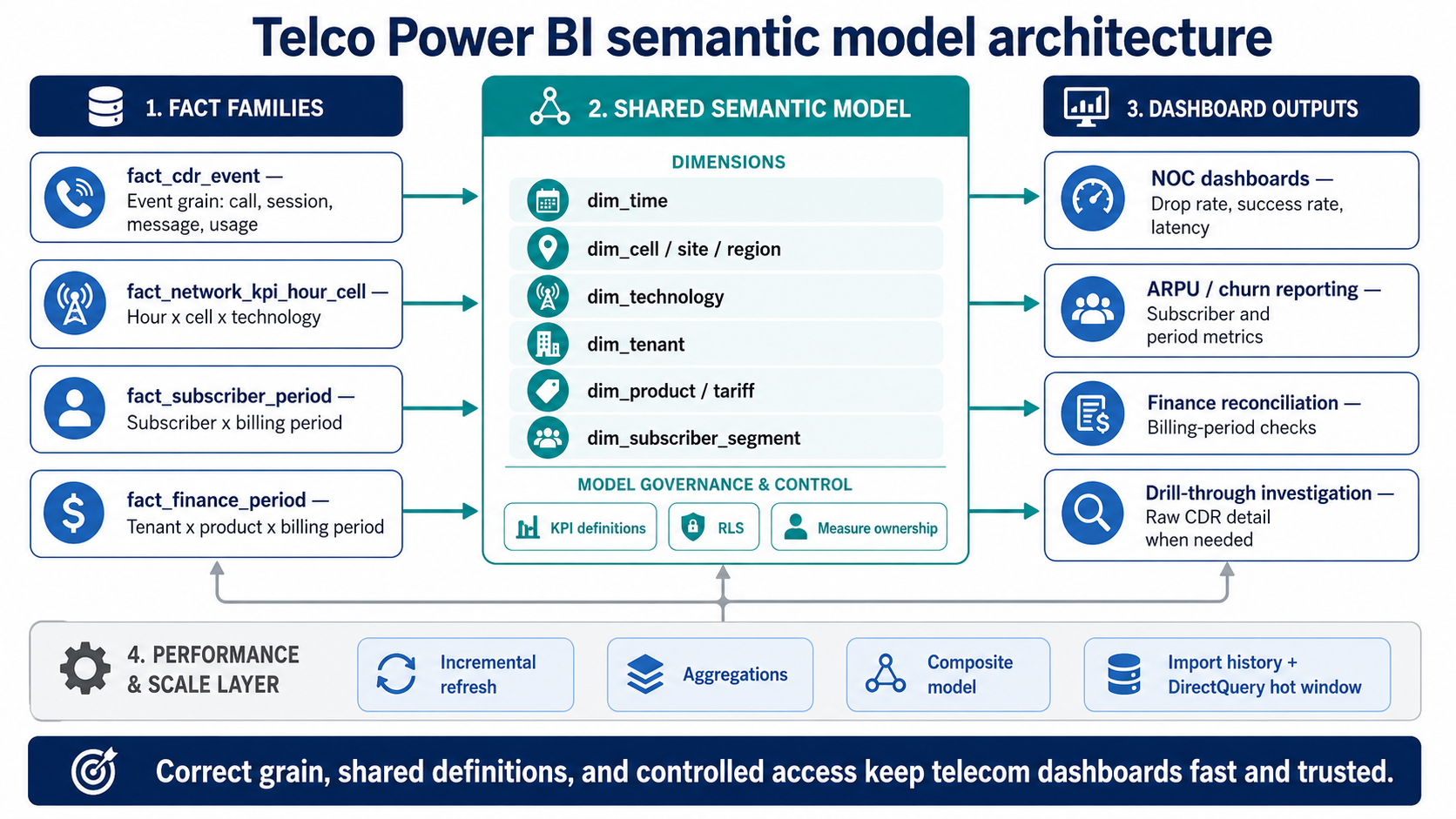
A telco Power BI model should separate raw CDR detail, network KPI aggregates, subscriber-period facts, and finance-period facts before they reach shared dimensions, RLS, and dashboard pages.
How row-level security should work in telecom reporting
Row-level security in telecom reporting should restrict access by tenant, region, partner, business unit, or role without making troubleshooting impossible. Microsoft describes Power BI row-level security as a way to restrict data access for specific users through row-level filters; the current reference is Microsoft Power BI row-level security documentation.
Telecom dashboards often serve several audiences from one semantic model: internal NOC users, finance teams, commercial teams, regional managers, MVNO partners, and external stakeholders. A single model can support these audiences, but only if access rules are designed into dimensions rather than patched into report copies.
The safest structure is usually a security bridge table that maps users or groups to allowed tenants, regions, partners, or business units. Avoid hardcoding complex access logic into many measures. Keep the RLS model readable enough that BI and security teams can explain why a user sees or does not see a row.
The failure scenario is predictable: a dashboard gets copied for each partner or region because RLS feels difficult. Six months later, each copy has a slightly different measure, filter, or page layout. The organization then has both access risk and KPI drift. A governed semantic model with documented RLS rules is cleaner than duplicated reports that no team wants to maintain.
A 30-day rollout plan for a cleaner telco Power BI model
A 30-day rollout should harden one reporting path before the team expands the model across every telecom KPI. The goal is to prove the pattern with a high-value dashboard, usually drop rate, success rate, ARPU, or churn, then repeat the approach.
Week 1 should focus on grain and definitions. Select one target dashboard and map every metric to its physical source, grain, owner, and filter scope. Separate raw CDR detail from hour-by-cell or day-by-region aggregates. Define the first shared measures: drop rate, success rate, paging success, ARPU, churn, p95 latency, and completeness.
Week 2 should focus on the model. Build the core fact and dimension structure, normalize time fields, create clean tenant and region dimensions, and remove joins through verbose operational tables. Add a date table that reflects real usage windows: current day, last seven days, last thirty days, current billing period, and previous billing period.
Week 3 should focus on performance. Configure incremental refresh for large facts, create aggregation tables for the most common slices, and decide where composite model behavior is worth the added complexity. Test dashboard performance under the exact filters users apply during incidents and monthly reviews.
Week 4 should focus on trust and rollout. Add RLS rules, validate them with real user groups, publish KPI definition panels, and add freshness and completeness indicators to the dashboard. Capture baseline and post-change observations: refresh duration, page load behavior, failed refreshes, user exports, and KPI dispute frequency. Avoid invented performance promises; use the team’s own telemetry and user feedback.
Key takeaways
- A telco Power BI model needs separate fact grains for CDR events, network KPI aggregates, subscriber periods, and finance periods.
- Raw CDR detail should support drill-through and reconciliation, while operational dashboards should usually query pre-aggregated tables.
- ARPU, churn, and network KPIs need visible definitions, owners, scope notes, freshness indicators, and completeness checks.
- Incremental refresh, aggregations, and composite models help only when the semantic model grain and DAX logic are already under control.
- RLS should be designed into the model through clear tenant, region, partner, or role mappings instead of duplicated report copies.
The model decides whether telecom dashboards stay useful
Telecom BI work becomes expensive when the dashboard layer carries problems that belong in the model: mixed grain, duplicated formulas, uncontrolled access rules, and raw event scans where summaries would answer the question. Power BI can support telecom reporting well, but the model has to respect how telecom data behaves. CDRs are detailed and high-volume. Network counters are time-and-location based. ARPU and churn depend on subscriber and billing context. Access rules often follow tenant, region, partner, or role boundaries.
The correct first move is rarely a full reporting rewrite. Pick one dashboard that matters, rebuild the semantic path behind it, and prove that the model can answer the question quickly and consistently. After that, the same pattern can move across NOC dashboards, finance views, commercial reporting, and partner reporting.
Bluepes can help telecom and BI teams review the current model, define the right fact grains, clean KPI ownership, and plan the next reporting layer without duplicating technical debt. For a focused review of your reporting architecture, plan a telecom Power BI model assessment with Bluepes.
Summarize with AI
 ChatGPT
 Claude
 Gemini
 Grok
Grok Perplexity
FAQ











Interesting For You



Java microservices for telecom: stable under real load
Java 21 LTS gives the team a more capable foundation for concurrent workloads, while the stability wins come from the operating patterns the team applies on top. A telecom system stays stable when state transitions are explicit, retries cannot duplicate writes, dependencies fail in bounded ways, and the people on the NOC bridge can see exactly how far behind a queue runs.
Read article



Power BI vs Amazon Quick Suite: a 2026 platform decision
Power BI suits organizations whose data, identity, and productivity already sit inside Microsoft 365 and Azure, with teams that model in DAX and consume through Excel-based workflows. Amazon Quick Suite (rebranded from QuickSight on October 9, 2025) suits AWS-native stacks where dashboards reach large viewer populations or get embedded inside customer-facing applications. The cost shape is different too — per-user heavy for Power BI, viewer-economical for Quick Suite — and the gap compounds with team size.
Read article


ETL vs real-time data pipeline: choosing the right fit
Deciding how to move data from source to destination sounds like an infrastructure problem. But it is really a business decision — one that determines how fast your teams can act on what the data actually shows. This article is for CTOs and heads of data at mid-market companies who are under pressure to support both historical reporting and live operational decisions. Next — a structured comparison of ETL and real-time data pipeline architectures, with guidance on when to use each and when to run both together. ETL — Extract, Transform, Load — remains the standard approach for analytics and compliance workloads. Real-time pipelines, built around streaming platforms, handle event-driven scenarios where minutes or seconds of delay matter. The two approaches solve different problems, and most production systems end up needing both.
Read article