


Power BI vs Amazon Quick Suite: a 2026 platform decision


A BI platform commitment locks in three things at once: a licensing model, a semantic layer, and a default integration path for several years. Framing Power BI vs Amazon Quick Suite as a feature contest — DAX versus SPICE, Microsoft Fabric versus Amazon Redshift — misses what actually drives long-term cost: fit with your stack, your team’s skills, and the way you distribute reports. By 2026, both platforms have matured into general-purpose BI tools with overlapping features, yet they still optimize for different operating environments.
Power BI suits organizations whose data, identity, and productivity already sit inside Microsoft 365 and Azure, with teams that model in DAX and consume through Excel-based workflows. Amazon Quick Suite (rebranded from QuickSight on October 9, 2025) suits AWS-native stacks where dashboards reach large viewer populations or get embedded inside customer-facing applications. The cost shape is different too — per-user heavy for Power BI, viewer-economical for Quick Suite — and the gap compounds with team size.
This guide compares the two on architecture, 2026 pricing, modeling depth, and failure modes that surface after the contract is signed — for BI Leads, CTOs, and Heads of Data preparing a multi-year decision in mid-market environments.
Updated in May, 2026
What changed when QuickSight became Quick Suite
Amazon rebranded QuickSight to Quick Suite on October 9, 2025, and the change went beyond cosmetics. The new branding bundles QuickSight’s BI tooling with a set of AI-driven capabilities — Quick chat, Quick Research, Quick Flows, Quick Automate, and Quick Index — accessed through Pro user tiers. The core BI engine and SPICE remain identical; what changed is the surface and the licensing model around generative features.
For decision-makers comparing platforms in 2026, the practical effect splits across three tiers:
- Standard Author and Reader tiers stay at $24 and $3 per user per month, with the familiar dashboard, paginated reporting, and embedded use cases.
- Author Pro ($50/user/month) and Reader Pro ($20/user/month) add Amazon Q-powered generative features — natural-language querying, executive summaries, scenario building.
- Accounts running any Pro user with Q&A topics or dashboard Q&A enabled also pay a $250/month per-account infrastructure fee.
When older comparison pieces reference "QuickSight," the analysis usually still applies to the Quick Sight BI portion of Quick Suite. The underlying platform comparison logic has not shifted, even though the product surface has. For the official rebrand announcement, see AWS announcement on Quick Suite.
How architecture and ecosystem fit shape the choice
Power BI and Amazon Quick Suite both connect to common data sources, but their default centers of gravity differ. Power BI was built around Microsoft 365 identity, Excel modeling, and the Azure data platform — Synapse, Azure SQL, Dataverse, Fabric OneLake. Connections to non-Microsoft sources work through documented connectors, but friction appears in authentication, scheduled refreshes against private VPC sources, and semantic-model compatibility across composite datasets.
Amazon Quick Suite was built around Redshift, Athena, S3, RDS, and IAM-managed access on AWS. SPICE, its in-memory columnar cache, pre-loads data so dashboards read fast regardless of underlying source latency. For an organization already running Redshift or a data lake on S3, Quick Suite sits directly on top with minimal plumbing. For data that lives outside AWS, the connector story works but adds operational steps — VPC peering, network egress costs, and refresh scheduling.
The semantic modeling layers also reward different skills. Power BI’s DAX engine is deep — calculated columns, measures, time intelligence, composite models, row-level security, deployment pipelines — and that depth is both an asset and a cost. DAX expertise is portable across consulting firms and clients, but it is also a specialist skill that takes six to twelve months to build at production quality. Quick Suite’s modeling layer is intentionally lighter, with SPICE handling most of the heavy lifting at the cache level and authors composing visuals against datasets rather than authoring deep calculated logic.
Teams that already maintain DAX models or rely on Excel-based reporting traditions treat Power BI as a continuation. Teams whose primary skill set is SQL and AWS administration find Quick Suite removes a learning curve they would otherwise face on Power BI.
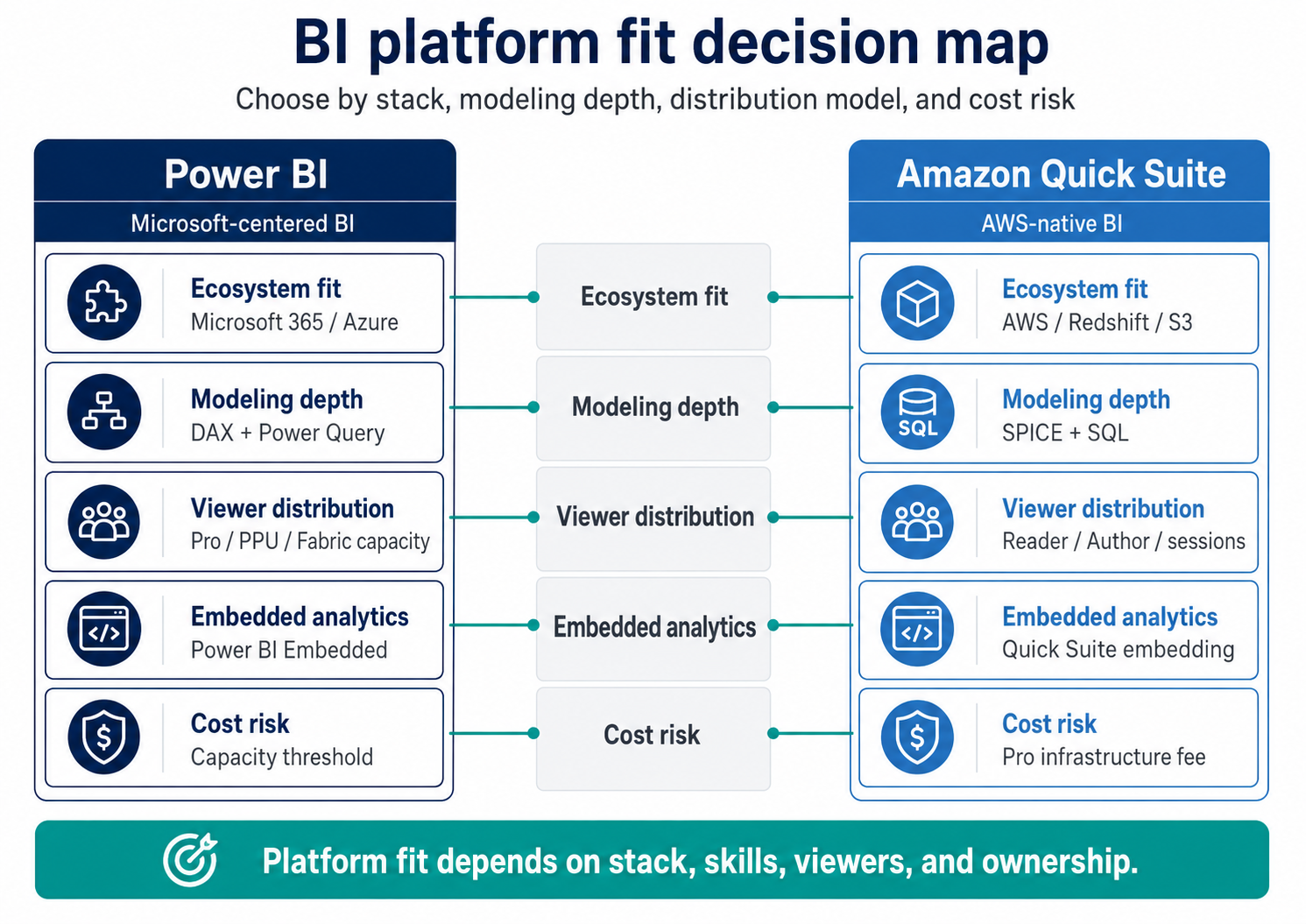
Power BI and Amazon Quick Suite should be compared by operating fit: Microsoft or AWS stack, semantic-model depth, viewer scale, embedded analytics needs, and capacity risk.
If you are still mapping out which platform fits your team’s skill set and growth plans, a short conversation with engineers who have built BI on both stacks usually shortens the decision by weeks. Discuss your BI platform selection.
Pricing patterns in 2026: where the bills diverge
Power BI and Amazon Quick Suite price along different axes, and the gap widens with viewer count. The values below reflect publicly listed rates as of May 2026, drawn from Microsoft and AWS pricing pages.
The shape of the bill is different. Power BI cost scales linearly with both authors and viewers up to roughly 200–350 users, after which Fabric F64 capacity becomes cheaper than per-user licensing because it removes the per-viewer fee. Quick Suite keeps viewer cost low from day one with Reader at $3 or session capacity for unpredictable usage. For a deployment with 30 authors and 500 viewers, Power BI under Pro licensing costs roughly $7,420/month before any premium features; the same audience on Quick Suite with Author and Reader tiers costs roughly $2,220/month. The math reverses for environments where authors need Premium-only features (PPU at $24/user) without broad viewer distribution.
For the official Power BI pricing announcement (Pro $14, PPU $24 effective April 1, 2025), see Microsoft Power BI pricing update. For the current Quick Suite tier breakdown, see AWS Quick Sight pricing page.
Cost-control practices once a platform is selected — capacity sizing, SPICE refresh strategy, license consolidation, semantic-layer governance — sit outside the scope of this comparison.
We cover those in detail in our piece on cost-control and semantic alignment patterns.
When Power BI is the safer choice
Power BI is the safer choice when the BI platform is one of many decisions inside an already-committed Microsoft stack. The fit is strongest in three patterns.
- The first pattern is Microsoft-centric environments. Organizations running Microsoft 365 (E3 or E5), Entra ID for identity, Azure for compute, and Office for productivity have an integration story already paid for. Microsoft 365 E5 includes Power BI Pro, which removes the $14/user/month cost for users already on that SKU. Single sign-on, sensitivity labels, conditional access, and audit logging carry over without rework.
- The second pattern is heavy semantic modeling. Power BI’s DAX layer remains the most expressive widely-deployed semantic engine outside dedicated cube technologies. Time intelligence, custom rolling averages, scenario calculations, and complex row-level security policies are well-served by DAX. If reporting requirements include logic such as "compare this period to the same period last year, excluding the second week, by sales territory," DAX expresses that without procedural code.
- The third pattern is Excel-led teams. A team that already lives in Excel — financial close, monthly KPI reviews, ad-hoc what-if — gains meaningful integration from Power BI. Power BI datasets can be analyzed in Excel as a connected data model, and Excel queries can be promoted to dataflows. The path from desk-level analytics to enterprise BI is short.
The constraint to plan for is capacity sizing. The Pro license model works smoothly up to roughly 200–350 viewers. Beyond that, organizations either license everyone with Pro or PPU or move to Fabric F64 capacity, which unlocks free-license viewers but costs more than $5,000/month at the floor SKU. Sizing this transition is the most common surprise in enterprise Power BI rollouts.
For teams already considering performance trade-offs in modeling, we publish data modeling patterns that cut query time as a separate read.
When Amazon Quick Suite is the safer choice
Amazon Quick Suite is the safer choice when the workload sits on AWS, when viewer counts are large, or when dashboards live inside another application. Three scenarios consistently favour Quick Suite over Power BI.
AWS-native data platforms come first. Teams already running Redshift, Athena, S3, or Aurora have a direct path to Quick Suite without provisioning cross-cloud bridges or paying egress between providers. The connection model uses IAM and VPC endpoints the team already maintains.
For tuning the underlying warehouse, our note on Amazon Redshift optimization covers the patterns that most affect Quick Suite dashboard performance.
Wide reader populations are the second case. At $3/reader/month or capacity sessions from $250 for 500 sessions, Quick Suite remains the most viewer-economical option among the major BI platforms in 2026. For organizations distributing dashboards to thousands of internal users — operational staff, store managers, field engineers, telecom analytics workloads — the per-viewer math compounds quickly in Quick Suite’s favour. We see this pattern repeated in telecom analytics workloads (https://bluepes.com/telecom) where ARPU and churn dashboards reach hundreds of regional managers and frontline support staff.
Embedded analytics inside SaaS products is the third case. Quick Suite’s embedded option supports anonymous and registered viewer authentication, capacity-based pricing for variable usage, and an SDK that fits inside a customer-facing application without licensing each end user individually. Power BI Embedded supports the same use case but typically costs more per concurrent user once the application crosses moderate scale.
The constraint to plan for is the Pro tier and infrastructure fee threshold. Enabling any Pro user with Amazon Q & A topics triggers a $250/month per-account infrastructure fee — a fixed cost that can surprise teams who turn on the feature for evaluation and forget to disable it. This is documented but easy to miss.
For implementations that need ongoing tuning, our Amazon Quick Suite implementation covers the operational setup and tier choice in more depth.
Failure scenarios: when the wrong choice becomes expensive
Both platforms work well in their home environments. The cases where teams regret a selection cluster around four recurring patterns.
Picking Power BI for an AWS-native stack. If data lives in Redshift, S3, and Athena, Power BI works — connectors exist — but cost shows up as cross-cloud egress, slower refresh windows due to data transfer, and operational overhead of maintaining authentication between Microsoft Entra and AWS IAM. Teams that standardize on Power BI for "Microsoft consistency" while their actual workload runs on AWS end up paying in two places: licensing and plumbing.
Picking Quick Suite for heavy semantic modeling. If finance, healthcare, or compliance reporting depends on intricate calculated logic — multi-currency consolidation, rolling 13-month comparisons with adjustments, complex row-level security tied to organizational hierarchy — Quick Suite’s modeling layer requires more SQL view engineering and less in-tool definition. The work is doable but moves into the warehouse layer. DAX-trained teams find this counterintuitive and slow.
Underestimating capacity planning. Power BI customers who skip Fabric capacity planning often discover at 250 users that they need either to license everyone at Pro ($14 × 250 = $3,500/month) or commit to F64 capacity ($5,257.50/month reserved). Quick Suite customers who skip session-capacity analysis often discover they are paying per-user Reader fees that capacity sessions would cover at a fraction. Sizing belongs in the platform evaluation, not after signature.
Underestimating refresh failure handling. Both platforms can drop refreshes silently when source schemas drift, source credentials expire, or capacity is throttled. The default monitoring on both is thin. Production BI on either platform needs alerting on refresh status and lineage tracking, which we cover in resilient BI patterns for 2026.
When running both Power BI and Quick Suite makes sense
Some mid-market organizations end up running both platforms, either by design or after acquisitions. The design pattern is clean when each platform owns a clear scope: Power BI for internal corporate reporting tied to Microsoft 365 identity, Quick Suite for customer-facing embedded analytics or warehouse-native operational dashboards on AWS. Scope separation keeps the architecture honest.
The pattern to avoid is symmetric coverage — same data, same dashboards, two platforms. That arrangement doubles refresh work, doubles license cost, and forces metric definitions to live in two semantic layers. KPI drift between the Power BI and Quick Suite versions of the same dashboard is a known failure mode, particularly visible in telecom and e-commerce environments where finance and operations both publish reports. When in doubt, pick one platform as the system of record for each business domain and treat the other as read-only or scope-bound.
Key takeaways
- Power BI fits organizations already standardized on Microsoft 365, Azure, and Excel-led modeling, where DAX expertise and Microsoft identity are in place.
- Amazon Quick Suite fits AWS-native stacks, large viewer populations, and embedded analytics use cases, with the lowest per-viewer cost of any major BI platform in 2026.
- 2026 baselines: Power BI Pro at $14/user/month, PPU at $24, Fabric F64 from ~$5,257.50/month reserved; Quick Suite Reader at $3, Author at $24, Author Pro at $50, plus a $250/month account-level fee when Pro users use Amazon Q.
- The October 2025 QuickSight-to-Quick-Suite rebrand added Quick Research, Quick Flows, Quick Automate, Quick Index, and Amazon Q-driven authoring through Pro tiers; the core BI engine is unchanged.
- Failure modes cluster around cross-cloud mismatches, semantic modeling depth, capacity sizing missed at signing, and silent refresh failures — all of which reward platform-fit due diligence before the contract.
Choosing the platform that survives your stack changes
The strongest argument for one platform over the other comes from outside the BI tool itself. Your data warehouse, your identity provider, your team's existing skills, and the way you distribute reports define which platform will hold up over the next three to five years. Feature parity has narrowed since 2023, and Amazon Q now matches Microsoft Copilot for Power BI in surface-level generative authoring, meaning the gap that matters in 2026 is environmental fit rather than feature checklist.
Mid-market BI teams making this decision benefit most from a short, structured platform-fit assessment before commitment — one that maps existing data sources, identity, viewer distribution, and modeling depth against each platform's strengths. Our engineers have delivered BI on both Power BI and Quick Suite across healthcare, telecom, and e-commerce environments, and a 30-minute scoping call usually narrows the decision to one clear option. Request a BI platform fit review.
Summarize with AI
 ChatGPT
 Claude
 Gemini
 Grok
Grok Perplexity
FAQ











Interesting For You



How to Optimize Amazon Redshift for Analytics Without Overprovisioning
A quarterly revenue dashboard takes four minutes to load. An analyst runs a join across two fact tables and the query sits in queue for six minutes before it starts executing. The BI lead’s response is usually the same: “Let’s add more nodes.” But the cluster already has spare capacity — the problem is how that capacity is being used.
Read article


BI dashboard performance: modeling patterns for speed
The fastest fix is rarely a bigger warehouse or a new reporting tool. Slow dashboards usually come from avoidable design choices: unclear fact table grain, wide transactional tables reused for analytics, expensive calculations running at click time, weak filter design, and joins that multiply rows before the report even renders.
Read article


ETL vs real-time data pipeline: choosing the right fit
Deciding how to move data from source to destination sounds like an infrastructure problem. But it is really a business decision — one that determines how fast your teams can act on what the data actually shows. This article is for CTOs and heads of data at mid-market companies who are under pressure to support both historical reporting and live operational decisions. Next — a structured comparison of ETL and real-time data pipeline architectures, with guidance on when to use each and when to run both together. ETL — Extract, Transform, Load — remains the standard approach for analytics and compliance workloads. Real-time pipelines, built around streaming platforms, handle event-driven scenarios where minutes or seconds of delay matter. The two approaches solve different problems, and most production systems end up needing both.
Read article