


Predictable BI Costs Start in the Semantic Model Layer


Two things often surface in the same monthly review. One dashboard reports a revenue figure, another reports a different one for the same period, and no one can say which is correct. Around the same time, the Power BI Fabric capacity bill or the Amazon Quick Suite SPICE charge climbs with no obvious trigger. Different people own each problem, so the two get handled as if they were unrelated.
Predictable BI costs come from controlling the semantic layer. The duplicated logic that makes two dashboards disagree is the same duplication that makes a platform refresh and store the same data several times over, and that repeated work is what lands on the bill. Aligning measures and models tends to steady the numbers and the spend at once.
The cause is usually structural rather than careless, which is why adding review meetings rarely makes it stick. What follows traces the connection between cost and consistency on Fabric and Quick Suite, then sets out where consolidating semantic models pays off and the cases where keeping them separate is the better call.
Updated in June, 2026
How duplicated semantic models inflate Fabric and Quick Suite bills
Duplicated semantic models inflate bills because both Power BI Fabric and Amazon Quick Suite charge for the work and storage that duplication multiplies. The two platforms meter it differently, which is worth understanding before you try to cut spend.
Fabric bills against a fixed pool of Capacity Units shared across every workload in a capacity. Background operations such as semantic model refreshes are averaged, or smoothed, over a 24-hour window so that short spikes don’t immediately cause throttling, according to Microsoft’s Fabric throttling documentation. Smoothing hides the cost of redundant refreshes for a while, but it does not remove it: three models refreshing overlapping data still burn three models’ worth of CUs, and once smoothed usage crosses the threshold the capacity throttles or runs into overage charges.
Quick Suite meters differently. Its in-memory engine, SPICE, holds dataset data in capacity allocated at the account level per AWS Region and billed by the gigabytes purchased; when several datasets store the same rows, they draw down the same shared, paid capacity, and a full account can hit ingestion failures, as AWS sets out in its SPICE and direct query best practices. Teams running AWS-native analytics through Amazon Quick Suite feel duplication as storage pressure first, paid back as either purchased capacity or failed loads.
The asymmetry is the practical part: on Fabric, duplication tends to show up as compute and throttling; on Quick Suite, as storage capacity and ingestion limits. In both, the line item that grows is downstream of how many models exist and how much they overlap.
If your Fabric capacity or SPICE usage keeps climbing without a clear reason, a short audit of duplicated models and refresh cadence usually finds the cause faster than a budget review does. Request a BI cost and semantic-model review and get a shortlist of the duplicates worth consolidating first.
What semantic alignment actually means in practice
Semantic alignment means agreeing on one authoritative definition for each metric and entity, then implementing it once in a model that other reports connect to instead of rebuilding. It is a modeling and ownership practice, not a setting you turn on.
Alignment comes down to a small set of decisions that have to match across every report drawing on a given metric:
- the exact calculation rule for each measure, including what gets included or excluded and under which conditions
- consistent names for measures and fields, so one concept isn’t called three different things
- a single agreed grain for each fact (per order, per day, per cell-hour) so totals roll up the same way
- relationship and filter direction, which silently change results when they differ between models
- row-level security rules, so the same user sees the same scope regardless of which report they open
Microsoft’s own guidance points away from both extremes — one giant model for everything, and a fresh model per report — and toward a relatively small number of shared, reusable semantic models, as described in its managed self-service BI guidance. That middle path is where most mid-market teams settle once duplication starts to hurt. Designing those shared models — measures, naming, grain, and security — is the core of Power BI semantic model design, and the same principles carry over to SPICE datasets on the AWS side.
Where consolidation breaks down (and when to keep models separate)
Consolidation stops paying off when one model is forced to serve needs that genuinely differ, and pushing past that point trades one problem for another. A single model that absorbs every department’s edge cases becomes large, slow to refresh, and political to change, because any edit risks breaking someone’s report.
Keep models separate when the grain or the security boundary really differs. A clinical operations model and a finance model may share a date table and little else, so merging them mostly adds RLS complexity and refresh time. Departments that move at different speeds also struggle under a shared model with a slow change process, since an urgent fix ends up waiting behind a governance queue. The honest test is whether two reports need the same numbers: if they do, they should share a model; if they legitimately need different numbers, a shared model only hides the difference rather than resolving it.
There is also a sequencing trap. Consolidating models before agreeing on the definitions just relocates the disagreement into one place and makes it harder to spot. Definition alignment comes first, and technical consolidation follows. The wider scaffolding around this — ownership, lineage, and the cost controls that stop a consolidated model from drifting back into sprawl — sits in BI governance, lineage, and cost control, which covers the operating model this article deliberately leaves aside.
A consolidation sequence that doesn’t stall reporting
A consolidation that doesn’t stall reporting moves in order: agree, then build, then migrate, then retire. Jumping straight to retiring duplicates is what breaks dashboards mid-quarter.
A workable sequence looks like this:
- inventory the duplicated measures and datasets, and record which reports depend on each
- agree the authoritative definition for every contested metric with its business owner, in writing
- build or designate one shared model that implements those definitions, then certify it
- repoint reports to the shared model a few at a time, validating totals against the old version before switching
- retire the duplicate models only after their dependent reports are confirmed migrated
The validation step is what protects trust. When a repointed report shows a different total, that gap is either a bug to fix or a definition the business never actually agreed on — both are better caught before the old model disappears. Running the migration in small batches keeps a surprise contained to one report instead of the whole portfolio.
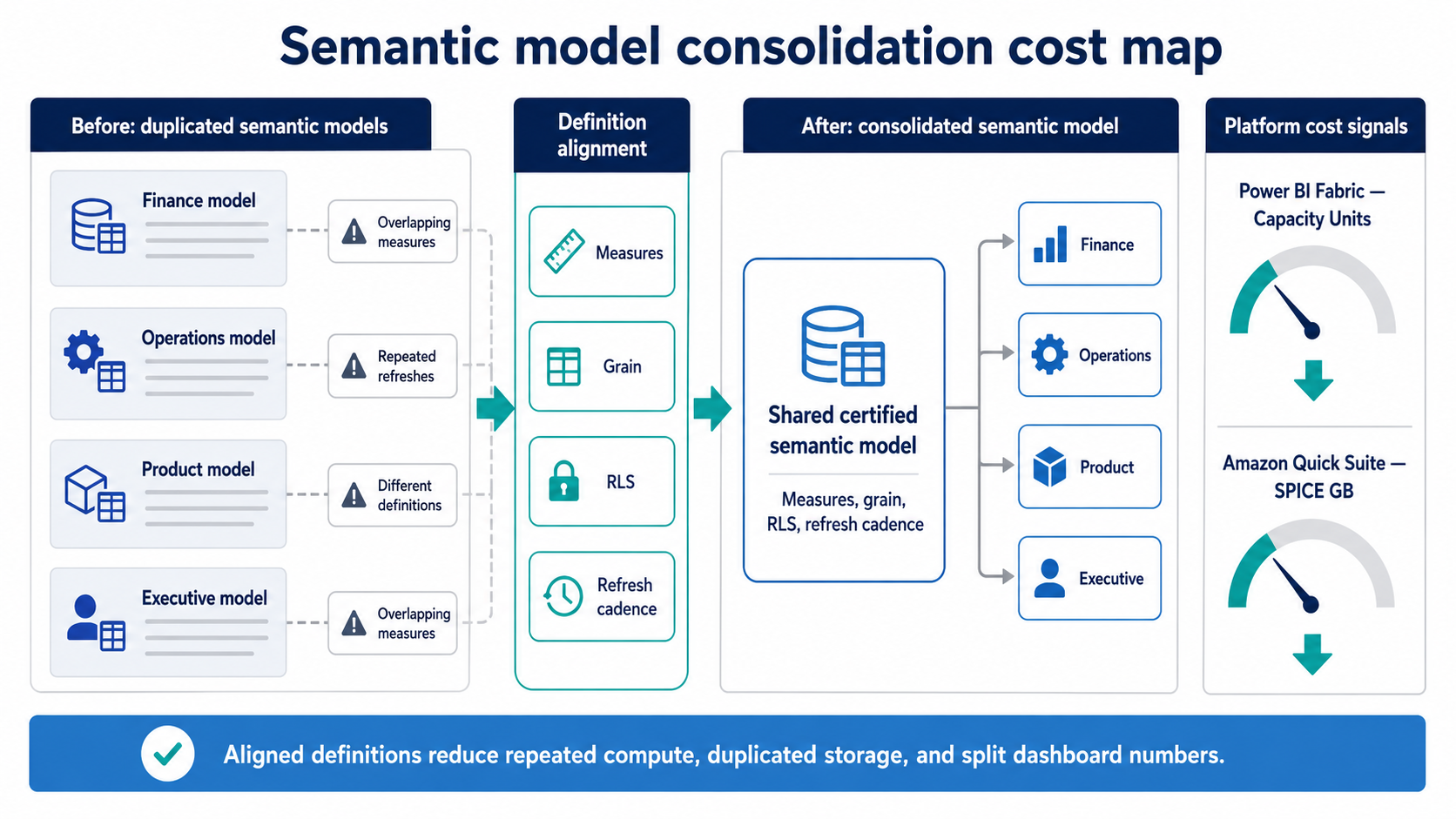
Consolidating duplicated semantic models helps BI teams align metric definitions and reduce repeated Fabric refresh work or duplicated Quick Suite SPICE storage.
Key takeaways
- Conflicting dashboard numbers and rising BI bills often trace to the same source: duplicated, divergent semantic models.
- Power BI Fabric meters duplication as Capacity Unit consumption and throttling; Amazon Quick Suite meters it as SPICE storage and ingestion limits.
- Semantic alignment is an agreement on definitions, names, grain, and security implemented once — not a platform feature you switch on.
- Consolidate models only where reports genuinely need the same numbers; differing grain or security boundaries are reasons to keep them apart.
- Agree definitions before merging models, and migrate reports in validated batches so consolidation never breaks live reporting.
Treating cost and consistency as one problem
Teams that reach predictable BI spend rarely start with the budget. They start with the semantic layer, because once definitions are agreed and models stop multiplying, the conflicting-numbers complaints fade and the compute and storage that fed them stop being billed. Cost predictability turns out to be a side effect of consistency rather than a separate workstream.
That reframing matters most for mid-market teams without a large platform group to absorb waste. A quarter spent inventorying duplicates, agreeing definitions, and consolidating onto certified models usually returns steadier dashboards and a flatter bill, and it leaves a foundation that survives the next wave of new reports. To put a sequence and a cost estimate against your own Fabric or Quick Suite environment, book a semantic-model consolidation assessment.
Summarize with AI
 ChatGPT
 Claude
 Gemini
 Grok
Grok Perplexity










Interesting For You



Power BI vs Amazon Quick Suite: a 2026 platform decision
Power BI suits organizations whose data, identity, and productivity already sit inside Microsoft 365 and Azure, with teams that model in DAX and consume through Excel-based workflows. Amazon Quick Suite (rebranded from QuickSight on October 9, 2025) suits AWS-native stacks where dashboards reach large viewer populations or get embedded inside customer-facing applications. The cost shape is different too — per-user heavy for Power BI, viewer-economical for Quick Suite — and the gap compounds with team size.
Read article


BI Team Alignment for 2026: BA, Engineering, and Business
The patterns are recognisable. Conflicting metrics show up across Finance and Operations dashboards. Refreshes miss windows because upstream owners changed without notice. Requests bounce between business analysts and data engineers through multiple sprints before anyone notices the scope shifted during the original intake. Each of these emerges whenever teams work alongside each other without explicit decision rights, clear intake rules, or durable handoff artifacts. As 2026 BI workloads grow, the cost of that ambiguity compounds.
Read article



Resilient BI Systems: Recovering from Data Failures
A resilient BI system recovers from a failed or incomplete data load without silently publishing wrong numbers. It detects that something went wrong, holds or labels the last trustworthy state, and gives the team a clear path back to correct data. That property matters more in 2026 because pipelines pull from more asynchronous sources, and a single late feed can corrupt a metric several departments depend on.
Read article