


Resilient BI Systems: Recovering from Data Failures


A finance lead pings you on a Monday: the revenue tile dropped sharply from Friday, and nobody touched the report. The refresh ran, the dashboard says it updated at 06:00, and the status shows green. The number is still wrong, because the nightly load wrote only part of the orders table before a source connection dropped, and the dashboard served the half-loaded result without complaint. Moments like this are where resilient BI systems prove their value — through how predictably they behave when a refresh, a feed, or a schema does not cooperate, rather than how quickly they refresh.
A resilient BI system recovers from a failed or incomplete data load without silently publishing wrong numbers. It detects that something went wrong, holds or labels the last trustworthy state, and gives the team a clear path back to correct data. That property matters more in 2026 because pipelines pull from more asynchronous sources, and a single late feed can corrupt a metric several departments depend on.
The sections below map the failure modes that break dashboards mid-cycle — partial refreshes, late or backfilled data, schema drift — and the recovery patterns that contain each one, using how Power BI Fabric and Amazon Quick Suite handle refresh and ingestion as concrete reference points. By the end, a BI lead can tell which failures their current setup would catch and which would reach a stakeholder first.
Updated in June, 2026
What resilience means for a BI system
Resilience in a BI system is the ability to recover from a failed or incomplete data load without serving wrong numbers as if they were correct. It is a narrower property than data quality or governance, and confusing the three is part of why teams under-invest in it. Data quality asks whether a value is right; governance asks who owns the definition and who to call when it breaks; resilience asks what the system does in the window between a failure and its repair.
Most BI platforms are tuned for the happy path. A refresh runs on schedule, every partition loads, the semantic model recalculates, and the dashboard shows the result. The failure path is where design decisions show up: whether a half-finished refresh is published or rolled back, whether a late record rewrites yesterday’s total, whether a missing column stops the load or quietly drops a measure. Two teams can run the same Power BI Fabric workspace and get very different outcomes from one upstream incident, depending on how they handled these branches.
The rules that define what “correct” means for each dataset — expected row counts, accepted delays, value ranges — sit in a separate discipline, covered in the companion guide on data quality rules for mid-market BI. The ownership and lineage that tell you which upstream system to investigate belong to governance, the subject of BI governance and lineage for 2026. This article assumes those are in place and focuses on the behavior in between: detection, containment, and recovery.
How partial refreshes leave dashboards in a mixed state
Partial refreshes are the most common way a dashboard ends up showing a blend of old and new data with no error on screen. Power BI and Amazon Quick Suite both refresh large tables incrementally — they reload only the recent partitions or a look-back window rather than the full history on every run. That design keeps refresh times manageable, and it introduces a failure mode: if the run stops after some partitions load and before others do, the table holds a mix of vintages, and the model recalculates over that mix.
Power BI’s incremental refresh splits a table into date partitions and, with the Detect data changes option, reloads only the periods whose tracking column has moved since the last run, as described in Microsoft’s incremental refresh documentation. The mechanism is efficient and well understood. The risk lives in the recovery path: a run that errors partway can commit the partitions it finished, so a daily orders table might carry Monday and Tuesday at new values while Wednesday still reflects an aborted load.
Why a green refresh status is not proof of correct data
A refresh status reports whether the platform’s job ran, not whether the resulting numbers are complete. The job can succeed against a source that returned a truncated result, or partially apply changes and still mark recent partitions as current. Resilient setups add a check after the refresh — a row-count comparison, a control-total reconciliation, or a freshness assertion — that runs before the dashboard is considered publishable. When that check fails, the system blocks the new state rather than letting it reach users.
Recovering from late-arriving and backfilled data
Late-arriving data corrupts a period that already looked final, and the fix is to design refresh windows that expect it rather than treating each late record as an exception. Multi-source pipelines and asynchronous integrations mean a transaction timestamped Tuesday can land on Thursday. If the refresh only covers the current day, Tuesday’s total is now understated and will stay that way until something forces a reload.
Amazon Quick Suite handles this with a look-back window on SPICE incremental refresh: the team picks a timestamp column and a window — hours, days, or weeks — and each run re-queries and replaces data within that window, per the Amazon Quick Suite refresh documentation. For teams whose analytics live on the AWS stack, configuring that window correctly is part of how Bluepes sets up Amazon Quick Suite delivery, so realistic lateness becomes an expected reload instead of a manual backfill.
Two properties make this recovery reliable. The refresh has to be idempotent, meaning a re-run for the same window produces the same result rather than double-counting; replacing a window of data, as SPICE does, satisfies this, while appending does not. The window also needs a reconciliation step — comparing the reloaded window against a control total from the source — so a backfill that should have changed a number and one that should not have are told apart.
If your team debugs these incidents after a stakeholder reports them — rather than before — the gap is usually missing checks between refresh and publish, not a platform limit. Bluepes builds those checks into Power BI and Quick Suite work as part of Power BI consulting services. Describe your refresh setup and get a recommendation.
Schema drift: when a column change breaks the load
A schema change upstream — a renamed column, a dropped field, a changed data type — is the failure that most often turns a working dashboard into an empty or broken one overnight. The load either rejects the new shape outright or accepts it and quietly drops a measure that depended on the old field. Neither outcome is visible until someone opens the report.
The platforms handle this differently, and both behaviors are worth knowing before you design recovery. In Power BI dataflows, a schema change on a table triggers a full refresh to realign the stored data, and if the source system keeps no history, incrementally stored data can be lost in that process — a point Microsoft makes explicitly in its dataflows incremental refresh guidance. Amazon Quick Suite does not auto-detect a database schema change on a SPICE dataset; ingestion fails until someone edits and saves the dataset to pick up the new shape, as the refresh documentation referenced earlier notes.
The recovery pattern is a contract at the boundary. Stage incoming data into a layer with declared column names and types, validate the incoming shape against that contract before it reaches the semantic model, and on mismatch hold the last successful version rather than overwriting it. The dashboard then keeps showing yesterday’s correct numbers with a visible “as of” timestamp while the team adjusts the model. Keeping measure definitions stable across that change is its own problem — semantic consistency across Fabric and Quick Suite is the subject of the guide on predictable BI environments.
Designing dashboards that degrade safely
A dashboard degrades safely when a failed refresh produces a clearly stale view rather than a confidently wrong one. The instinct to always show the freshest available data is exactly what causes the Monday-morning incident; freshest and complete are different things, and a system that cannot tell them apart will publish the gap.
The core move is to keep a last-known-good state — the most recent dataset that passed its post-refresh checks — and fall back to it when a new load fails validation. Pair that with a visible freshness signal so users know which state they are looking at. A finance lead who sees “data as of Friday 06:00” on a Monday will ask why the refresh did not run; the same lead seeing no marker will trust a wrong Monday number.
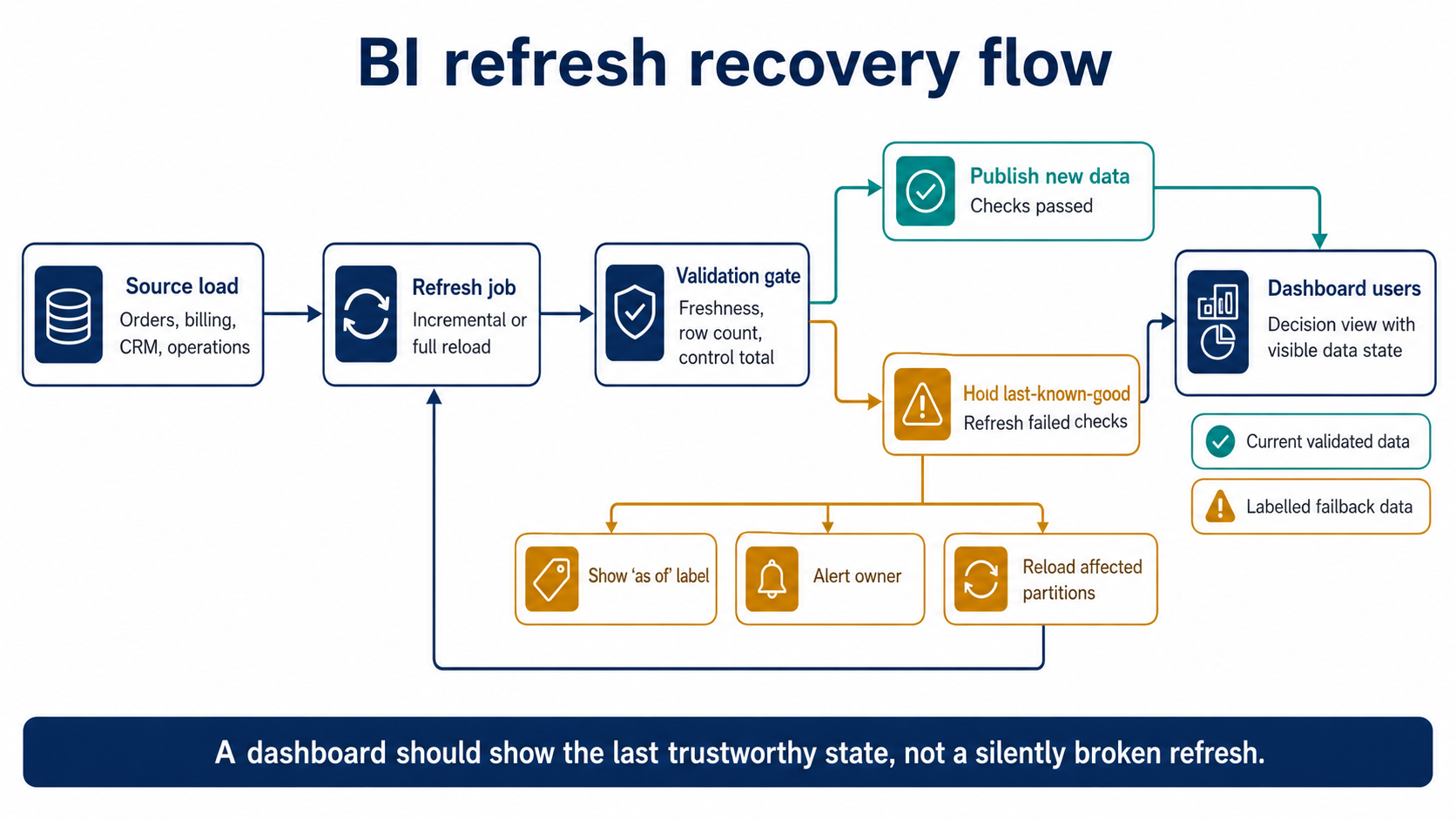
A resilient BI refresh flow validates the loaded data before publishing and falls back to the last-known-good state when checks fail.
Beyond fallback, resilient dashboards make a deliberate choice about partial data. The options are limited, and each carries a cost:
- Block publish and keep the last-known-good state, accepting staleness in exchange for correctness.
- Publish partial data with explicit gaps marked, suitable when a missing region is obvious and isolated.
- Show new data only after a manual review gate, used for high-stakes board or regulatory reports.
The right choice depends on the audience. An operational dashboard that drives same-day decisions may prefer marked partial data over staleness, while a financial close report should hold rather than show an unreconciled figure. What matters is that the behavior is chosen and built, not left to whatever the platform does by default.
Detecting failures fast enough to recover
Detection only helps if it buys the team time to recover before users act on bad data, which makes the relevant metric the gap between failure and notice, not the number of dashboards monitored. A refresh that fails at 02:00 and is caught at 09:00 by a stakeholder has already done its damage; the same failure caught at 02:05 by an alert is a non-event.
Both platforms expose the raw material. Power BI keeps a refresh history per semantic model with timing and error detail, and Quick Suite records SPICE ingestion runs with error codes and an option to email dataset owners when a refresh fails. Wiring those signals into the channel the on-call BI engineer actually watches — rather than a console nobody opens — is what converts available telemetry into recovery time.
Two checks repay the effort more than generic uptime monitoring. A freshness assertion confirms each critical dataset advanced its “as of” marker on schedule, catching the silent case where a job reports success on stale or truncated input. A reconciliation check compares a small control total against the source after refresh, catching the partial-load and late-data cases that a green status hides. Together they shorten the window in which a wrong number can travel across the business.
Key takeaways
- Resilience is how a BI system behaves between a data failure and its repair — distinct from data quality, governance, and uptime.
- Incremental and partition-based refresh can leave a table holding mixed vintages, so a green refresh status is not evidence that the numbers are complete.
- A look-back window wide enough for realistic lateness, paired with a reconciliation step, turns most late-arriving data into an expected reload rather than a manual backfill.
- A schema change can force a full refresh and data loss in Power BI dataflows or an ingestion failure in Quick Suite, so validate incoming shape at a staging boundary and hold last-known-good on mismatch.
- Dashboards should degrade to a clearly labelled stale view instead of a confidently wrong one, and detection should be measured by how fast a failure is noticed.
Why the failure path deserves as much design as the refresh
The difference between a BI system that survives a bad night and one that embarrasses a finance team rarely comes down to the platform. Power BI Fabric and Amazon Quick Suite both give teams incremental refresh, look-back windows, ingestion history, and failure alerts. What separates resilient setups is the deliberate handling of the branches those features create: what happens to a half-loaded table, a late record, a renamed column, a truncated source response. Teams that design those branches — validation gates, last-known-good fallback, freshness labels, reconciliation — recover quietly, while teams that assume the happy path find out from a stakeholder.
If your dashboards have ever shown a confidently wrong number after a “successful” refresh, the cheapest improvement is usually a validation gate between load and publish, not a new tool. To pressure-test where your Power BI or Quick Suite setup would break first — and what it would show users when it does — talk to the Bluepes engineering team about a BI resilience and refresh review.
Summarize with AI
 ChatGPT
 Claude
 Gemini
 Grok
Grok Perplexity
FAQ











Interesting For You



BI Readiness for 2026: Governance, Lineage, and Cost Control
BI readiness is the state of governance, lineage, refresh and capacity controls that determines how predictably reporting holds up as workloads grow. A team is ready when scaling adds dashboards without adding reconciliation calls. This article walks through the dimensions a BI lead can inspect this quarter, what “not ready” looks like in each one, and which gap to close first.
Read article



BI Team Alignment for 2026: BA, Engineering, and Business
The patterns are recognisable. Conflicting metrics show up across Finance and Operations dashboards. Refreshes miss windows because upstream owners changed without notice. Requests bounce between business analysts and data engineers through multiple sprints before anyone notices the scope shifted during the original intake. Each of these emerges whenever teams work alongside each other without explicit decision rights, clear intake rules, or durable handoff artifacts. As 2026 BI workloads grow, the cost of that ambiguity compounds.
Read article


BI operating model for mid-market analytics teams
A BI operating model gives mid-market companies a practical way to run analytics work without turning every dashboard request into a ticket queue. It defines who owns KPI logic, who changes the semantic model, how dashboard releases are reviewed, and what reliability level business users can expect from each report.
Read article