


Data quality rules every BI team should apply before 2026


Data quality became an explicit set of rules in mid-market BI teams during 2025. By the end of the year, most teams had stopped treating it as an analyst's manual sanity check and started codifying it as concrete checks on the dataset itself: schema validation, freshness windows, identifier uniqueness, refresh failure thresholds. The pressure came from familiar places — a marketing team disputing yesterday's signup count, finance pulling totals that did not reconcile with billing, an operations dashboard showing two-day-old numbers because an overnight refresh had failed silently. The structural cause behind all three is the same: there is no validation layer between the source systems and the dashboards consuming them.
Data quality rules close that gap. They define what every dataset is expected to contain, when it is allowed to update, which numeric values count as plausible, and how the system should respond when any of those expectations is violated. They are the reason the same KPI returns the same number across Finance, Operations, and the executive team on a Monday morning, even when the underlying systems have changed during the week.
What follows is the rule set mid-market teams adopted across Power BI Fabric and Amazon Quick Suite in 2025 — what each rule catches, where the trade-offs sit, and how the rule set differs by platform and team size.
Updated in June, 2026
What data quality rules cover — and where governance takes over
Data quality rules define what a dataset must look like to be usable. Governance defines who is responsible for keeping it that way. The two are often discussed together because they overlap in practice, but the failure modes they prevent are different. A schema validation rule catches a renamed column at 3am before the morning dashboard breaks. A governance practice — a named dataset owner, a documented release process, a change request workflow — makes sure someone is on call when the rule fires and that the response is coordinated across teams.
This distinction matters because most BI maturity work in 2025 happened on both sides at once, and the rule layer is the part that runs automatically. A rule is something a refresh pipeline can evaluate without a human in the loop: a check on column names, a comparison against a control total, an expected row count, an alert when freshness slips past its window. Governance is the part humans handle: deciding which rules to write, which thresholds to set, and how the team responds when one fails.
For the governance side of the same problem — ownership, data contracts, release notes, and lineage as organisational practice — see lightweight data governance for BI. This article stays at the rule layer.
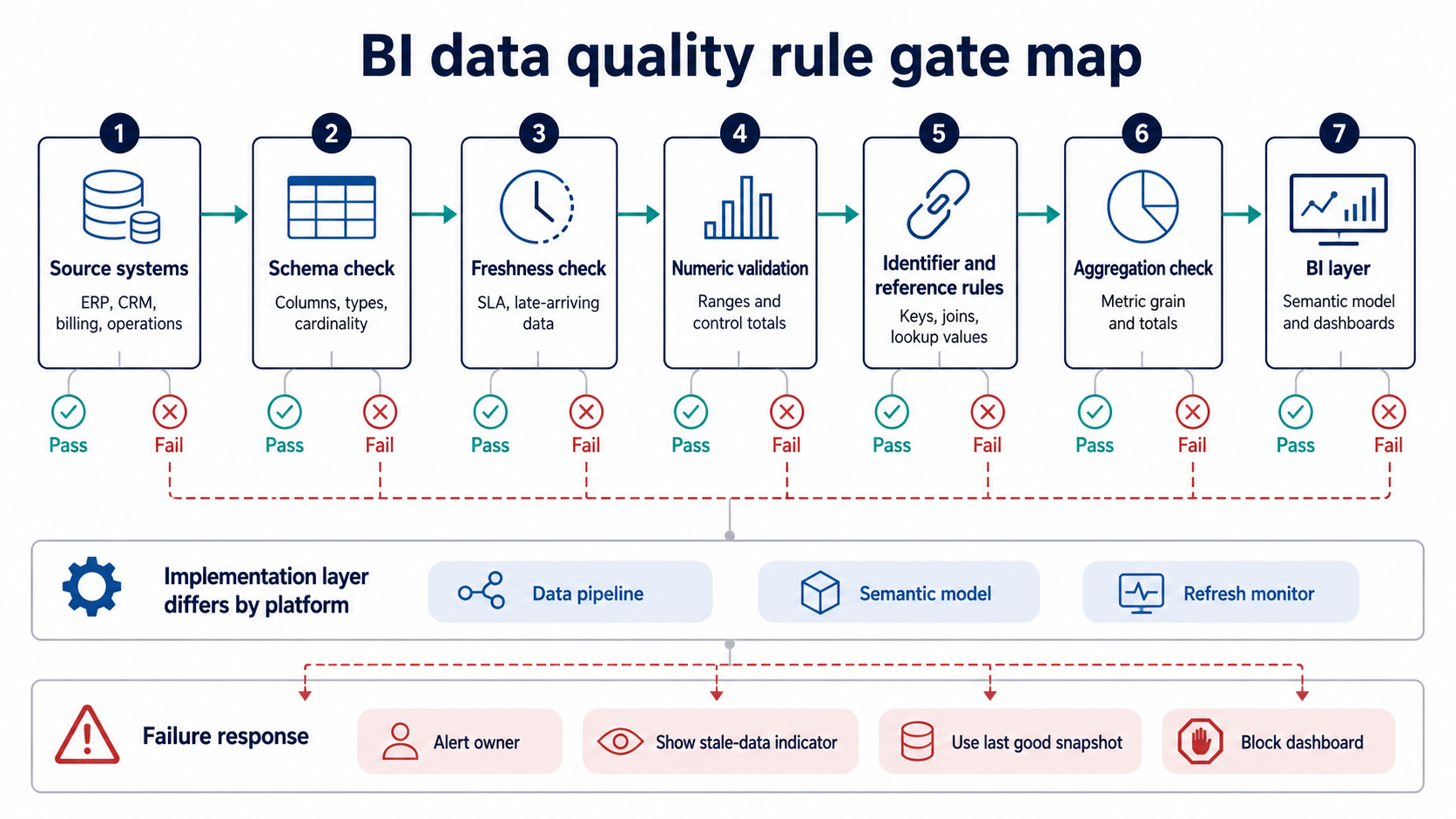
BI data quality rules work as validation gates before the dashboard layer: they catch schema drift, stale refreshes, invalid values, broken identifiers, reference mismatches, and aggregation drift.
Schema validation rules: catching upstream changes before refresh
Schema validation rules check that the dataset arriving from an upstream system still matches the structure the BI layer was built against. Without these checks, the most common silent failure pattern looks like this: a developer renames customer_id to cust_id in the source ERP, the nightly extract picks up the rename without complaint, and the next morning every dashboard that joined on customer ID returns wrong totals — without throwing a single error in the refresh log.
Mid-market teams in 2025 converged on a small set of checks that run before the data lands in the semantic model:
- Column removal — any expected column missing from the incoming dataset.
- Column rename or relocation — the same name appearing in a different position, or the same position carrying a different name.
- Type modification — a date arriving as text, a decimal arriving with reduced precision, a boolean arriving as a 0/1 integer.
- Cardinality shift — an unexpected spike or collapse in distinct values for a key field, which often signals a semantic change upstream rather than a structural one.
Power BI dataflows and Amazon Quick Suite SPICE datasets both support this pattern, though through different mechanisms. Microsoft's guidance on reusing semantic models across workspaces makes the importance of documented field and measure definitions explicit, since the same dataset is consumed by multiple downstream reports and any schema change propagates everywhere at once.
Where schema rules stop working: semantic drift inside a stable structure
Schema validation has a known blind spot. The column name and type are stable, the row count is stable, and the meaning of the values changes anyway. A common example is a status column where the upstream system silently adds a new enum value — pending_review instead of pending — and downstream filters that match pending exclude the new rows. The dataset passes every schema check and still produces wrong dashboards.
Defending against semantic drift requires a reference data rule rather than a schema rule. The two get conflated because both prevent ‘unexpected values’, but they sit at different layers: schema validation handles structure, reference data validation handles meaning. The reference data rules covered later in this article are the right place to catch this class of failure.
Freshness rules: when data is ready enough for reporting
Freshness rules define the time window inside which a dataset is allowed to be used. Outside that window, the dataset is considered stale and the dashboards depending on it should either fall back to a previous snapshot, display a clear stale-data indicator, or block use entirely. The rule combines three values: expected delivery time from upstream, allowed delay before the dataset is treated as late, and the action to take when the delay exceeds that window.
Late-arriving data is the difficult case. Most operational datasets contain a small fraction of records that arrive after the main batch — adjustments, corrections, retroactive bookings, settlements posted across a day boundary. Treating these as a refresh failure produces noise; ignoring them entirely produces inaccurate totals. Power BI's incremental refresh policies allow a defined late-arriving window during which historical partitions can be refreshed without rebuilding the full model, and Microsoft documents the standard patterns for this case.
The trade-off is straightforward. A longer late-arriving window catches more corrections but extends the period during which yesterday's numbers can still shift. Most teams resolve this by setting different windows for different fact tables: a shorter window for operational KPIs that drive same-day decisions, and a longer one for transactional tables where late corrections are routine. Specific values should be tuned from observed delivery patterns rather than guessed at the start.
If your team is already firefighting refresh issues or chasing inconsistent KPIs across reports, a focused conversation with engineers who have built validation layers for mid-market BI platforms will save weeks of trial and error. Discuss your BI reliability with our team.
Validation rules for numeric fields, identifiers, and reference data
This is where most of the rule volume lives. The three categories serve different purposes and catch different failure modes, but they share the same logic — define what the value should look like, and decide what happens when it doesn't.
Numeric validation rules check that the values inside a column are plausible. The simplest version compares each column against a fixed range (an order amount cannot be negative, an age cannot exceed 120, a percentage stays between 0 and 100). The more useful version compares the current batch against historical control totals — yesterday's total revenue is within a defined band of the trailing seven-day average, the daily transaction count is within an expected window for the day of the week. These cross-period checks catch most cases where an extract picked up partial data without erroring.
Identifier rules govern the keys that join datasets together. They check uniqueness (no duplicate customer_id within a daily batch), referential integrity (every order_id in the orders table has a matching customer_id), and null handling (which columns may carry nulls, which must not). Identifier failures are responsible for most ‘where did half my customers go’ incidents — a join silently drops rows when the keys do not align, and the dashboard renders with no error.
Reference data rules govern the controlled vocabulary that gives values their meaning: country codes, product categories, status enums, currency codes, tax classifications. The rule is usually a single check — the incoming value must exist in a known reference table — but the operational consequence of getting it wrong is high. A new value appearing without a mapping breaks segmentation in every dashboard that filters on that field, and the failure is invisible to schema validation. Reference data rules should fire on the way in, not on the way out, because rejecting an unknown value at ingestion is cheaper than discovering it three reports later.
Aggregation consistency: rules for how numbers are summed
Aggregation is where the same dataset starts producing different numbers in different reports. The cause is rarely the data itself. A revenue figure summed at the order line level differs from one summed at the order header level if any order has line-level discounts. A count of active customers using count distinct on customer_id differs from a count of customer accounts because the underlying entity is not the same. The rule layer here is about pinning down which aggregation is canonical and writing the check that exposes when a report deviates from it.
Three rule patterns are common. The first is a documented aggregation method per metric, attached to the metric definition itself: revenue uses SUM at order line grain; active customers uses COUNT DISTINCT at customer_id grain; handling time uses AVG with an outlier filter at the 95th percentile. The second is a validation query that runs against the semantic model after each refresh and confirms key metrics return the expected values on a known historical date — a regression test for measures. The third is a cross-report check: the same metric pulled from two reports should produce the same number, and a scheduled comparison flags drift.
Aggregation drift is one of several causes that produce the ‘different teams trust different numbers’ pattern. For the broader analysis of why this happens — and how to address the structural side rather than the rule side — see structural causes of KPI misalignment.
Example aggregation rule entries for a small metric catalogue:
Refresh failure handling: what to do when a rule fires
A rule that detects a problem is only useful if the system around it knows how to respond. Refresh failure handling is the layer that converts a rule trigger into a defined action — usually one of three: surface a stale-data indicator on dependent dashboards, fall back to the last known-good snapshot, or block the dashboard entirely until a human reviews. The choice depends on how the dashboard is used. A leadership KPI board can usually tolerate a stale-data indicator with a timestamp. A reconciliation dashboard that drives financial postings cannot — it has to block.
Notifications should match the action. A rule failure that blocks a dashboard needs an immediate alert to the data owner and a clear escalation path. A rule failure that triggers a fallback to the previous snapshot needs a record in a daily summary, not a 3am page. Both Power BI Fabric and Amazon Quick Suite expose refresh failure events through their respective monitoring interfaces, and integrating those events with the team's existing alerting stack is usually a one-time setup rather than a per-rule effort.
How systems should behave around freshness failures, late-arriving data, and partial refreshes is the architectural complement to the rule definitions in this article. For the patterns themselves — incremental refresh design, fallback strategies, partition rebuild logic — see BI resilience patterns for late-arriving data.
Where Power BI Fabric and Amazon Quick Suite split responsibility
The rule set described in this article applies to both platforms, but the layer where each rule is implemented differs. In Power BI Fabric, schema and freshness rules sit naturally inside dataflows and semantic models, and the platform provides built-in lineage views, refresh history, and incremental refresh policies. Identifier and reference data rules are typically implemented upstream in the data pipeline (Synapse, Fabric Lakehouse, or an external warehouse) because the semantic model layer is consumption-side, not validation-side. Teams using Fabric should treat the semantic model as the boundary at which schema rules become hard contracts.
In Amazon Quick Suite, SPICE refresh behaviour drives much of the freshness rule design. SPICE imports the dataset on a schedule, and any rule that depends on data being current must align with the SPICE refresh cadence rather than with the underlying database. Schema validation usually happens in Redshift, Glue, or the Lake Formation layer before the dataset reaches SPICE, and Quick Suite's role is to enforce the freshness contract and surface refresh failures. Identifier and aggregation rules apply at the data preparation layer.
For a deeper view of the implementation choices on each platform — modelling, governance, refresh tuning — see Power BI consulting and semantic model design and Amazon Quick Suite implementation.
Key takeaways
- Data quality rules sit at the dataset layer and run automatically; governance sits at the team layer and runs through people.
- Schema validation catches structural changes but cannot detect semantic drift inside a stable structure — reference data rules cover that gap.
- Freshness rules need different windows for different fact tables, tuned from observed upstream delivery patterns rather than guessed.
- Aggregation rules belong with the metric definition itself, not with the report that consumes it; cross-report drift is a sign the rule is missing.
- On Power BI Fabric and Amazon Quick Suite, the rules are the same; the layer at which each rule lives is different.
Why a written rule set is the cheapest part of BI reliability
Most of the reporting incidents mid-market BI teams escalate in 2025 — disputed KPIs, broken refreshes, mismatched totals between systems — could have been caught by a rule that fits inside a paragraph of plain text. The cost of defining the rule is small, the cost of running it is near zero on either Power BI Fabric or Amazon Quick Suite, and the cost of skipping it is paid by the analysts and business users who have to reconstruct what the numbers should have been. The work that actually scales is writing the rules down, agreeing where each one fires, and connecting the failure response to a named owner. The platforms handle the rest.
If a structured review of the validation layer across your BI platform would help, our engineers work with mid-market teams on Power BI Fabric and Amazon Quick Suite to define rule sets, implement schema and freshness controls, and connect refresh failures to existing alerting. Request a BI reliability review.
Summarize with AI
 ChatGPT
 Claude
 Gemini
 Grok
Grok Perplexity
FAQ











Interesting For You



Reporting workflows for business analysts in 2026
Reporting workflows give business analysts a controlled path from request intake to published dashboard. The workflow defines who owns the metric, which dataset is trusted, how changes reach the semantic model, what validation happens before publishing, and how refresh or access issues are tracked after release.
Read article


BI dashboard performance: modeling patterns for speed
The fastest fix is rarely a bigger warehouse or a new reporting tool. Slow dashboards usually come from avoidable design choices: unclear fact table grain, wide transactional tables reused for analytics, expensive calculations running at click time, weak filter design, and joins that multiply rows before the report even renders.
Read article


Power BI vs Amazon Quick Suite: a 2026 platform decision
Power BI suits organizations whose data, identity, and productivity already sit inside Microsoft 365 and Azure, with teams that model in DAX and consume through Excel-based workflows. Amazon Quick Suite (rebranded from QuickSight on October 9, 2025) suits AWS-native stacks where dashboards reach large viewer populations or get embedded inside customer-facing applications. The cost shape is different too — per-user heavy for Power BI, viewer-economical for Quick Suite — and the gap compounds with team size.
Read article