


Separate storefronts or one platform on a shared backend


A B2C webshop that has run smoothly for two years gets a new requirement from sales: a wholesale portal for business buyers, live by Q3. The team starts extending the existing storefront, and within a few months the frontend is trying to serve two audiences that want different things from the same screens. The question that surfaces is architectural — should B2B and B2C share one storefront, or run as separate storefronts on a shared backend?
The honest answer turns on one thing: how different the ordering experience needs to be. Catalog, inventory, and customer data almost always belong in a single shared backend either way. What is actually in question is the frontend. When B2B differs from B2C only by price list and role, one storefront with role-based logic ships faster and stays maintainable; when the ordering experiences diverge structurally, separate storefronts on a shared backend become the cheaper path over time.
This piece is about that topology decision and the shared backend underneath it, not about how to model the B2B side once you have chosen — that modeling is its own subject, linked below. By the end you should have a decision framework you can apply to your own platform, a clear view of what the shared backend has to provide regardless of approach, and a sense of when neither option is worth building yet.
Where B2C and B2B actually diverge, and where they don’t
B2C and B2B share more than most teams expect, and they diverge mainly in one place. The catalog, the inventory, the customer records, and the order history can serve both audiences from the same foundation. What changes between them is the ordering experience: how prices are set, how an order is placed and approved, how it is paid for, and how it is delivered.
Those four areas — pricing, ordering, payment, and fulfillment — are where the divergence lives. A consumer pays a list price; a business pays a negotiated or tiered one. A consumer checks out a cart; a business may raise a purchase order through an approval chain. A consumer pays by card at checkout; a business often pays on net terms after delivery. A consumer ships to one address; a business may need palletized, scheduled, or split delivery to specific docks.
How to model each of those on a single platform — chain hierarchies, negotiated pricing as a first-class entity, invoice-based order lifecycles — is its own subject, covered in our piece on building a hybrid B2B and B2C platform. The question here sits one level up: the catalog and inventory rarely force a topology decision; the ordering experience does.
The decision that actually matters: how different is the ordering experience?
The deciding question is how structurally different the ordering experience needs to be, because that is what a frontend either absorbs cleanly or fights. When B2B differs from B2C only by price list and a few role-gated features, one storefront with role-based logic handles it well: the same checkout, the same flows, with prices and permissions resolved per customer. Most of the platform stays single-purpose, and the B2B-specific parts are additions rather than forks.
The picture changes when the B2B ordering experience diverges structurally. These are the signals that one storefront will start fighting itself:
- approval chains, where an order is drafted, reviewed, and approved before it is placed
- purchase-order workflows and PO numbers carried through to invoicing
- recurring or scheduled orders that consumers never make
- bulk ordering, including CSV or spreadsheet imports
- custom delivery terms — scheduled windows, split shipments, dock instructions
When several of these are in play, a single frontend ends up branching most of its screens by buyer type, and every new feature has to be designed twice inside one codebase. That is the point where separate storefronts on a shared backend usually become the cheaper path.
Two topologies, with honest trade-offs
Two topologies are viable, and each trades upfront cost against long-term flexibility.
Single storefront, role-based logic
One storefront serving both audiences is the faster, cheaper start. It launches sooner, reuses the existing B2C investment, and keeps one frontend to maintain. The cost shows up later: every UI and flow decision now serves two audiences, and as their needs diverge the frontend accumulates conditionals — this block for businesses, that one for consumers — until small changes carry risk for both. It stays the right call as long as the ordering experiences stay close.
Separate storefronts on a shared backend
Separate storefronts cost more upfront and pay off when the experiences diverge. Each channel owns its own frontend and ordering flow, so the B2B storefront can carry approval chains and PO workflows without the consumer storefront ever knowing. Underneath, both read from the same backend, so catalog, inventory, and customers stay unified. This is the backend-for-frontend pattern applied to commerce: a tailored frontend-facing layer per interface, sitting over shared backend services.
The trade-offs side by side:
If you are weighing one storefront against separate ones and need to present both with honest trade-offs, that is easier with people who have built multi-channel commerce on a shared backend. Our e-commerce engineering team can map your ordering-experience divergence to a topology before you commit to a build.
What the shared backend has to provide, whichever approach you choose
Whichever topology you pick, the same things belong in the shared backend, because both channels depend on them being consistent. The product catalog, inventory counts, customer master data, and order history live here, usually alongside a pricing-and-availability service that resolves the right price and stock for a given channel and customer. Unifying these is what gives you consistent stock across channels, cross-channel order visibility, and one source of truth for who a customer is.
Most multi-channel e-commerce platforms share these backend concerns regardless of how many storefronts sit on top. Kortreistved’s dual-channel build is a concrete example: a client webshop and a chain-customers webshop run over one backend, with catalog, inventory, and suppliers shared underneath while each surface owns its ordering flow.
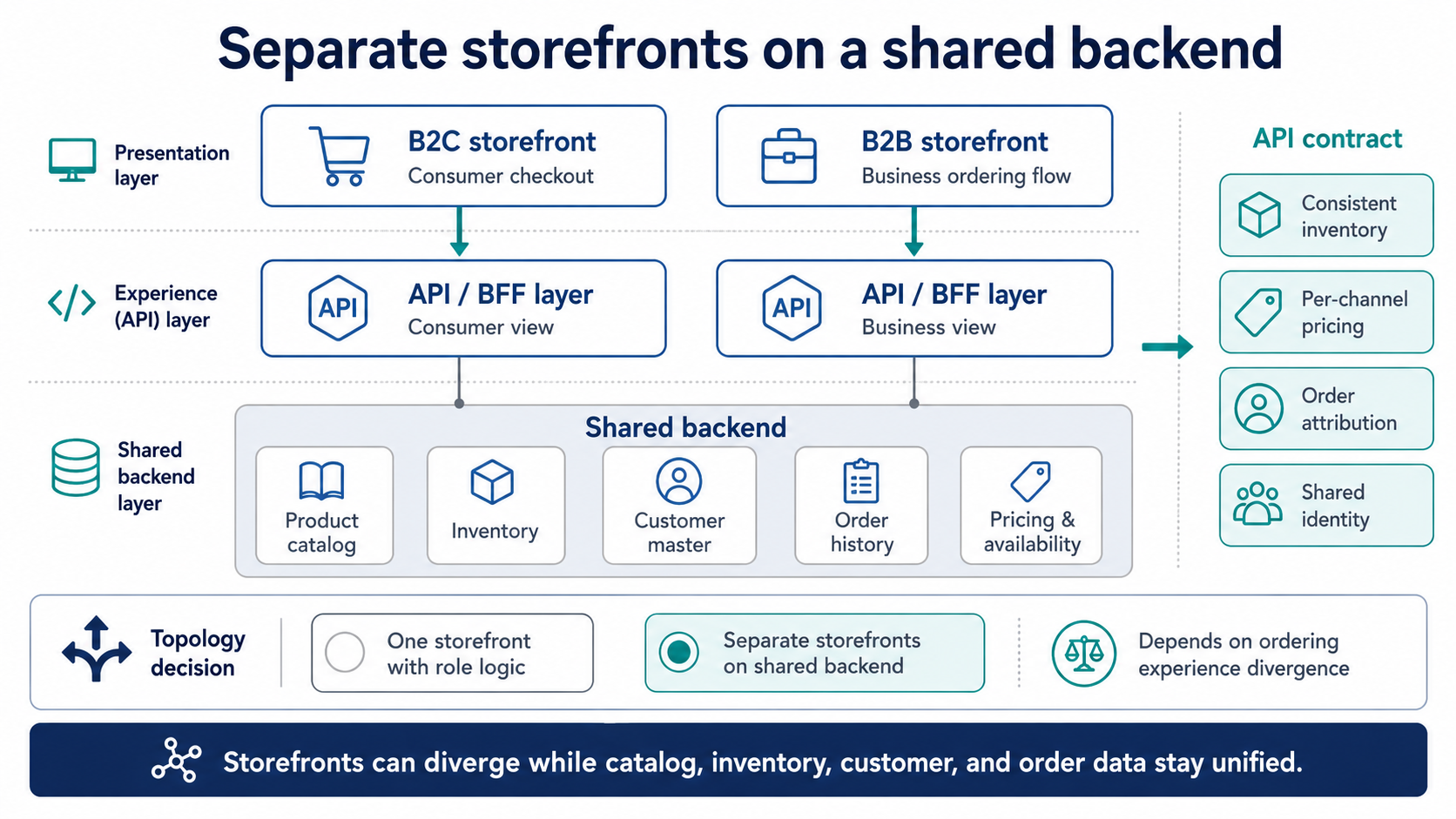
Separate storefronts can support different B2C and B2B ordering experiences while catalog, inventory, customer, order, and pricing services stay shared.
The API contract between the storefronts and the backend
The shared backend is only as useful as the contract it exposes to the storefronts. That contract has to guarantee a few things:
- consistent inventory, so two channels never oversell the same stock
- price resolution per channel and per customer, so each storefront shows and charges the right price
- order creation with channel attribution, so every order records where it came from
- shared customer identity, so a buyer is recognised across storefronts
Composable commerce platforms make this concrete. In Medusa, a storefront request carries a publishable key scoped to a sales channel, which returns the right products and inventory and attributes the order to that channel; commercetools models the same idea through Stores and Channels over one API-first backend.
Aggregating requests so the storefront stays simple
A single storefront action — rendering a product page, placing an order — often needs data from several backend services at once. Rather than have each storefront orchestrate those calls, an aggregation layer combines them behind one request, which is the gateway aggregation pattern. It keeps the frontends thin and the chattiness between storefront and backend under control, which matters more as the number of storefronts grows.
How SaaS platforms handle B2B, and where they cap out
SaaS platforms support B2B natively, within their storefront model. Shopify, for example, models B2B with company accounts: companies and company locations, company-specific catalogs and price lists, approval-style draft orders, and payment terms. For a B2B channel whose ordering experience stays close to the consumer flow, this is fast to adopt and avoids building anything custom.
The cap is the frontend. The B2B experience lives inside the platform’s storefront and theming, so a genuinely distinct B2B ordering UX pushes against what the platform is built to do. At that point teams either accept the platform’s constraints or move to a composable backend where separate storefronts can each own their experience. The choice maps back to the same question — how different the ordering experience needs to be.
When neither topology is worth building
Sometimes the right answer is to build neither yet. When the B2B channel is small — a handful of wholesale accounts — a manual process can be cheaper than any architecture: orders by spreadsheet, invoicing by email, fulfillment handled by hand. Building a storefront or a shared-backend integration only pays off once the volume or the operational pain justifies it. Once it does, vetting a build partner matters as much as the topology, and the e-commerce RFP technical questions to put to a vendor — code ownership, handover, production risk, and proof-of-concept scope — are worth settling before any contract.
The other case is divergence in the data itself. If the product catalog for B2B and B2C diverges so far that they share almost no products, attributes, or structure, putting both on one shared catalog can create more friction than it removes, and you may be looking at two systems rather than one backend with two faces. Knowing when you have crossed that line — and the related question of when to move from a plugin to a purpose-built platform — is worth settling before committing budget.
Key takeaways
- Catalog, inventory, customer master, and order history belong in one shared backend regardless of whether B2B and B2C share a frontend.
- The choice between one storefront and separate storefronts turns on how structurally different the ordering experience needs to be, not on the catalog or inventory.
- A single storefront with role-based logic ships faster but accumulates conditionals as the audiences diverge; separate storefronts cost more upfront and isolate each channel’s UX.
- The shared backend’s value depends on a clear API contract: consistent inventory, per-channel and per-customer pricing, order attribution, and shared identity.
- Sometimes neither build is justified — a manual process can be cheaper for a small B2B channel, and a fully divergent catalog may not belong on a shared backend at all.
Letting the ordering experience decide the architecture
The architecture follows one question rather than the other way around. Put the catalog, inventory, customers, and orders in a shared backend, then let the degree of divergence in the ordering experience decide whether one storefront with role-based logic is enough or whether each channel needs its own frontend.
Design the API contract between storefronts and backend deliberately, because that is what keeps stock, pricing, and identity consistent across channels. And when the B2B channel is small or the catalogs barely overlap, the cheapest architecture may be none at all for now.
If you are scoping a B2B channel onto an existing B2C platform and want a clear read on which topology fits, a short conversation will get you there faster than another month of patching. Talk through your channel architecture.
Summarize with AI
 ChatGPT
 Claude
 Gemini
 Grok
Grok Perplexity
FAQ











Interesting For You



Ecommerce scalability and performance for peak season
Auto-scaling does not save you when the bottleneck has moved to a synchronous call that did not exist last year. Preparing a seasonal platform is less about handling load in the abstract and more about knowing where this year's stack will fail under concentrated demand, and testing for that specifically. The article walks through where seasonal platforms typically break, how to model peak traffic accurately during load testing, and how to design for scale-up and scale-down so you stop paying for January capacity in July.
Read article


E-commerce RFP technical questions vendors must answer
This article gives eight questions worth adding to an e-commerce development RFP and explains what a strong answer, a weak answer, and a direct Bluepes-style answer should look like.
Read article

Why Your ERP Integration Fails Silently Under Load
These ERP integration failures are the most expensive category of integration problem in e-commerce because they don’t generate tickets or on-call pages. They surface as accounting discrepancies weeks after the data diverged, when the cost of diagnosis and correction has already multiplied. Almost always, they trace back to four architectural decisions that were either made implicitly or not made at all when the integration first went live: field-level data ownership, sync model selection per data type, bidirectional idempotency, and pre-incident observability. Each gap is diagnosable in a running integration, and each has a fix that does not require a full rewrite.
Read article