


BI project estimation starts before the first dashboard


The request arrives and it sounds straightforward: "We need three dashboards — sales, operations, customer churn. Eighty hours, fixed price, done by end of quarter." The client has a number, a deadline, and a clear picture of the output. What they don't yet have — and what often nobody has explained to them — is a picture of what sits underneath those dashboards.
This article is for Heads of Data, BI Leads, and IT Directors who have initiated or are planning a BI project with a defined budget and delivery timeline. Next — a practical explanation of why BI project estimation frequently misses the mark, what the real architecture looks like at each layer, and how a structured pre-project conversation prevents the kind of surprises that erode client trust.
The short answer: most BI scoping underestimates happen because the client sees the reporting layer and nobody maps what feeds it. Data ingestion, storage, and transformation aren't optional add-ons — they're the foundation. When they don't exist, the project scope changes. Not because the vendor is inflating the work, but because the work was always there.
Why the first clarifying questions change the whole project
You hand a BI team a dashboard request, and within the first hour of scoping, someone asks: "Where does the data currently live?"
That question is not a warning sign. It is the most important question in the entire engagement. What comes after it determines whether this is an 80-hour reporting build or a three-month infrastructure project.
Here's what a typical discovery session uncovers in mid-market companies: sales data lives in a CRM — HubSpot or Salesforce — with no direct database access, only API exports that require authentication management and pagination logic. Operational data sits in a proprietary ERP with a vendor-managed schema that changes without notice. Customer behavior data is split across a SaaS analytics platform with rate-limited APIs and a 90-day data retention window that predates the business questions the dashboards are supposed to answer.
None of this is unusual. According to the Microsoft Azure Architecture Center's documentation on ETL patterns, moving data from operational sources into a reporting-ready format requires deliberate pipeline design — it does not happen automatically when you point a BI tool at a data source. Each step in that pipeline represents real engineering work.
The client isn't wrong to ask for dashboards. They just haven't been shown what producing reliable dashboards actually requires from the infrastructure beneath them.
What a real BI architecture consists of — and why clients only see one layer
BI architecture is the layered system that moves raw data from where it originates into a form suitable for analysis and decision-making. The term "BI project" is frequently applied only to the top layer of that system — the reports and dashboards. But every layer below it must function for the top layer to work.
There are five layers in any production BI system.
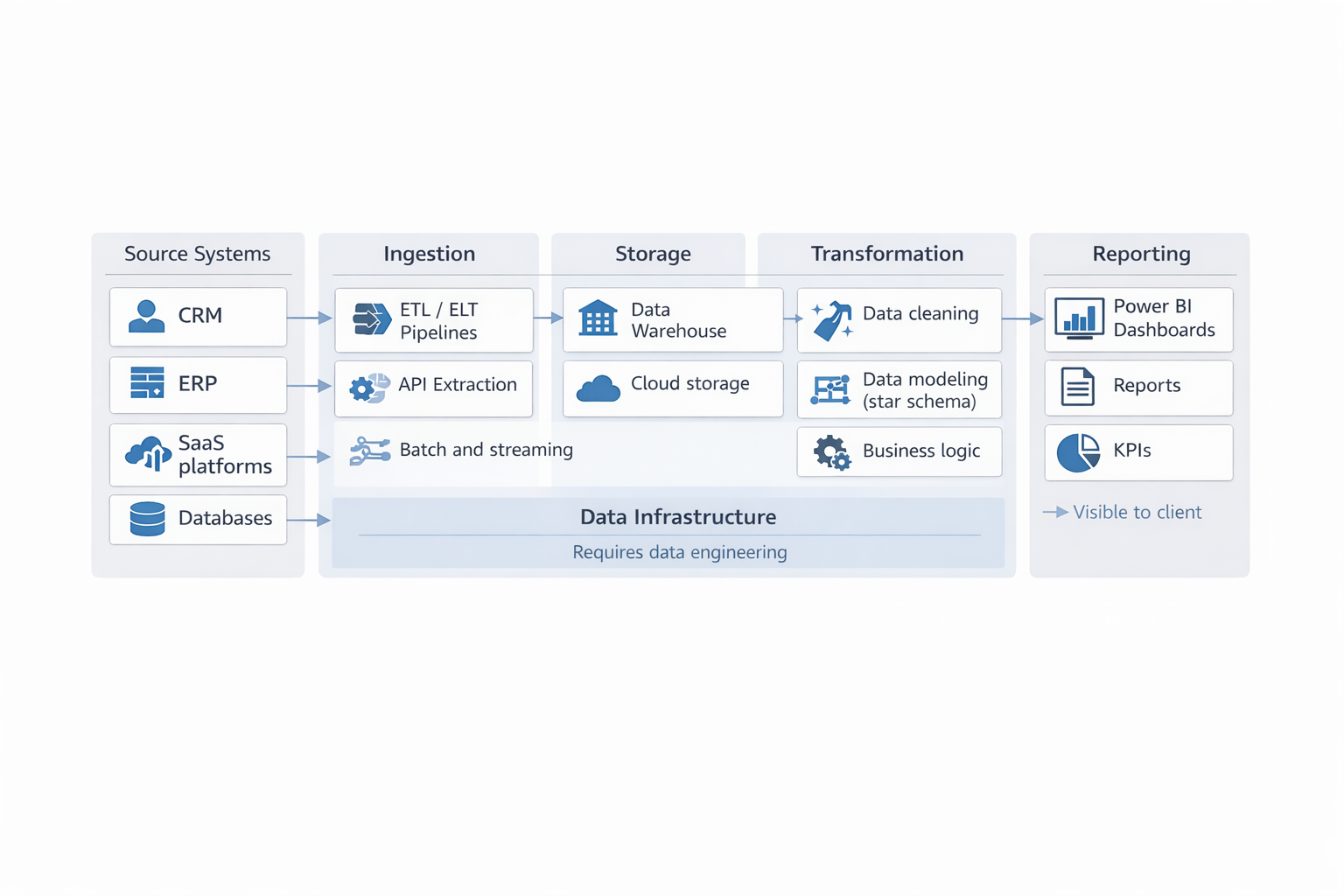
A production BI system consists of five layers, where ingestion, storage, and transformation remain invisible but define delivery timelines.
Layer 1: Source systems
Source systems are the places where data originates — CRMs, ERPs, SaaS platforms, relational databases, flat file exports, streaming feeds. The source layer is not technically part of the BI build, but its structure shapes everything that follows. Inconsistent schemas, missing timestamps, undocumented business rules, and unreliable export formats at the source level mean that every layer above absorbs the consequences.
Layer 2: Ingestion
Ingestion is the process of extracting data from source systems and moving it to a central location. This is where pipelines are built — scheduled batch jobs, event-driven triggers, real-time streams. A company without a functional ingestion layer has no repeatable, automated way to get data into a reporting system. Building dashboards in that environment means the dashboards will be refreshed manually, will break when someone changes a column name upstream, or will simply show stale data. Understanding ETL and real-time data pipeline patterns is often the first step toward scoping this layer accurately, because the ingestion architecture determines cost, latency, and maintenance burden for the entire system.
Layer 3: Storage
Once data is ingested, it needs a structured home — typically a cloud data warehouse such as BigQuery, Snowflake, Amazon Redshift, or Azure Synapse Analytics, or a managed SQL database for smaller volumes. Storage design is not just provisioning a database. It involves schema design, partitioning strategy, access control, retention policy, and cost management for query volume. A poorly designed storage layer produces slow queries at the reporting layer and makes future changes expensive.
Layer 4: Transformation
Raw ingested data is almost never in a format suitable for direct reporting. Transformation involves cleaning records, resolving duplicate entries, joining datasets across systems, encoding business logic, and restructuring everything into a consistent model — typically a star or snowflake schema. According to Microsoft's Power BI documentation on data modeling, a well-structured dimensional model is the foundation of efficient, maintainable Power BI reports. Skipping or shortcutting the transformation layer produces dashboards that are slow, inconsistent across filters, and fragile when any source changes.
Layer 5: Reporting
This is the layer the client requested. Dashboards, KPI cards, drill-through reports, scheduled exports, embedded analytics. The reporting layer is genuinely the most visible part of the project — which is exactly why it gets scoped, priced, and promised first. The problem is that Layers 1 through 4 must already exist, or must be built, before Layer 5 can function reliably in production.
Our Power BI consulting services include a pre-project architecture review that maps which layers exist, which are partial, and what it takes to make each one production-ready before dashboard development starts.
If your team is heading into a BI project without a clear picture of what sits between your SaaS systems and your planned dashboards, that gap will surface mid-project — at the moment when changing course is most disruptive. A one-week ingestion analysis before kickoff costs a fraction of a mid-project architecture pivot. Start with an infrastructure audit before you commit to a delivery scope. Request an ingestion analysis from the Bluepes BI team.
Why clients feel "pulled into enterprise complexity" — and what's actually happening
There is a specific moment in almost every BI discovery conversation when the client's tone shifts. It happens when "architecture" appears for the second time in twenty minutes, or when someone mentions cloud data warehouse pricing. The client was expecting a dashboard project. They are now in a conversation about platform licensing, pipeline tooling, and cloud storage tiers.
The instinct is to read this as scope inflation - it isn't. What the client is experiencing is the first accurate picture of their data environment.
The right response from the vendor's side is not to simplify the explanation or defer the infrastructure question to a later phase. It's to make the full picture visible early, and then give the client real options:
- Which layers already exist in their environment (partial builds are common, and they reduce scope significantly)
- Which layers must be built versus configured
- Whether certain layers can be deliberately deferred with a documented trade-off — manual refresh now, automated pipeline later
- What the cost and timeline look like for a staged approach versus a full build
The distinction between "scope creep" and "accurate scoping" is entirely about when the infrastructure conversation happens. When it happens in week six of an eight-week project, it feels like the scope is growing. When it happens before the contract is signed, it is just an honest estimate.
Gartner's research on BI program management identifies stakeholder alignment on project scope — including infrastructure prerequisites — as one of the primary factors separating successful BI initiatives from failed ones. That alignment can only happen if the infrastructure picture is on the table before work begins.
The role question matters here too. A Power BI developer vs. data engineer is not a stylistic distinction — these are genuinely different skill sets addressing different layers of the architecture. A Power BI developer works at the reporting and transformation layer: building dashboards, authoring DAX measures, designing data models. A data engineer works at the ingestion and storage layer: building pipelines, managing warehouses, ensuring data arrives in a reliable and structured form. Many BI projects need both. Scoping a BI project as though one role covers all five layers is a common and measurable source of underestimation.
What a proper BI project estimation process includes
Good BI project estimation is not a number rounded to fit the client's budget. It is a structured analysis that produces a scope the team can actually deliver — and that the client can actually hold a vendor to.
Here is what that process covers, in order.
- Source system audit. How many source systems are in scope? Does each have a stable, documented API or direct database access? What are the rate limits, schema documentation quality, and historical data retention windows? SaaS platforms often retain only 90–180 days of event data by default, which directly constrains what the dashboards can show without a backfill strategy.
- Ingestion assessment. Does any automated ingestion pipeline already exist? If yes, what does it cover and where are the gaps? If no, what tooling fits the client's existing cloud environment, and what is the expected data volume and refresh frequency? This step alone routinely surfaces the majority of hidden scope — it is not uncommon for ingestion to represent 40–60% of total project effort in a first-time BI build.
- Storage review. Is there an existing data warehouse? If yes, is the schema documented, maintained, and accessible without manual intervention? If no, which cloud platform fits the client's existing infrastructure, geographic constraints, and budget for ongoing storage and query costs?
- Transformation gap analysis. What business logic needs to be encoded in the transformation layer? How consistently do the source systems define shared concepts — do the CRM, ERP, and analytics platform all use the same definition of "active customer," or does each system track it differently? Resolving definitional conflicts in transformation is unglamorous work, but it determines whether the dashboards produce numbers that finance, sales, and operations all agree on.
- Reporting scope definition. Only after the first four layers are mapped does scoping the reporting layer become a predictable task. The dashboard build, at that point, is not a placeholder for everything that wasn't captured upstream — it is a defined deliverable with a clear input contract.
For teams managing BI delivery across multiple quarters, keeping BI projects predictable and within budget depends on this upstream scoping discipline being applied consistently, not just at the start of the first project. Our data engineering services cover the full stack — ingestion architecture, transformation modeling, storage design — so the reporting layer is built on a foundation that holds under real production load.
What to know
- BI project estimation that begins at the reporting layer will underestimate total effort in most first-time BI builds, because infrastructure layers are not visible until a discovery process surfaces them.
- Every production BI system has five layers — source, ingestion, storage, transformation, and reporting — and each must be inventoried before the project scope is defined.
- The ingestion layer is the most commonly absent in mid-market environments and the most consequential for total project cost and timeline.
- When a client feels "pulled into enterprise complexity," the real problem is that the infrastructure conversation is happening mid-project instead of before it started.
- A structured pre-project ingestion and architecture analysis is the single most effective way to produce an estimate that the team can deliver and the client can trust.
Transparency at the start is what makes the rest of the project work
The infrastructure conversation is not a vendor tactic. It is not a mechanism for expanding the contract. It is the only way to give a client an honest answer about what their BI project actually costs.
When the full picture is laid out before work begins — here is what exists in your environment, here is what is missing, here is what each layer costs to build or configure — the client can make a real decision. They can reduce scope to what their current budget supports, or they can fund the full build with a clear understanding of what they are getting. Both outcomes are far better than signing an 80-hour contract and finding the infrastructure problem in week three, when changing direction costs more than the original project.
We have applied this approach across BI engagements in fintech, healthcare, and telecom environments where data fragmentation across three or more source systems was the baseline, not the exception. The starting point was never a dashboard wireframe. It was a structured audit of what data existed, where it lived, and what it would take to make it reliable enough to report on.
If you are approaching a BI engagement — whether your first project or a rebuild of something that stopped working — the right first step is a scoped infrastructure analysis, not a visual mockup. Request an ingestion and architecture audit from the Bluepes BI team before you commit to a scope or a timeline.
Summarize with AI
 ChatGPT
 Claude
 Gemini
 Grok
Grok Perplexity
FAQ











Interesting For You



Power BI developer vs data engineer: who comes first
A Power BI developer specialises in visualisation, data modelling inside Power BI, and report logic. They do not build data pipelines or transform raw data from complex sources. Without a clean, prepared data layer in place, there is nothing for them to work with — and no amount of experience changes that constraint. The decision that determines project success is not who you hire, but what is already ready when they start.
Read article



Telco Power BI Model for CDR and KPI Dashboards
A reliable telco Power BI model needs clear fact-table grain, shared KPI definitions, controlled access rules, and performance design before dashboards multiply. CDRs should stay at event grain only where detail is required, while network KPIs should be pre-aggregated at time-and-location grain for operational reporting.
Read article



Reporting workflows for business analysts in 2026
Reporting workflows give business analysts a controlled path from request intake to published dashboard. The workflow defines who owns the metric, which dataset is trusted, how changes reach the semantic model, what validation happens before publishing, and how refresh or access issues are tracked after release.
Read article