


Why Small BI Projects Fail Before They Even Start


The phrase comes up more often than it should: “We thought it was just a report.” It surfaces after a BI project has already failed — scope creep has set in, the deadline has passed, and the initial budget was spent on infrastructure work nobody put in the estimate. The team wasn’t incompetent. The intention was right. The project failed before it really started, and understanding why BI projects fail at this stage is what prevents the next one from going the same way.
This article is for IT directors, BI leads, and data decision-makers who have lived through a stalled or failed BI initiative — or who are planning one and want to get the scope right from day one. Next — a breakdown of the specific patterns that cause small projects to collapse early, and one diagnostic question that reframes how any BI engagement should begin.
The core issue sits below execution — in the gap between what the project was scoped to deliver and what the data environment actually requires. A dashboard looks like a reporting deliverable. Behind it sits a chain of decisions about data ingestion, transformation, modeling, access control, and refresh scheduling. Underscope any one of those layers, and the project either stalls mid-delivery or produces output nobody trusts enough to act on.
Why small BI projects carry more risk than large ones
Large BI programs — the ones with multi-month discovery phases and cross-functional teams — tend to survive their own mistakes. There’s enough slack to absorb a misconfigured pipeline, a modeling rethink, or a delayed data access request. The team has room to course-correct without blowing the timeline.
Small projects don’t have that room. A six-to-eight-week engagement with a fixed budget operates with near-zero tolerance for unscoped work. A single undiscovered data quality problem — a source system that outputs inconsistent date formats across regions, for example — can consume two weeks that weren’t in the plan. The project doesn’t fail because of negligence. It fails because there was no margin for the unexpected.
According to a Gartner survey of 566 data and analytics leaders (reported by CIO.com), fewer than half reported their teams effective at delivering value to the organization — and this gap is most acute in smaller, faster engagements where formal discovery is skipped in the interest of moving quickly (Gartner survey on analytics team effectiveness). The projects treated as low-risk are, in practice, the ones most likely to fail.
What a dashboard actually requires
Here’s what the client sees: a Power BI report with three pages, six visuals, and a date slicer. Clean, responsive, fast to load.
Here’s what was required to build it: a connection to one or more source systems, authentication and access configuration, an ETL or ELT pipeline to extract and load data on a schedule, a data model designed around the correct grain and relationships, transformation logic that handles nulls, duplicates, and business-rule edge cases, row-level security if different users need different data visibility, and a refresh schedule with error monitoring so the report doesn’t silently serve yesterday’s numbers.
None of that is visible in the final output. None of it is optional. Each layer carries a discovery cost before a single visual is built.
Bluepes’s Power BI consulting services cover this full stack — not just the visual layer. That distinction matters because a team scoped only for report development will hit blockers at the pipeline or modeling layer with no budget to address them.
A small BI dashboard is only the visible layer. Data ingestion, transformation, modeling, security, and monitoring must be scoped before development starts.
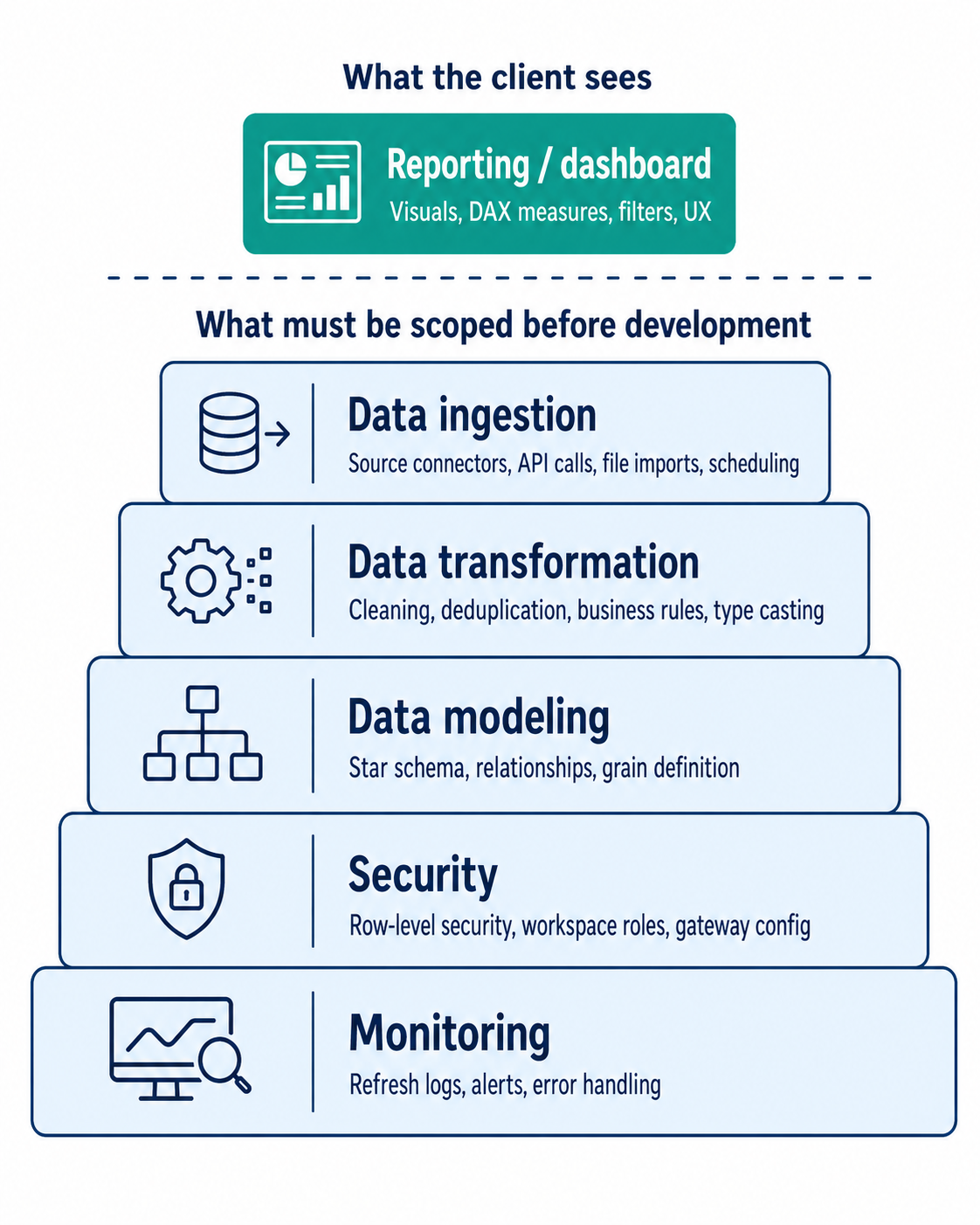
The Microsoft documentation on star schema design for Power BI details why the modeling layer alone — frequently treated as straightforward — determines whether calculations produce consistent results across slicers, filters, and time-intelligence functions. That’s the layer most clients don’t see at all when they approve the project brief.
Why a small BI budget means zero room for mistakes
A lean budget doesn’t just limit what you can build. It limits what you can fix.
In a project scoped for six weeks of development, a two-week detour into data remediation consumes a third of the available timeline. At that point the team faces a bad set of choices: cut features, request more budget, or ship something that works technically but isn’t trusted by the business. None of those outcomes match what was agreed on.
The work behind BI project cost estimation and ingestion scope — understanding what the source data actually looks like before committing to a delivery date — is the single highest-leverage activity in any BI engagement. It’s also the one most often skipped when clients want to move fast.
For teams trying to understand how this fits into a repeatable structure, the lean BI operating model for mid-market describes how companies absorb exactly this kind of variability — not by having larger budgets, but by building explicit discovery buffers and governance checkpoints into the workflow from the start.
If your team is already looking at a BI project with a fixed timeline and no discovery phase planned, that is the moment to pause. A structured scoping engagement before the build phase will cost less than the rework that follows a month of building on unvalidated assumptions. Bluepes engineers have mapped this across fintech, healthcare, and mid-market e-commerce contexts. Start with a technical discovery session before the sprint begins — not after the first deadline is missed.
The four most common causes of early BI project failure
1. Data access isn’t confirmed before the project clock starts
This sounds administrative. It isn’t. Getting read access to a production database, a cloud data warehouse, or a third-party SaaS API can take two to three weeks when it involves a security review, vendor approval, or an internal procurement process. A project that starts estimating delivery dates before access is confirmed is already behind before the first task is complete.
2. Data quality problems surface mid-build
Source data is almost never as clean as documented. Common problems that surface mid-build include:
- Nulls in required fields that break aggregation logic
- Duplicated transaction IDs across source systems
- Currency values stored as plain text instead of decimal types
- Timestamps without timezone information that corrupt time-intelligence calculations
These are not edge cases. They are the norm in production systems, and each one requires a decision: fix it in the pipeline, flag it to the source team, or document it as a known limitation with a workaround. Every path has a time cost. None of it appears in an estimate built around the assumption that “data is ready.”
3. Unclear ownership between reporting and data engineering roles
A Power BI developer and a data engineer are not interchangeable. The first designs the semantic model and builds the report layer. The second builds and maintains the pipelines that feed it. When a small project assigns one person to both roles, or treats the boundary as unimportant, work reliably falls into the gap between them. Understanding the difference between Power BI developer vs. data engineer responsibilities before the team is assembled prevents the most common form of mid-project confusion — and the most expensive one.
4. No named data owner on the client side
A BI team can build a technically correct model. But “correct” depends on business rules, and business rules live with specific people: the finance lead who knows how revenue is recognized, the operations manager who defines what counts as a completed order. When those people aren’t formally assigned from day one, the team builds to assumptions that later need revision — sometimes at the reporting layer, sometimes deeper in the model. The lightweight data governance for BI approach addresses this directly: minimal process overhead, clear ownership, decisions documented early. It doesn’t require a governance program. It requires a named person per domain.
The one question that changes how you approach any BI project
Before any scoping document is written, before any tool is selected, before any timeline is proposed — one question determines the shape of the entire engagement:
- Is this a reporting task or a data architecture task?
A reporting task — the narrower category — assumes that clean, structured, accessible data already exists. The work is primarily in the semantic model and the visual layer. The timeline is reasonably predictable.
A data architecture task means that data needs to be extracted from source systems, transformed, and stored in a form that can support reporting. That work has to happen before reporting begins, and it typically takes longer than the reporting itself.
The majority of small BI projects that fail were scoped as reporting tasks and turned out to be data architecture tasks in disguise. The difference isn’t visible in the initial request — “we need a sales dashboard” — but it becomes visible immediately during discovery.
McKinsey’s global survey of C-level executives and senior managers found that companies still responding to data and analytics shifts with ad hoc initiatives — rather than strategic adjustments — consistently underperform, and that organizational data readiness and leadership engagement, not tool selection, distinguish high performers. A team building reports on top of unready data will produce untrustworthy output regardless of the technology used.
Answering the architecture question first is exactly what shapes how Bluepes structures the data engineering and BI services it delivers. Answering it before the project starts is not a delay — it is the condition that makes the rest of the project predictable.
Key takeaways
- Small BI projects fail more often than large ones because there is no margin for unscoped work — every unexpected issue consumes a disproportionate share of the timeline and budget.
- A dashboard is the visible output of a six-layer technical process; skipping discovery means five of those layers are estimated without real data.
- The four most common early failure points are unconfirmed data access, undiscovered data quality issues, blurred role boundaries, and no named data owner on the client side.
- The most important question before any BI engagement is whether it is a reporting task or a data architecture task — they require different teams, timelines, and starting conditions.
- A structured technical discovery session, completed before the build phase begins, costs less than the rework it prevents.
Conclusion
The projects that fail quietly are usually the ones treated as simple. A focused BI engagement with a clear deliverable and a short timeline sounds like the easiest kind to execute. In practice it is one of the hardest — because every mistake costs a proportionally larger share of the available budget, and there is no buffer to absorb what wasn’t scoped.
A bigger budget or a longer timeline won’t fix a project that was scoped against assumptions instead of data. What changes the outcome is where the project begins: a structured discovery phase that surfaces data access gaps, defines role ownership, identifies data quality issues, and answers the architecture question before a single line of code is written. That work takes days, not months. And it changes the probability of a successful delivery more than any other single investment in the project.
If you’re planning a BI initiative and want clarity on what you’re actually getting into before committing to a timeline, discuss your project scope with Bluepes engineers. A technical discovery session is the right first step — not the first dashboard.
Summarize with AI
 ChatGPT
 Claude
 Gemini
 Grok
Grok Perplexity
FAQ











Interesting For You



BI project estimation starts before the first dashboard
The short answer: most BI scoping underestimates happen because the client sees the reporting layer and nobody maps what feeds it. Data ingestion, storage, and transformation aren't optional add-ons — they're the foundation. When they don't exist, the project scope changes. Not because the vendor is inflating the work, but because the work was always there.
Read article


Power BI developer vs data engineer: who comes first
A Power BI developer specialises in visualisation, data modelling inside Power BI, and report logic. They do not build data pipelines or transform raw data from complex sources. Without a clean, prepared data layer in place, there is nothing for them to work with — and no amount of experience changes that constraint. The decision that determines project success is not who you hire, but what is already ready when they start.
Read article



BI Readiness for 2026: Governance, Lineage, and Cost Control
BI readiness is the state of governance, lineage, refresh and capacity controls that determines how predictably reporting holds up as workloads grow. A team is ready when scaling adds dashboards without adding reconciliation calls. This article walks through the dimensions a BI lead can inspect this quarter, what “not ready” looks like in each one, and which gap to close first.
Read article