


n8n workflow reliability: when AI automations fail silently


An AI automation ran green for two weeks while quietly processing nothing. A trigger had stopped firing, every execution showed success, and no one noticed until the weekly report came back empty. n8n workflow reliability is mostly about this failure — not the loud crash that pages you, but the silent drop that looks healthy while work disappears.
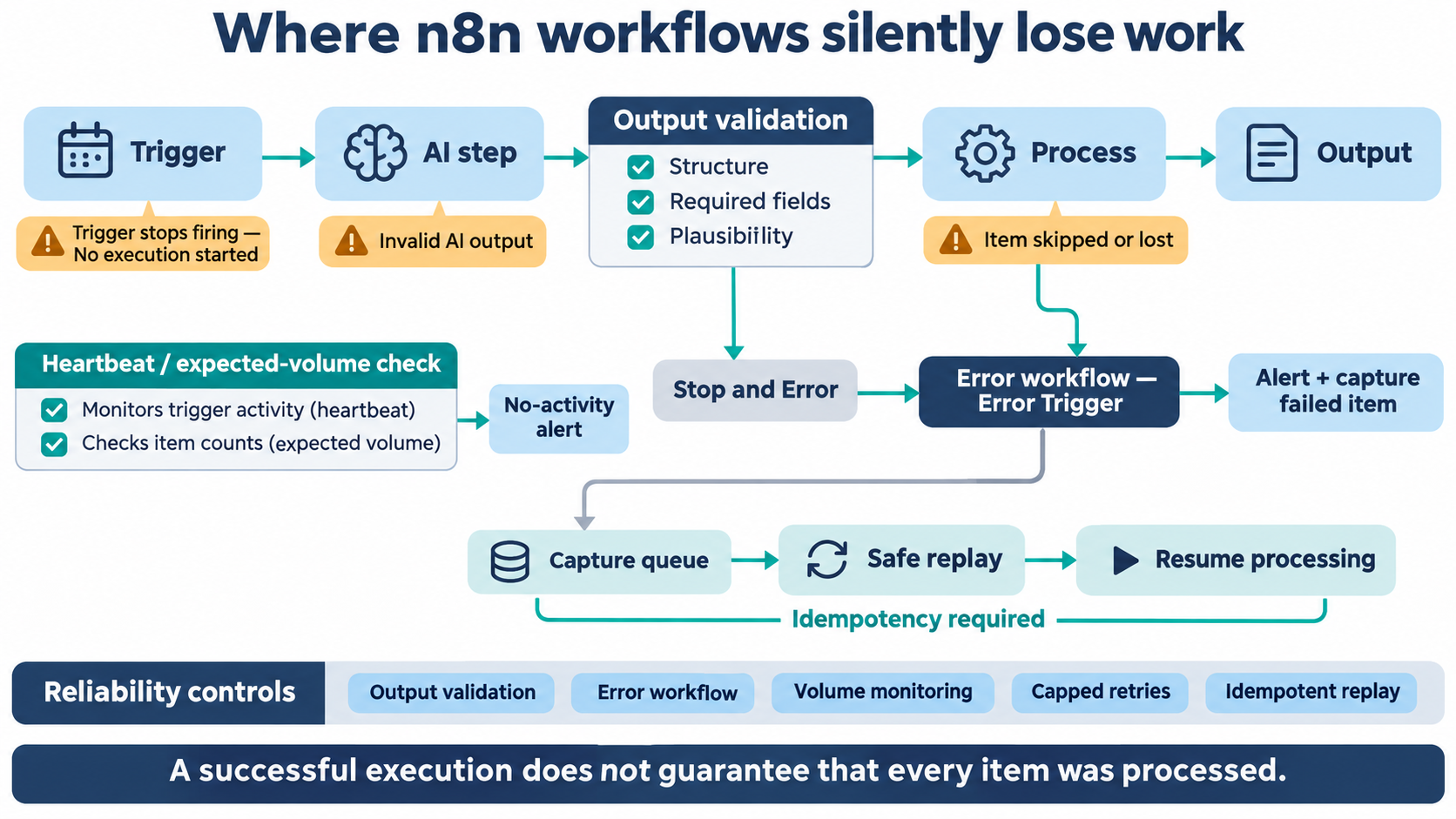
An AI automation fails silently when a step errors with no one watching, when a bad model output flows downstream as if it were valid, or when items are skipped and nothing records it. The aim is to make silent failures loud: validate the AI step's output, route every error to one place that alerts you, retry what's transient, and park what isn't so it is never lost.
What follows is why AI automations drop work quietly and the specific controls that catch it in n8n — output validation, an error workflow, retries with backoff and idempotency, a capture queue, and alerts that fire even when nothing happened.
Why AI automations fail silently
AI automations fail silently because a green run and a correct run are not the same thing, and nobody watches a dashboard that stays green. A workflow reports success when its nodes finished without throwing an error, which says nothing about whether the right work actually happened. Several common failures never raise an error at all, so they slip past the one signal most teams rely on.
The usual silent failures fall into a few shapes. A trigger quietly stops firing, so the workflow runs zero items and reports nothing wrong. A node errors and the execution halts, but the failure sits in a log no one reads. An AI step returns an empty or malformed answer — not an error, just wrong — and every downstream node processes the garbage as if it were valid. A batch partially fails and the remaining items are dropped without a record. None of these pages anyone, which is exactly why they persist.
This is a different failure from the runaway agent. An autonomous agent in a loop fails loudly and expensively, by not stopping — covered separately — while a fixed automation fails quietly, by stopping or skipping without telling anyone. The reliability work here is the opposite of a brake: it is a smoke alarm. The same care that goes into adding an AI feature to a live product belongs around every automation in your production AI systems, because an automation is an AI feature that runs with no one looking at it.
Validate the AI step's output before anything acts on it
Check the AI step's output before any downstream node touches it, because a model fails by returning something wrong far more often than by erroring. A language model will happily return an empty string, a half-formed answer, or valid-looking text with the wrong value in it, and the node reports success every time. Without a validation step, that output flows straight into the next node and the automation does the wrong thing confidently. Validation is the single highest-value check in an AI automation for exactly this reason.
What to validate depends on the step, but the pattern is consistent: confirm the shape, then the content, and send anything that fails to the error path instead of downstream. A practical check covers a few things:
- Structure — the output parses and has the fields you expect, not an apology or a truncated fragment.
- Required values — the fields you depend on are present and non-empty, not silently blank.
- Plausibility — values fall in the range you expect, so an obviously wrong number is caught, not stored.
- A fallback — when validation fails, the item routes to a human or a default path rather than vanishing.
Catch every failure in one place with an error workflow
Route every failure to one error workflow that alerts a human, so no failure dies quietly in a log. n8n is built for this: in a workflow's settings you assign an error workflow that runs whenever an execution fails, and one error workflow can serve many automations. It begins with the Error Trigger node, which receives the execution ID, a link to the failed run, the error message, and the last node that ran — everything an alert needs to be actionable rather than just noisy.
The same mechanism handles the failures that aren't technically errors. When an AI output fails validation, or a batch comes back smaller than it should, use the Stop and Error node to force the execution to fail on your own condition, which hands it to the same error workflow and the same alert. That turns a silent, wrong-but-successful run into a loud one. From there, the error workflow does three jobs: it alerts, it records the failed item so you can recover it, and it decides whether to retry — the subject of the next section.
Wiring this reliability layer — validation, a shared error workflow, retries, a capture queue, and alerting — is straightforward to describe and easy to postpone until after the first silent loss. Our engineers have built it around n8n automations so a quiet failure becomes a page, not a surprise. Set it up with engineers who build reliable integrations.
Retry what's transient, park what isn't
Retry failures that will pass on a second attempt, and preserve the ones that won't. A rate limit, a brief timeout, or a momentary API error is worth retrying; a malformed input or a rejected request is not, and retrying it only wastes calls. When you do retry, follow the standard discipline: the AWS Builders' Library notes that retries add load to a service that may already be struggling, so cap the attempts and space them with exponential backoff and jitter rather than hammering in a tight loop.
What still fails after its retries must not disappear. Send it to a capture queue — the same idea as a dead-letter queue, a holding area for items that couldn't be processed, so they're kept for inspection and replay instead of lost. In n8n that can be a table, a queue, or a dedicated workflow the error path writes to. One caution: if a retry or a replay repeats an action with a side effect, attach an idempotency key so re-running a dropped item doesn't create a duplicate record or send a second message.
Alert on failure — and on nothing happening
Alert on errors, and alert just as loudly when nothing happened. An error workflow catches the runs that fail; it does not catch the run that succeeds while processing zero items, which is often the most expensive failure of all. A workflow that handled forty items yesterday and zero today has almost certainly broken upstream, and only an expected-volume or heartbeat check will tell you. Route alerts somewhere a person actually looks — a chat channel, an on-call tool — and fold them into the same observability and alerting you run for the rest of your systems.
Two alerts cover most silent failures. The first fires when an execution fails, carrying the detail from the Error Trigger so someone can act without digging. The second fires when throughput falls outside its normal range — zero processed, or far fewer than expected — which is the only way to catch a trigger that stopped or a source that went quiet. n8n's Executions list and log streaming give you the raw record; the alerts are what turn that record into something you hear about the same day rather than at the end of the month.
Make dropped work recoverable, not just visible
Catching a failure only helps if you can replay the work it dropped. An alert that says "item 4,217 failed" is useful only when you still have item 4,217 and can run it again, which is why the capture queue stores the original input alongside the error, not just a notification. Make the replay idempotent, so re-processing a recovered item produces one result rather than a duplicate, and the loop closes: a failure is caught, parked, and recoverable. This matters most in e-commerce lead and order automations, where a silently dropped lead or order is a lost sale no report will flag until it's too late to recover.
Recoverability is also what makes the rest of the system trustworthy. Once dropped work is captured and replayable, you can retry aggressively without fear of loss, deploy changes without worrying that in-flight items vanish, and treat a failed run as a queue to clear rather than an incident to reconstruct from memory. The elements and the silent failures they prevent line up directly:
Key takeaways
- The dangerous AI-automation failure is silent, not loud: a run that looks green while dropping work, which no error signal catches.
- Validate the AI step's output — shape, required values, plausibility — before any downstream node acts on it, because models fail by returning wrong far more than by erroring.
- Route every failure to one error workflow that alerts a human, and use Stop and Error to force a failure on bad-but-successful runs.
- Retry transient errors with capped backoff and jitter, park what still fails in a capture queue, and make retries idempotent so nothing is lost or duplicated.
- Alert on failures and on zero-processed runs, and keep dropped items so the work is recoverable, not just visible.
Why reliable automation is mostly about being told it broke
A reliable AI automation can still fail; what it can't do is fail quietly. The controls that get you there are modest — validate the AI output, catch every failure in one error workflow, retry what's transient and park what isn't, make replays idempotent, and alert on both failures and silence — but together they convert the failure that hurts, the invisible one, into a loud and recoverable one. Build them in while the automation is small, and a green dashboard goes back to meaning what you assumed it meant: that the work actually got done.
If you're running AI automations in n8n and can't say for certain that nothing is being dropped, the reliability layer is worth adding before the next empty report — make your n8n automations fail loudly with our team.
FAQ











Interesting For You



AI coding assistants for teams without quality slipping
What follows is why quality slips when a small team adopts these tools, and the specific guardrails that hold it steady — one review bar, capped change size, real tests, CI gates, and clear author accountability — without giving up the speed.
Read article


Multimodal RAG: why your RAG breaks on real documents
What follows is why RAG breaks on real documents and the ingestion steps that fix it — layout-aware parsing instead of plain text, OCR for scans, pulling tables out as structure, and using a vision model to turn figures and complex tables into text a retriever can actually find.
Read article


AI agents in production: controls that stop runaway runs
What follows is why agents run away, the specific controls that stop them — per-step and per-run timeouts, retries with backoff and idempotency, token and cost budgets, loop detection — and when escalating to a human beats retrying one more time.
Read article