


Healthcare Semantic Model in Power BI for Clinical KPIs


A morning huddle at a 350-bed hospital. The medical director pulls the ED door-to-doctor metric from the dashboard on her phone and reads 41 minutes. The ward team has 48 from a different page. Finance has 39 from a separate report. Same process, three numbers, fifteen minutes lost arguing which one is right — then someone exports to Excel and recomputes by hand.
A healthcare semantic model in Power BI fixes this by anchoring every clinical KPI to one grain, one definition, and one refresh cadence. The model decides where encounters live, how observations land, when DirectQuery is justified, and where row-level security and PHI minimization sit on the surface rather than buried in a policy document. With those four decisions made consistently, the morning huddle stops arguing about whose number is right and starts deciding what to do about it.
This article walks through the data model itself, the performance patterns that survive peak load, the privacy controls that hold up under audit, and a 30-day rollout you can run on one high-impact dashboard before scaling to the rest of clinical reporting.
Updated in May, 2026
Where Clinical Dashboards Lose Trust First
Clinical dashboards lose trust at predictable failure points, and most of those points sit in the data model rather than the visual layer. The symptoms repeat across the hospitals and telemedicine platforms we work with: KPIs disagree between teams; p95 page load spikes when filtering by unit or shift; DirectQuery models scan months on every click; Import models refresh during business hours and collide with rounds; PHI is technically restricted but practically exposed through ungoverned exports.
The structural causes behind these symptoms are consistent across deployments:
- Mixed grains in a single fact table. Encounters, orders, observations, and capacity all live in one wide fact without a stable grain, so downstream measures double-count or under-count depending on which filter is active.
- Filters wrapped in DAX functions. DATEADD, FORMAT, or text parsing on filter columns blocks predicate pushdown to the storage engine, and every visual replays the work on every interaction.
- Definitions that drift between departments. Length of Stay and Readmission 30-day exist in five variants — finance counts midnight-to-midnight days, clinical counts hours, quality counts the discharge encounter only when the patient survives.
- Privacy as a permissions checkbox. PHI is hidden behind workspace roles but flows freely through ad-hoc exports and shared workspaces that nobody actively governs.
Each of these causes sits in the model layer, which is why throwing more capacity at the problem rarely helps. We have seen organizations triple their Power BI Premium SKU and still hit the same p95 numbers because the model still scans cold partitions, the same DAX still iterates row by row, and the same six versions of LOS still appear in different rooms. For a longer treatment of why metric variance is structural rather than behavioral, see structural causes of KPI misalignment.
Build the Model Around Clinical Reality
The clinical question comes first; the schema follows. In healthcare reporting, the data shape mirrors how care actually happens — episodes of care framed by admission and discharge, observations streaming in at minute or hour resolution, capacity tracked by unit and shift. A semantic model that mirrors operational tables instead will collapse under the first set of cross-cutting questions, because nobody asks questions in operational-table shape.
Three core facts cover most of clinical reporting work:
Supporting facts come in for specific service lines: fact_theatre at the slot × OR grain for utilization and turnover time; fact_ed_flow at the event grain for door-to-triage and triage-to-doctor; fact_readmission as a small derived mart joined to fact_encounter by patient pseudonym and time window.
Dimensions stay narrow and friendly. dim_patient carries a pseudonymized ID and demographic bands (age 65–74, sex, risk flags) rather than direct identifiers. dim_provider holds clinician, specialty, and team. dim_unit and dim_facility carry the service line and location. dim_time exposes pre-parsed helper columns for date parts (year, month, day-of-week, hour-of-day) so visuals do not need to wrap raw timestamps in functions during query time.
Measures get defined once and reused across reports. A small published library — Length of Stay, Median LOS, 90th-percentile LOS, Readmission 30-day, Bed Occupancy %, Time-to-Antibiotics, OR Utilization, Observation Coverage — covers most clinical executive reporting. Each measure gets a one-screen definition card next to the KPI in the report: purpose, formula, the filters that must be present, the known caveats, and one worked example. Most of the disputes at the morning huddle are about definitions rather than data. The card removes the dispute.
This is where the upstream pipeline matters as much as the model. A clinical warehouse that lands HL7v2 ADT events and FHIR R4 Observation resources at event grain preserves the fidelity the semantic model needs; one that pre-aggregates upstream forces the semantic layer to re-derive things it should not. A worked example of an end-to-end pipeline of this kind is described in the Bluepes healthcare data platform architecture.
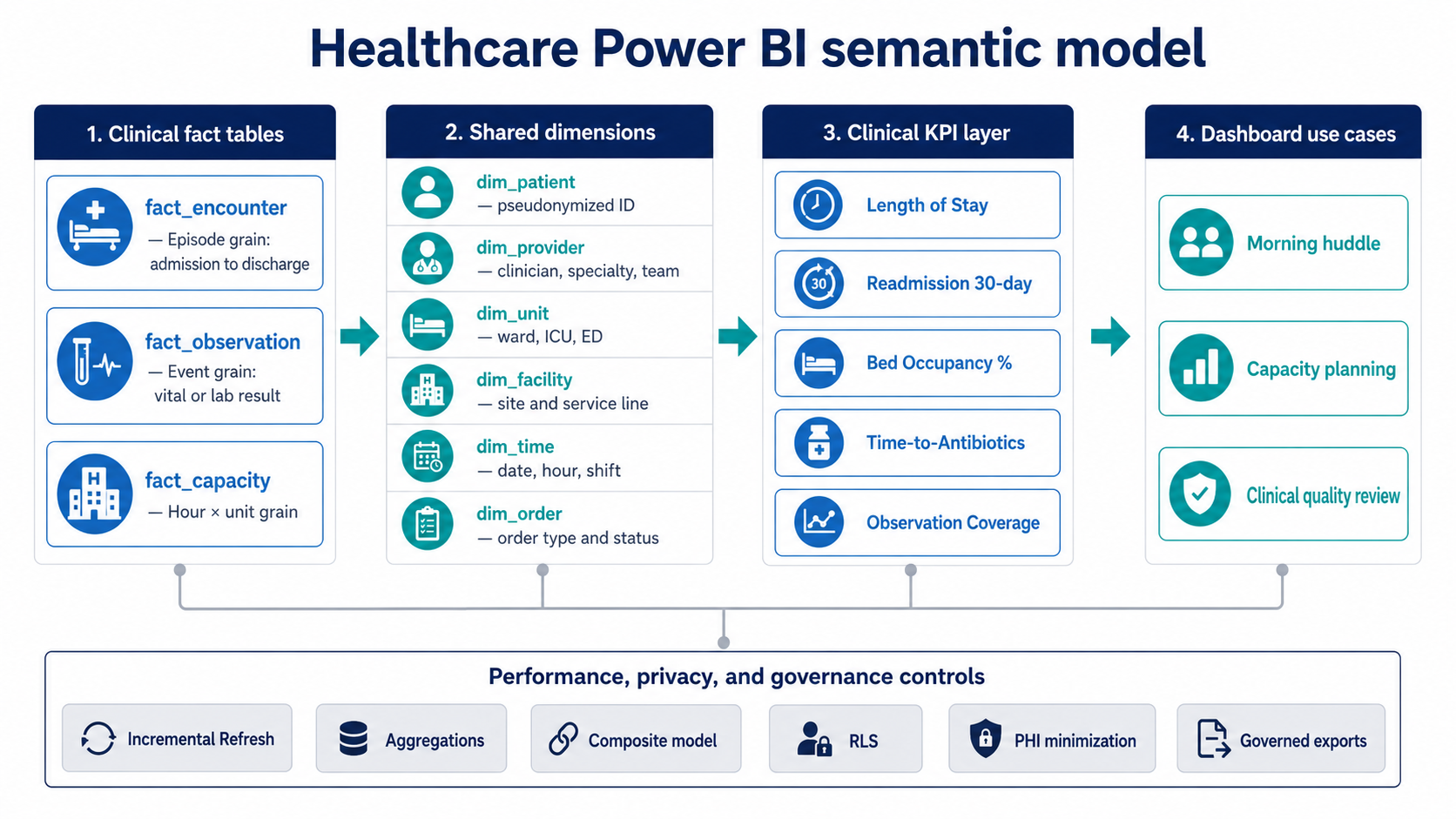
A healthcare Power BI semantic model should separate encounter, observation, and capacity grains before adding shared dimensions, KPI definitions, privacy controls, and refresh strategy.
Performance Patterns That Survive Peak Load
Speed in a clinical reporting environment comes from pruning the data the engine touches, not from larger capacity tiers. Three Power BI features carry most of the weight: Incremental Refresh on long-history facts, Aggregations on the slices clinicians read most, and a Composite model for hot near-real-time partitions.
Incremental Refresh for long-history facts
Incremental Refresh keeps months or years of encounter history in the model while refreshing only the last few days. For fact_encounter, a typical setup keeps 12–24 months of detail and refreshes the rolling 7 days; for fact_observation, the active partition might be the last 24–48 hours with archived history reaching back further. Refresh duration drops from hours to minutes, and the model stops colliding with morning rounds. Microsoft documents the configuration and partition behaviour in detail in the Microsoft Learn — Incremental refresh overview.
Aggregations for the views clinicians read most
Aggregations pre-compute the slices the dashboard hits most: day × unit for executive summaries; hour × unit for ED flow and ICU coverage; day × service line for readmissions and theatre utilization. Power BI routes queries to the aggregation first and falls back to the detailed fact only when the visual needs row-level detail. The result is responsive executive pages that hand off cleanly to detail pages where a clinician drills into a single patient encounter.
Composite models for hot partitions
Composite models mix DirectQuery and Import in the same semantic model. ED tracking boards, bed management, and critical labs need the current state — those tables go on DirectQuery against a hot partition or a streaming endpoint. Historical analysis stays on Import. The trade-offs and the storage-mode decisions per table are covered in the Microsoft reference on composite models in Power BI.
DAX practices that hold under load
A few DAX practices separate a model that holds up from one that grinds. Use VAR for any value referenced more than once in a measure — repeated subexpressions are repeated work. Prefer measures over wide calculated columns; calculated columns inflate the model and bypass the storage-engine compression that Import speed depends on. Avoid FILTER(ALL(...)) on large fact tables when a simpler filter context will do; row-by-row iterators on the hot path show up in every visual a clinician opens. Test with the filter ranges clinicians actually use (last 4 hours, 12 hours, 24 hours, by unit or team), not just full-month samples, because the failure modes hide at small ranges with high concurrency.
Late-arriving clinical data
Late-arriving data needs explicit handling. Labs land minutes to hours after the encounter; some observation feeds carry timestamps from devices whose clocks drift. The reporting surface should expose this honestly. A "Data through hh:mm" timestamp and a completeness percentage (records received versus expected) near each KPI let the clinician tell whether a dip is clinical or upstream. The Incremental Refresh window should cover the typical late-arrival lag for the source — 24 to 72 hours for most observation feeds — so the model picks up late records without manual reprocessing.
If your Power BI deployment slows down during rounds or runs into business-hours refresh collisions, a focused review of the data model usually finds three or four changes that recover the most time. Discuss your semantic model design with engineers who have built clinical reporting under load: Power BI implementation and consulting.
Privacy and Access Where Clinicians Read
Privacy controls work in clinical reporting when they are visible at the point where decisions are made. Role-based permissions that hide PHI through workspace access are necessary but not sufficient. The model needs row-level controls, surface-level minimization, and audit signals that hold up under a HIPAA review.
Row-Level Security by unit and facility
Row-Level Security in Power BI filters fact rows by user identity. A common pattern for hospitals: filter by unit and facility, with role-based exceptions for clinical leadership and quality reporting. Keep the RLS expressions short and testable. A single function that resolves the user's units from a mapping table is easier to audit than a chain of nested IFs, and it survives the inevitable reorganization that follows a service-line change.
PHI minimization on by default
PHI minimization on by default means the model carries pseudonymized patient IDs and demographic bands rather than dates of birth, with re-identification kept out of the semantic layer entirely. A "show identifiers" toggle, where one exists, sits behind a separate role and logs every use. The HIPAA Security Rule frames this as the minimum-necessary standard — access limited to what a workforce member needs to perform their function. The full text and HHS guidance is at the HIPAA Security Rule reference.
Governed exports replace ad-hoc CSVs
Governed exports replace ad-hoc CSV dumps with curated export views. The model exposes a small set of export-ready tables — already pseudonymized, already aggregated where appropriate, with explicit retention windows — and blocks export from raw tables. This eliminates the path through which most exposure incidents actually happen: a user with legitimate read access exporting a wider table than the use case required, then storing it on a laptop or a shared drive nobody governs.
Audit trail hooks and a reliability surface
Audit trail hooks forward sensitive-read events to the audit sink with correlation IDs. The forwarding rides on Power BI activity logs or on the underlying warehouse audit, depending on where the read happens, and the audit value comes from having one place to answer "who looked at what, when, and why" without reconstructing it from three logs.
A small "reliability and access" block on each clinical page closes the loop: last refresh timestamp, completeness percentage, the user's effective row filters, and a link to definitions and the contact for the metric owner. This is the same lightweight pattern described in lightweight data governance for BI, applied to the healthcare context where the regulatory bar is higher.
A 30-Day Rollout on One High-Impact Dashboard
A semantic model rewrite that touches every clinical report at once carries too much risk for a hospital environment. The pattern that works is to stabilize one high-impact view, prove the model, then replicate. The four-week rollout below targets a single dashboard — Bed Occupancy by hour × unit with LOS drill-through — chosen because it touches both real-time and historical analysis, and because everyone in the executive group already reads it.
Week 1 — Grain and definitions
Build the star: fact_encounter, fact_capacity, dim_unit, dim_time, dim_provider, dim_patient (pseudonymized). Implement the core measures: LOS family (mean, median, p90), Bed Occupancy %, Readmission 30-day. Publish one-screen definitions next to each KPI with the metric owner named. Add a date table with helper columns and strip every function wrapper off filter columns. By the end of week one, the model should return matching numbers between the dashboard and the source-of-record report for the same period.
Week 2 — Refresh and aggregations
Configure Incremental Refresh on fact_encounter (rolling 7 days, 24 months retained) and on fact_capacity (rolling 7 days, 12 months retained). Build aggregations for hour × unit (Bed Occupancy, admissions, discharges) and day × unit (LOS summaries). Map the aggregations to the measures used on the main pages. Validate that the dashboard answers the last 7-day, 30-day, and 90-day filter ranges without scanning the full history each time.
Week 3 — Near-real-time and reliability surface
Switch the current day to DirectQuery and keep history on Import — a composite model with one hot partition. Trim cross-filtering on live visuals; expensive filters on every slicer change will kill DirectQuery performance fast. Add the reliability block to the page: Updated time, Completeness, Last successful load, and the link to definitions. Run a load test with the realistic shift-change concurrency, not just a single-user session.
Week 4 — Privacy, audit, and a measured baseline
Implement RLS by unit and facility; test with real user accounts including clinical leadership and quality reporting roles. Confirm PHI minimization on the export views. Publish the mini-changelog for any definition changes the rollout introduced — explicit notes prevent the "why did the number move?" thread two weeks later. Measure: p50 and p95 page load before and after, scanned rows per visual, refresh duration, Excel export frequency on the governed page, and clinician adoption (weekly returning viewers in target units).
The 30-day window is not arbitrary. Beyond four weeks, the rollout starts to compete with the next cycle of operational priorities, and the team that built it loses context. Inside four weeks, the model improvements stay close to the people who can validate them.
Signals That Tell You the Model Is Working
After the rollout, four signals tell you whether the model is doing its job, and they should be tracked weekly for at least the first quarter.
p50 and p95 page load on the target dashboard, measured during peak hours — morning rounds, shift change, end-of-month executive review. The p95 number matters more than the average, because averages hide the slow rounds when occupancy is high and clinicians are reading at the same time. A workable target on a mid-sized clinical model: p50 under three seconds, p95 under eight seconds at peak.
Refresh duration and refresh time-of-day. After Incremental Refresh is configured correctly, the duration should drop substantially and the time-of-day should fall outside business hours without manual intervention. If refreshes still run during rounds, the incremental boundary or the partition strategy needs another pass.
Excel exports on the governed page. A meaningful drop in exports usually means the dashboard now answers the questions clinicians used to take to spreadsheets. If exports stay flat or rise, the dashboard is missing something the spreadsheet still provides — usually a filter, a column, or a definition that is precise enough in Excel but vague in the report.
Clinician adoption — weekly returning viewers in the target units — and the count of definition disputes raised at the morning huddle. The definitions card and the named metric owner should cut the back-and-forth. If disputes persist, the definition needs refinement or the data quality at the source needs work; at that point the model itself is not the problem.
These four signals are also the leading indicator for scope expansion. When the first dashboard is stable across all four, the same pattern can be applied to ED flow, OR utilization, or readmission reporting without rebuilding the foundation each time.
What to know
- A healthcare semantic model in Power BI resolves clinical KPI disputes by anchoring each measure to one grain, one definition, and one named owner.
- Three core facts — encounter at episode grain, observation at event grain, capacity at hour × unit — cover most clinical reporting and keep measures from double-counting.
- Performance under load depends on Incremental Refresh for long-history facts, Aggregations on the most-read slices, and a Composite model for the current-day hot partition.
- Privacy controls hold up under audit when RLS, PHI minimization, governed exports, and audit hooks are visible on the surface rather than hidden in workspace permissions.
- A focused 30-day rollout on one high-impact dashboard proves the pattern before scaling, with p50/p95 load, refresh duration, export frequency, and clinician adoption as the four signals to track.
Why the Model Decides Whether Clinical BI Earns Trust
The visual layer of a clinical dashboard accounts for the last 5% of the work. The first 95% — the grain, the definitions, the refresh strategy, the privacy controls — sits in the semantic model. Hospitals and telemedicine platforms we have helped tend to discover this after a Power BI rollout that looked clean in demo and fell apart at the first morning huddle. The fix usually requires revisiting model decisions that nobody surfaced earlier: grain, definitions, refresh strategy. Chart-type changes rarely move the needle.
A healthcare semantic model in Power BI is the foundation every subsequent clinical dashboard will rest on. The patterns described here — fact grain discipline, a measure library, Incremental Refresh, Aggregations, Composite models for hot partitions, RLS, PHI minimization, governed exports — give you a baseline that holds up under both peak clinical load and HIPAA review.
If you are evaluating Power BI for a clinical reporting environment, or planning to rework an existing model, an architecture review against the patterns above tends to find three or four high-impact changes that pay for themselves inside one rollout cycle. Request a Power BI clinical reporting architecture review — Bluepes engineers will look at the model, the refresh strategy, and the privacy controls together with your team.
Summarize with AI
 ChatGPT
 Claude
 Gemini
 Grok
Grok Perplexity
FAQ











Interesting For You



BI dashboard performance: modeling patterns for speed
The fastest fix is rarely a bigger warehouse or a new reporting tool. Slow dashboards usually come from avoidable design choices: unclear fact table grain, wide transactional tables reused for analytics, expensive calculations running at click time, weak filter design, and joins that multiply rows before the report even renders.
Read article


Power BI vs Amazon Quick Suite: a 2026 platform decision
Power BI suits organizations whose data, identity, and productivity already sit inside Microsoft 365 and Azure, with teams that model in DAX and consume through Excel-based workflows. Amazon Quick Suite (rebranded from QuickSight on October 9, 2025) suits AWS-native stacks where dashboards reach large viewer populations or get embedded inside customer-facing applications. The cost shape is different too — per-user heavy for Power BI, viewer-economical for Quick Suite — and the gap compounds with team size.
Read article



Telco Power BI Model for CDR and KPI Dashboards
A reliable telco Power BI model needs clear fact-table grain, shared KPI definitions, controlled access rules, and performance design before dashboards multiply. CDRs should stay at event grain only where detail is required, while network KPIs should be pre-aggregated at time-and-location grain for operational reporting.
Read article