


Code freeze: release management for seasonal peaks


A code freeze is the period when a team deliberately stops shipping routine changes to protect something fragile — in e-commerce, the revenue that lands during a peak season. For a software team this has nothing to do with the hospital term of the same name; here it means holding the codebase against regular releases so a Friday-afternoon deploy cannot take down checkout during the busiest week of the year.
In practice a code freeze is a release-management decision. During the freeze window, only specific kinds of change are allowed to reach production, and everything else waits. The hard parts are setting the window, classifying which releases qualify, and deciding under pressure whether a given change is important enough to override the freeze at all.
Two things tend to surprise teams new to this. First, for a seasonal business the freeze rarely fits in a long weekend around Black Friday; it can run for months, as long as the peak itself. Second, the freeze reshapes the roadmap, because anything large has to land before it starts. The examples here come from a seasonal firewood marketplace whose peak runs through autumn and winter, with the rest of the year reserved for the bigger work.
What a code freeze actually does
A code freeze stops routine releases from reaching production during a window when a mistake would be especially expensive. Everything that normally flows to production — new features, refactoring, non-urgent fixes — is held back, while a short list of exceptions stays open. The reasoning is blunt: most production incidents are caused by a change someone pushed, so the most reliable way to avoid one during a critical period is to push fewer changes.
Google’s site reliability engineers make the same point in their writing on release engineering, noting that most outages are triggered by a change of some kind. A freeze trades agility for stability on purpose, for a bounded period, because during a peak the cost of an outage outweighs the cost of waiting to ship.
How long the freeze runs, and why seasonal changes the answer
A code freeze should last as long as the window it protects, which is where seasonal businesses differ from everyone else. A team running steady traffic year-round might freeze for a few days around a single holiday. A business whose revenue concentrates into one season has a risk window measured in months, so the freeze runs that long too.
On a seasonal firewood marketplace we built, the peak runs through autumn and winter, and the freeze covers that whole stretch. The rest of the year — spring and summer — is when new features, refactoring, and larger system work happen. Treating the freeze as a long weekend would leave the platform exposed for most of the period that actually matters.
The window does not have to be a manual agreement. CI/CD platforms can enforce it directly: GitLab, for example, supports deploy freeze periods that block deployments during the dates you set, so the freeze becomes a configured rule rather than a hope that nobody deploys.
Which releases are allowed through a freeze
During a freeze, only a few classes of change are allowed through, and naming them in advance is what keeps the freeze from becoming an argument every time something comes up. A practical classification splits releases into four types, of which only the first three pass during the window:
This mirrors how IT change management classifies work. Atlassian’s change management guidance splits changes into standard, normal, and emergency, with the level of review scaled to risk — the same instinct behind waving through an emergency hotfix while making a normal feature release wait.
If your peak is coming and you do not yet have a freeze window, a release classification, and an override rule written down, that gap is where peak-season incidents start. Our DevOps team helps seasonal businesses put a release strategy in place before the season rather than during it.
Deciding whether a change is business-critical enough
The hardest call is the business-critical bucket, because it is judgment rather than a rule. A hotfix and a security patch are easy to recognise; a business-critical change is whatever someone argues is urgent, which is exactly why it needs a test. The one that holds up: would shipping this now remove more risk than it adds? A checkout bug quietly losing orders clears that bar easily. A feature someone wants live before the weekend almost never does.
Before letting a change override the freeze, it helps to confirm a few things:
- it fixes something actively losing money or blocking customers now, or its delay would cost more than the risk of shipping it
- it can be fully smoke-tested on production immediately after deployment
- a named stakeholder has agreed to own the risk, not just request the change
If a change cannot clear those, it goes into the backlog and ships after the freeze. Most of the discipline is in saying no to changes that merely feel urgent, which is far easier when the test was agreed before the season started than when it is argued live.
Shipping safely during a freeze: gates, approval, and smoke tests
When a change does ship during a freeze, it goes through more scrutiny than a normal release, not less. The whole point of the freeze is that nothing reaches production by accident, so the few changes that qualify carry extra checks. Every in-freeze release passes through:
- a QA validation gate before it is approved for production
- explicit sign-off from the stakeholder who owns the change
- a smoke test on production immediately after the deploy, to catch a regression while someone is still watching
Release pipelines support this directly. Azure DevOps approvals and gates let teams require manual stakeholder approval and automated quality checks before a stage deploys, so the freeze’s extra scrutiny is enforced by the pipeline rather than remembered by a person under pressure.
Planning the roadmap around the freeze
The freeze reshapes the roadmap as much as the release process, because anything large has to land before it begins. A payment-provider swap, an inventory rebuild, a major refactor — none of these can be in flight when the freeze starts, since there is no room to stabilise them once peak traffic arrives. Large work is scheduled into the open season and has to be finished and settled before the window closes.
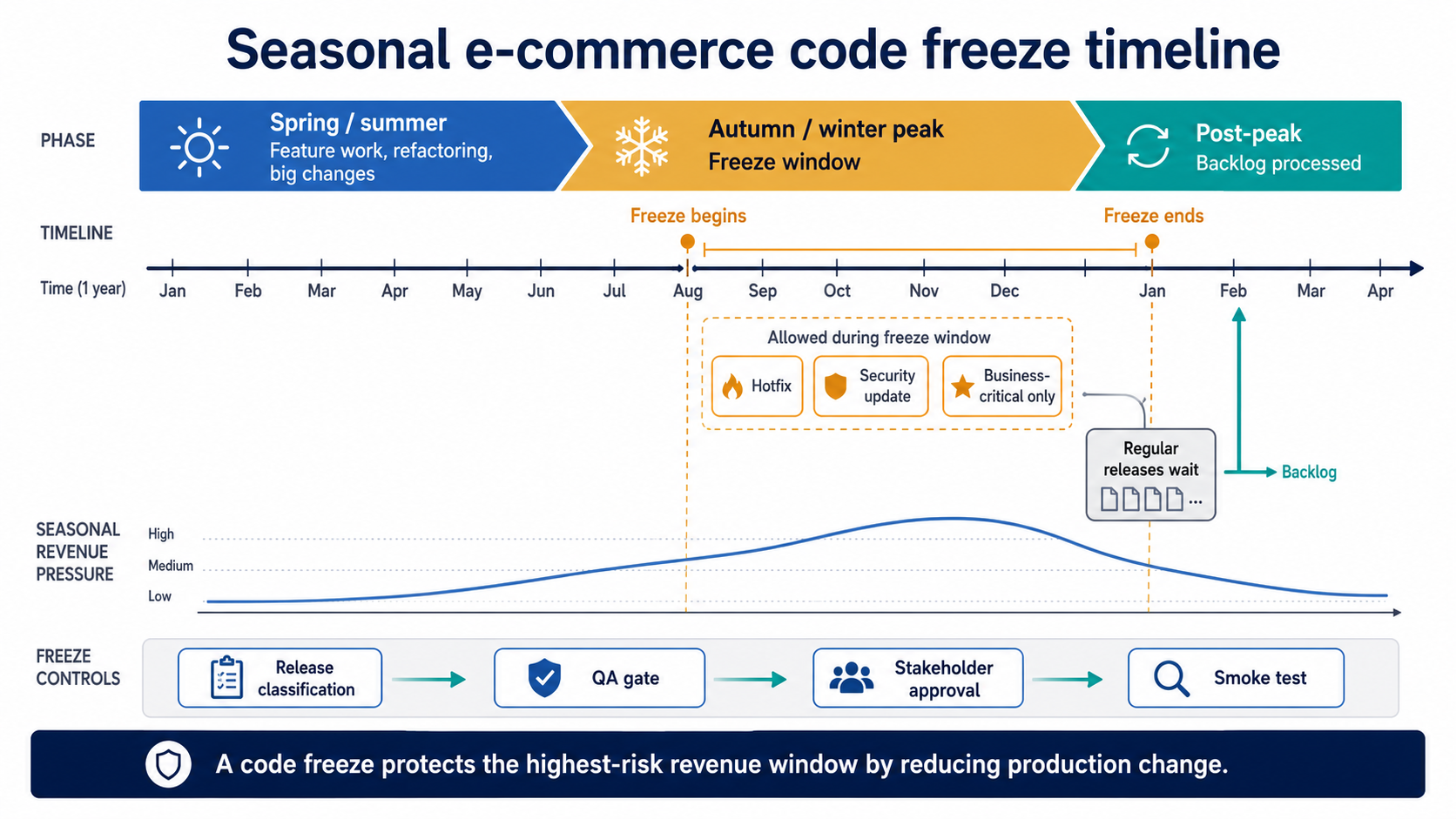
A seasonal code freeze moves large feature work before the peak, limits production releases during the freeze, and reserves backlog processing for after the season.
The backlog is the other half of the plan. Through the freeze, regular changes pile up, and that backlog is worked off once the freeze lifts — which only goes smoothly if the team planned for the surge. A freeze, a growing backlog, and peak-season support arriving at once is a capacity problem, and it is a common moment to bring in a dedicated engineering team to absorb the post-freeze work or hold reliability through the peak.
Release risk is only one side of peak readiness. The other is load: a frozen, stable codebase still has to survive the traffic, which is the subject of scaling for seasonal peak load. Most seasonal e-commerce platforms need both — a release freeze to control change and a scaling plan to control load — prepared in the same quiet months before the season.
Key takeaways
- A code freeze stops routine releases during a high-risk window so a change cannot take down revenue at the worst possible time.
- For a seasonal business the freeze runs as long as the peak — often months — rather than a single holiday weekend.
- Only hotfixes, security updates, and genuinely business-critical changes pass during a freeze; everything else waits.
- Whether a change is business-critical enough is a judgment call: would shipping it now remove more risk than it adds, and will a stakeholder own that risk?
- The freeze reshapes the roadmap — large work lands before it starts, and the backlog is cleared after the peak.
Planning the freeze long before the peak arrives
A code freeze works when it is decided early rather than improvised under pressure. The window is set before the season, the release types are agreed so nobody argues mid-peak, the override test is written down, the large work is shipped and stabilised in advance, and the post-freeze backlog and peak support are staffed for. Run that way, the freeze becomes a quiet, boring stretch — which, during the weeks that make the year, is exactly what you want.
If you are heading into a peak season and your release process treats it like any other month, mapping out a freeze now is far cheaper than recovering from an incident later. Plan your freeze with us.
Summarize with AI
 ChatGPT
 Claude
 Gemini
 Grok
Grok Perplexity
FAQ











Interesting For You



Dynamic route optimization when indexes aren't enough
This is an engineering case rather than a tutorial. It draws on a Norwegian firewood-delivery marketplace where route recalculation dropped from five-to-seven seconds to under one, and a multi-condition availability query fell from three-to-five seconds to about one. The numbers matter less than the reasoning behind them: how to tell when the answer is a better algorithm, when it is caching, and when it is simplifying the work itself.
Read article

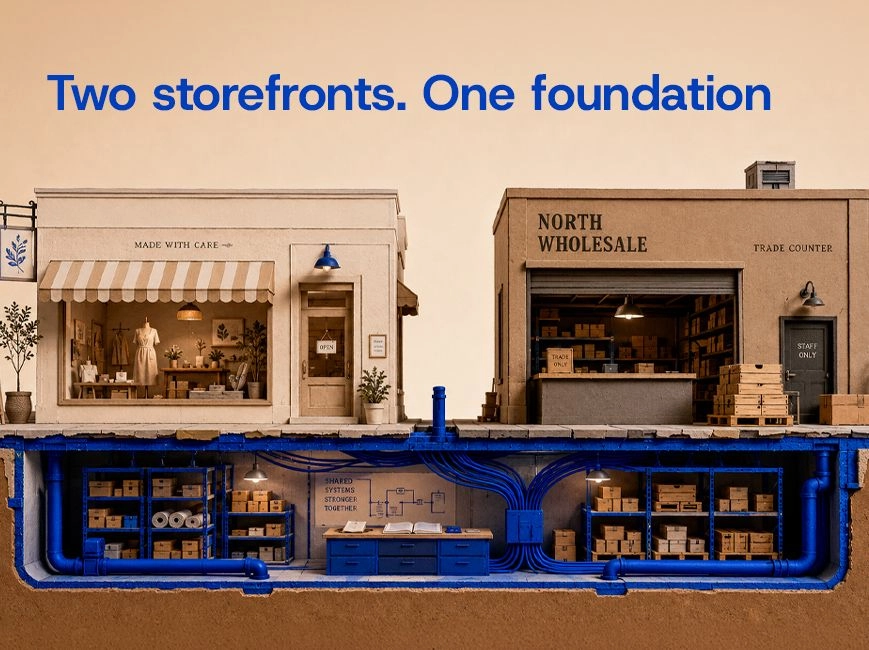
Separate storefronts or one platform on a shared backend
This piece is about that topology decision and the shared backend underneath it, not about how to model the B2B side once you have chosen — that modeling is its own subject, linked below. By the end you should have a decision framework you can apply to your own platform, a clear view of what the shared backend has to provide regardless of approach, and a sense of when neither option is worth building yet.
Read article


Ecommerce scalability and performance for peak season
Auto-scaling does not save you when the bottleneck has moved to a synchronous call that did not exist last year. Preparing a seasonal platform is less about handling load in the abstract and more about knowing where this year's stack will fail under concentrated demand, and testing for that specifically. The article walks through where seasonal platforms typically break, how to model peak traffic accurately during load testing, and how to design for scale-up and scale-down so you stop paying for January capacity in July.
Read article