


Supplier mobile app for marketplaces: a decision guide


Support tickets keep landing on the same theme. A vendor missed an order that came in during their lunch break. Another acknowledged a pickup four hours past the cutoff because they only open the dashboard once a day, after the workday is over. A third tried to update inventory from a job site and the form kept timing out on mobile data. The web dashboard works as designed — it just doesn’t work where the vendors actually are.
For marketplace teams with a functioning supplier dashboard, the next decision is whether to extend it with a mobile experience and what shape that mobile product should take. The reader of this piece already has operational evidence on where vendors fall out of the flow. The question is whether a supplier mobile app for marketplaces is worth the engineering investment, and which architectural decisions matter most if the answer is yes.
A vendor web dashboard and a vendor mobile app are different products serving different user journeys. The web flow centres on inventory, reporting, catalogue, and admin work. The mobile flow centres on push-driven order response, proof-of-pickup, and status updates from the field. Treating them as the same product behind two screen sizes is the most common mistake in marketplace mobile investment, and it is the reason most “responsive dashboard” projects fail to move the response-time numbers that triggered them in the first place.
A vendor mobile app is a different product, not a responsive layout
The web flow exists for tasks vendors do at a desk: managing the catalogue, uploading product images, configuring shipping zones, reviewing the previous week’s sales, downloading invoices, adjusting pricing. The session is long, focused, and intentional. The vendor sat down knowing what they came to do and works through it methodically.
The mobile flow exists for tasks vendors do during something else. They are loading a truck, walking the warehouse, between client calls, or on a delivery route. The session is short and triggered by an external event — usually a new order, a status change, or a customer message. The vendor opens the app to acknowledge or act, then closes it within seconds.
When teams compress the web flow into a responsive layout, they preserve the long-session model on a small screen. The result reads as cramped tables, multi-step forms collapsed into accordions, and navigation that takes three taps to reach the order list. None of that helps a vendor confirm an order in twenty seconds at a job site. The responsive version is still the web product, just less usable on a phone.
A genuine mobile product makes the order response the home screen. Push lands, vendor taps, vendor confirms — three taps and the obligation is met. Inventory adjustments and admin work either move to a separate “back office” tab or stay on the web entirely. This divergence is what web dashboards cannot deliver, no matter how well they reflow on a small viewport.
Web flow vs mobile flow for marketplace vendors
Three marketplace patterns where mobile stops being optional
The decision to invest in a vendor mobile app depends on what vendors physically do between receiving an order and completing it. Three operational patterns make mobile essential, and each maps to a specific way vendors are away from a desk during the part of the order flow where speed matters.
Physical goods with local pickup or delivery
If vendors leave their workspace to pick up goods, drop them off, or hand them to a courier, they are away from a desk during the critical part of the order flow. A web dashboard requires them to return, log in, find the order, and update its status. A mobile app delivers the order to their hand, lets them confirm pickup with a tap, and captures a proof-of-pickup photo without leaving the screen. The pattern repeats across local delivery, last-mile logistics, and any marketplace where vendors physically handle goods.
The location-based marketplace pattern — where orders route to the supplier nearest the buyer — amplifies the case for mobile. Vendors are accepting orders that have already been geographically assigned to them based on the buyer’s address. A delayed acknowledgement means the assignment expires and the order routes to another supplier. For the architectural side of that routing logic, see location-based order routing.
Seasonal or time-sensitive demand
In seasonal markets — firewood before winter, agricultural produce at harvest, holiday flowers, summer rentals — order volume concentrates into windows where every hour matters. Vendors working through peak periods cannot stay tethered to a desktop. They need order intake in the field while they are physically running the business at peak. Outside the peak window the same vendor may not need mobile at all; the rest of the year is web work. Mobile here is a peak-season instrument, and the decision to build is judged against the cost of dropped orders during the few weeks when they matter most.
On-demand services with instant dispatch
For dispatch-style marketplaces — cleaners, handyman services, mobile repair, courier work — the entire vendor lifecycle happens away from a desk. There is no web fallback because there is no desk. Mobile is the only viable interface, and the web dashboard, if it exists at all, serves a different audience entirely (the operations team configuring the platform on behalf of vendors).
A worked example: Kortreistved
The Kortreistved firewood marketplace combines all three patterns. The product is seasonal — firewood demand concentrates around autumn and winter. The goods are physical and handled by suppliers in the field. The assignment model is location-based: orders are issued to the customer from the nearest supplier based on the buyer’s address. Suppliers manage sales and delivery through a dedicated mobile application alongside the supplier web dashboard, and the platform also includes admin, client, and chain-buyer surfaces.
The mobile surface in this kind of marketplace is not a duplicate of the dashboard. It exists because suppliers are small operators — working out of a yard, loading deliveries, handling local pickups — for whom a desk-based acknowledgement flow would lose the order during peak season. The architectural decisions discussed in the next three sections (push as a primary signal, offline-first behaviour, and lean onboarding) are the decisions that shape whether a supplier mobile app in this kind of marketplace actually holds up in production.
If your supplier base shows the same field-work pattern — physical handling, peak windows, vendors away from a desk — internal feasibility studies tend to stall on the architectural questions covered next. A scoped engineering conversation usually moves the decision forward in days rather than weeks. Talk to Bluepes engineers about your supplier mobile architecture.
Push notifications belong inside the order architecture
Push is the primary order signal for a vendor mobile app, not a notification layer painted over an order system that already exists. When a new order arrives, the push message is how the vendor learns about it. If the architecture assumes push will reach the device — and that is the only way the vendor finds out — then push has to be designed as a first-class component of the order flow, with the same care given to acknowledgement, retry, and fallback that you would give to any production messaging system.
Neither APNs nor Firebase Cloud Messaging guarantees delivery. Both platforms describe delivery as best-effort. A push can be delayed, throttled, or deprioritised by the operating system. It can never be delivered if the device is offline beyond the TTL window. It can land successfully but be silenced because the user has turned off notifications, or because the OS has decided the app is sending too many high-priority messages. None of those are edge cases. They are the normal operating envelope for any production push system.
What “first-class signal” actually means in code
The order service must keep the order in a “pending acknowledgement” state independently of push delivery status. The push is one of several signals — the others being the foreground app’s WebSocket or polling channel, and the in-app order list refresh that happens whenever the vendor opens the app. When the vendor opens the app for any reason, the app reconciles its pending orders against the server, regardless of which push events did or didn’t fire.
The order routing layer should expose an explicit acknowledgement endpoint, and the mobile client should call it independently of any push delivery callback. Treating the push tap as the acknowledgement is a common shortcut and a fragile one — the OS may suppress the notification entirely on a busy device, the user may dismiss the push without opening it, or the push may have been delivered as a silent data message that never produced a tap event at all.
Cross-platform behaviour and fallback
iOS and Android differ in how aggressively they conserve battery, how strictly they enforce notification rate limits, and how reliably they wake the app for high-priority messages. FCM documents two priority levels and a TTL window for retry, both of which behave differently across the two platforms. The architecture has to assume worst-case behaviour for the platform the vendor is on, not best-case behaviour observed on the developer’s test device.
A defined fallback path is essential. If a push has not been acknowledged within a documented window (one to three minutes for time-sensitive marketplaces; longer for next-day delivery), the system can fall back to SMS, an in-app polling refresh on next foreground, or a secondary contact channel for the vendor. None of these replaces push as the primary path, but they prevent a single missed push from cascading into a missed order — and into a support ticket.
Offline-first behaviour is an architectural commitment, not a UX polish
Vendors on delivery routes, in warehouses, or in basements lose connectivity. If the mobile app stops working when the network drops, the vendor experience falls apart at exactly the moment when the vendor needs to record what just happened — confirming a pickup, capturing a signature, marking inventory consumed. Offline-first design is the discipline of deciding what the app can do while disconnected and how it reconciles state when it reconnects. There are three layers to think through: local read state, local writes, and conflict resolution.
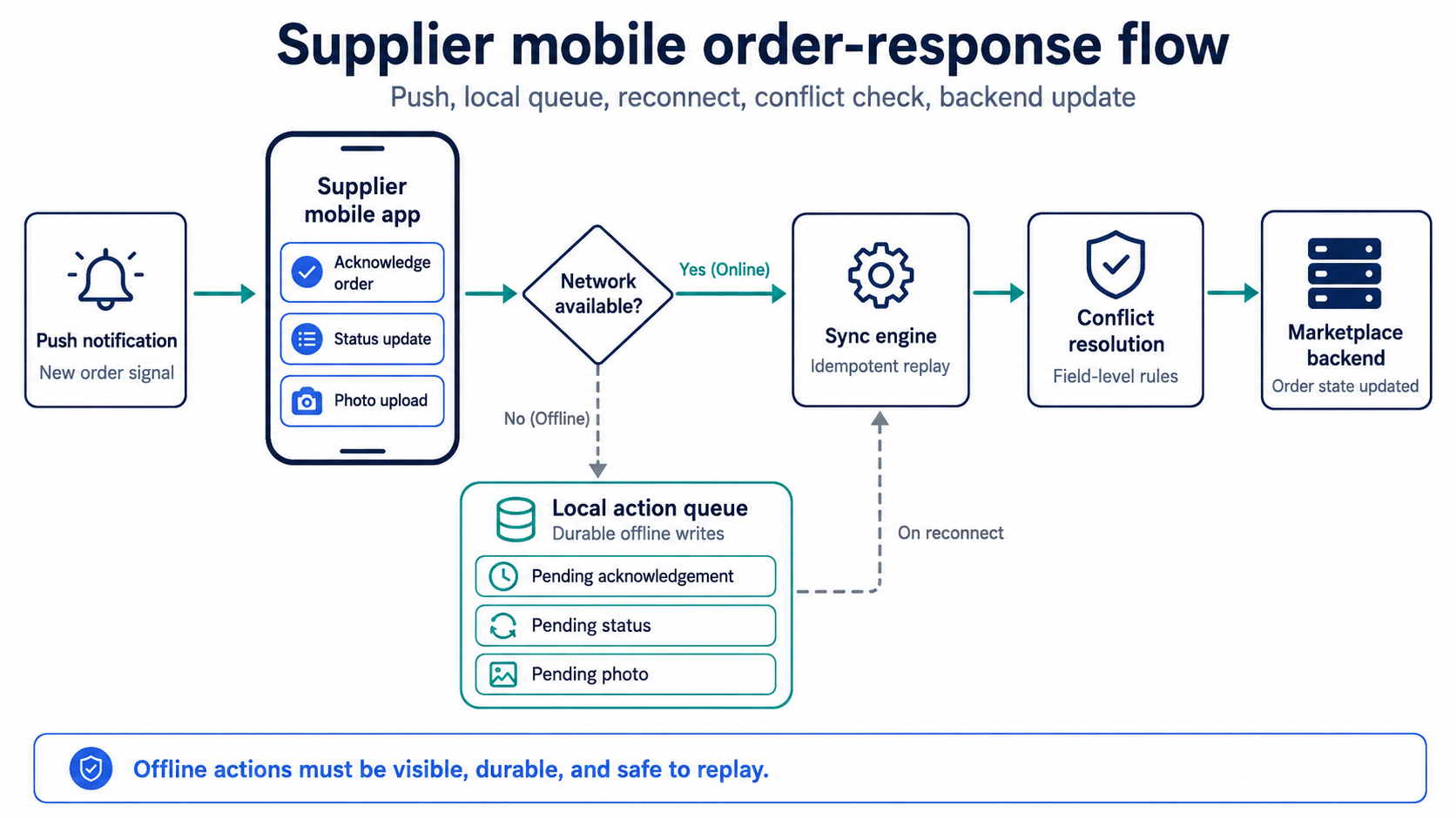
A supplier mobile app needs its own order-response architecture: push triggers the action, offline writes are stored locally, and the sync engine reconciles updates before the marketplace backend changes order state.
For local writes, the app queues actions taken offline (order acknowledgements, status updates, photo uploads) and replays them when the network returns. The queue has to be durable across app restarts, idempotent on retry (a double-replay must not double-process), and observable to the user so they can see what hasn’t synced. The most common production failure here is silent loss — an action queued offline never reaches the server, and neither the vendor nor the support team notices until a customer complains.
For conflict resolution, the team has to decide what happens when two writes touch the same record. A vendor updates inventory offline while a warehouse operator updates the same inventory on the web. When the vendor reconnects, whose write wins? Last-write-wins is simple but loses data. Field-level merge is more correct but expensive to build. CRDTs (conflict-free replicated data types) solve a narrow band of cases well and are operationally heavy. Most marketplaces end up with a pragmatic mix: optimistic last-write-wins for low-stakes fields (notes, secondary metadata) and explicit conflict surfacing for high-stakes fields (inventory counts, prices, status transitions).
The honest trade-off is that full offline support is expensive to build and maintain. Partial offline support is confusing if the boundaries are not visible to the vendor. The right scope depends on how often vendors are actually offline — measure first, then decide. If your operational data shows vendors are offline for more than two or three minutes per session on a meaningful share of orders, full offline is worth the investment. If they are effectively always online, queueing writes for short reconnection windows is enough and the rest can stay simple.
Vendor onboarding to mobile is its own engineering problem
Most vendors will not enthusiastically install another app. They already have one for the marketplace’s competitor, one for their POS, one for their accounting tool. The install-to-first-action friction has to be lower than the web dashboard equivalent — not the same, lower — or the mobile app becomes shelfware. Three engineering decisions shape that friction, and getting any of them wrong noticeably reduces the share of vendors who adopt at all.
Single sign-on from the web dashboard
The vendor is already authenticated to the web product. The mobile app should consume that session — either via a deep link from the web dashboard with a short-lived token, or via SSO against the same identity provider the web app uses. Asking the vendor to re-enter credentials they last typed six months ago is the first place mobile onboarding fails. A QR code on the web dashboard that authenticates the mobile app in two taps is the lowest-friction pattern for vendors who already have the web product open in front of them.
Permissions asked in context
Each permission request is a moment when the vendor can drop off. The app should request only what is needed for the first session and defer the rest to the moment they are needed. Push permission is non-negotiable because it underpins the entire order model. Camera permission can wait until the first proof-of-pickup. Location permission can wait until the first delivery flow. The wrong order — asking for everything up front — converts at noticeably lower rates than progressive permissions, because each modal is another chance for the vendor to think “I’ll do this later” and close the app.
A first action that delivers visible value
The vendor should leave the first session having done something concrete: confirmed a pending order, marked a delivery, or at minimum acknowledged a real notification triggered against their account by the onboarding flow itself. If the first session is configuration screens and tutorial overlays, vendors close the app and do not come back. The first session is the only one a marketplace is guaranteed to get without a second push of effort. The web dashboard does not have this problem because the vendor is already at a desk and committed to a task when they reach it. Mobile onboarding is structurally different and warrants its own design and engineering treatment, not a port of the web onboarding.
When a supplier mobile app is the wrong investment
Not every marketplace pattern benefits from a vendor mobile app. The honest answer to a CTO asking “should we build mobile?” sometimes has to be “no, or at least not yet.” Three patterns where the web-only model still fits:
- Desk-bound vendor work. B2B wholesale marketplaces where vendors fulfil from warehouses with dedicated operations staff, real estate listing platforms where agents work from offices, digital service marketplaces where the deliverable is software or content. In all of these, the vendor is at a desk during the relevant moments of the order lifecycle. A responsive dashboard or a tablet-friendly view is enough.
- Low order velocity per vendor. If a vendor receives one order a day, the cost of building and maintaining a polished mobile experience is hard to justify. The vendor can check the dashboard once in the morning and once in the afternoon and miss nothing. Mobile becomes worth building when vendors lose orders because they cannot respond fast enough — and that requires an order density that desk-checking cannot keep up with.
- High-touch human dispatch. Some marketplaces operate with account managers who phone the vendor when an order needs attention. If a human-in-the-loop is already part of the order architecture, the mobile app mostly replaces a phone call. The phone call may be perfectly acceptable, especially at smaller scale.
Getting this wrong has real cost. A mobile build that vendors do not install or use is a sunk cost in engineering time and an ongoing maintenance burden — two stores to publish to, two SDKs to update, and a vendor-facing surface that does not move the metrics it was built to move. The decision to build should follow the operational pattern, not the assumption that mobile is a universal upgrade for a maturing marketplace.
One adjacent decision is worth resolving first. If the marketplace is still on a plugin model layered on top of a generic e-commerce CMS, the platform architecture often constrains what a vendor mobile app can do — vendor APIs may not exist, or order routing may run inside the plugin in a way that mobile cannot cleanly consume. That separate trade-off is covered in marketplace plugin or purpose-built platform.
Key takeaways
- A vendor web dashboard and a vendor mobile app are different products that serve different operational moments — extending one as the other rarely works, regardless of how well the layout reflows.
- Mobile becomes essential when vendors are away from a desk during the critical part of the order flow: physical handling, seasonal peaks, location-based routing, or on-demand dispatch.
- Push notifications are best-effort across both APNs and FCM, so the order architecture must keep state independently and reconcile on every app open, with a defined fallback path when push does not land.
- Offline-first is an architectural commitment with three layers — local reads, durable write queue, conflict resolution — and the scope depends on measured offline behaviour, not worst-case assumption.
- Mobile onboarding has its own failure modes: SSO from the web dashboard, progressive permissions, and a value-delivering first session matter more than feature breadth at launch.
Why the supplier mobile decision is operational evidence first, architecture second
The honest version of this decision is that supplier mobile earns its place in some marketplaces and not others. Marketplaces with vendors in the field, a seasonal peak, or a location-routed assignment model gain a meaningful response-time advantage from mobile — provided push, offline behaviour, and onboarding are designed deliberately rather than ported from the web product. Marketplaces with desk-bound vendors, low order velocity per vendor, or human-dispatch workflows gain much less, and often nothing.
Once the pattern fits, the engineering questions are the ones discussed above: how push is treated inside the order state machine, how much offline support the vendor actually needs, how onboarding gets a working vendor to their first acknowledged order in one session. These are the questions that separate a vendor mobile app that moves the response-time numbers from one that takes a year to build and gets uninstalled.
For marketplace teams evaluating the build, Bluepes runs scoped architecture conversations with teams across marketplace and e-commerce platform engineering — including category-specific patterns like location-routed seasonal marketplaces (Kortreistved) and other field-vendor models. Start with a scoped mobile architecture conversation before committing engineering quarters to the build.
Summarize with AI
 ChatGPT
 Claude
 Gemini
 Grok
Grok Perplexity
FAQ











Interesting For You



Location-based order routing: where geo-routing breaks
Location-based order routing is an architectural choice that touches four systems at once — supplier registry, inventory visibility, pricing logic, and customer-facing UX. The routing algorithm itself is usually the smallest part of the work. Most marketplaces hit this point when delivery cost starts to dominate the customer's experience of the platform.
Read article


Marketplace plugin vs purpose-built platform: when to move
Marketplace plugin vs purpose-built platform is not a feature comparison. A plugin is an adapter over someone else's commerce architecture. At low volume the adapter holds. As the operating model grows — multi-jurisdiction payouts, custom routing, per-vendor pricing and inventory variation — the gap between what the plugin allows and what the business needs widens into operational cost. At that point the architecture decides the next eighteen months of the business, not the feature roadmap.
Read article

E-commerce RFP technical questions vendors must answer
This article gives eight questions worth adding to an e-commerce development RFP and explains what a strong answer, a weak answer, and a direct Bluepes-style answer should look like.
Read article