


Operational BI for faster decisions: alerts and write-back


A dashboard can show that return rates are rising, stock coverage is falling, or production yield is drifting below target. That does not mean anyone has acted. In many BI environments, the visible metric is only the start of a separate workflow that moves through chat, email, tickets, spreadsheets, and weekly calls. By the time someone asks what changed, the decision trail is already scattered.
Operational BI closes that gap by connecting metrics to alerts, recorded actions, and controlled scenarios. The goal is to make the dashboard useful at the point where a business owner needs to decide, assign, approve, pause, adjust, or escalate. The system does not need to become a full workflow engine. It needs enough structure to show what happened, who acted, what data they saw, and whether the action changed the metric.
For BI Leads, Heads of Data, and IT Directors, the practical question is where to start without creating a fragile reporting application. The answer is a narrow loop: one decision, one trusted metric, one owner, one alert rule, one write-back path, and one bounded what-if model. That is enough to test whether BI can support operational decisions rather than only explain them later.
Updated in May, 2026
How operational BI changes the dashboard’s role
Operational BI turns a dashboard from a passive reporting surface into a controlled decision workspace. The dashboard still visualizes metrics, but it also carries ownership, data freshness, alert rules, action logging, and a short path from insight to decision.
A standard analytical dashboard answers questions such as “what happened?” and “where did the number move?” Operational BI adds the next layer: “who is responsible for acting on this?” and “what was done after the signal appeared?” That change matters because BI problems often look technical from a distance, while the real delay sits in ownership and follow-through.
A practical operational BI setup usually contains four parts. The metric has a named owner. The dashboard shows freshness and completeness signals. Alerts are tied to business thresholds, rather than every small data movement. Actions are recorded in a structured place with user, timestamp, reason, and scope.
For teams using Microsoft tools, Power BI consulting for operational reporting should cover more than charts. The work needs to connect semantic model design, row-level security, Power BI service behavior, Power Apps or workflow integration, and governance around who can update which record. For AWS-heavy teams, Amazon Quick Suite analytics delivery needs the same operating discipline around metric definitions, alert handling, and action ownership.
Operational BI works best when the dashboard supports a known business decision. It works poorly when the team tries to add alerts and write-back to every report at once. The narrow starting point is usually the safer one.
What to build before adding write-back
The first operational BI work is not the write-back form; it is the control layer around the metric. If the metric definition, refresh status, permissions, and owner are unclear, write-back only records decisions against a number people may not trust.
Write-back means writing a user action, comment, status, approval, or decision from a BI interface into a controlled data store. It can be simple: a manager records that a promotion was paused, an inventory planner logs a replenishment adjustment, or a production supervisor records a maintenance action. The technical risk starts when write-back changes operational systems directly without validation, permissions, or auditability.
Before adding any write-back capability, the BI team should confirm four things:
- The metric has one accepted definition and one named owner.
- The dashboard shows when the data last refreshed and whether the expected data arrived.
- User permissions match operational responsibility, including row-level or entity-level scope.
- The target write-back table captures user ID, timestamp, action, reason, affected entity, and previous state where relevant.
Microsoft documents that Power BI data alerts can notify users when dashboard data changes beyond set limits, with alert behavior depending on dashboard tiles and the Power BI service. Microsoft Power BI data alerts documentation is a useful reference when deciding what should be handled by native alerts and what needs a separate workflow layer.
For write-back patterns inside Power BI, Microsoft documents the Power Apps visual, where a canvas app can receive context-aware data from a Power BI report and allow users to take action from the report surface. Microsoft Power Apps visual for Power BI documentation is the relevant starting point for teams that want to record actions without sending users into a separate application.
Governance still matters. If the underlying metric is disputed, the action log becomes another disputed dataset. The right foundation is covered in lightweight BI governance for ownership and lineage, especially where teams need KPI definitions, owners, data contracts, and release notes without slowing delivery.
Why BI alerts fail when the model is weak
BI alerts fail when the underlying model cannot produce stable, timely, and explainable signals. A noisy alert is usually a modeling, ownership, or threshold problem before it becomes an adoption problem.
A useful alert is tied to a decision. It should tell the owner what changed, whether the data is fresh, why the change matters, and what action paths are available. A weak alert fires because a number crossed a threshold, even when the data is incomplete, the baseline is wrong, or the owner has no authority to respond.
The semantic model is central here. If the dashboard calculates return rate differently across pages, an alert on return rate becomes a source of disputes. If the model refreshes late during month-end load, the alert may push stale information. If a metric depends on a slow query, users may stop trusting the dashboard before the action loop is tested.
This is where operational BI connects directly to performance work. BI data modeling patterns for dashboard performance matter because alert reliability depends on the same foundations as dashboard speed: grain, joins, pre-aggregations, filters, and query behavior.
A good alert payload should include:
- Current metric value and comparison point.
- Threshold or delta that triggered the alert.
- Last refresh time and basic completeness status.
- Owner or role responsible for the next action.
- Link to the exact filtered dashboard view.
- Short runbook with accepted responses and escalation path.
Alert fatigue starts when signals arrive faster than owners can assess them. The fix is rarely “send fewer emails” as a standalone change. The better fix is threshold review, cooldown rules, owner mapping, and a check on whether the alert points to a decision someone can actually make.
If your BI dashboards already show problems but action still happens through screenshots, spreadsheets, and chat threads, the issue needs more than another report page. Bluepes can help scope the metric, ownership, alert, and write-back path as one controlled workflow. Discuss your operational BI workflow with Bluepes.
How to scope operational BI in the first 30 days
A 30-day operational BI rollout should test one decision loop, rather than attempt to operationalize the whole reporting environment. The best candidate is a recurring decision with visible cost, a known owner, and enough historical data to define a reasonable baseline.
The timeline should be treated as a contained pilot, not a delivery guarantee for every organization. A company with clean data, clear owners, and an existing semantic model can move faster. A company with unstable ingestion, unclear KPI definitions, or disputed ownership needs discovery before alerting or write-back work starts.
The decision should be specific. “Improve inventory management” is too broad. “Notify the category owner when stock cover falls below the agreed threshold for top SKUs and record the replenishment decision” is workable. The same applies to manufacturing: “improve OEE” is vague, while “alert the line supervisor when first pass yield drops below the target range during a shift and record the corrective action” can be scoped.
A useful 30-day plan starts with data layer checks. Ingestion, warehouse tables, transformation logic, semantic model, and report surface all affect whether the alert can be trusted. This is why BI project estimation across data layers should happen before a team commits to alerts, write-back, or what-if scenarios.
The first pilot should produce evidence in three areas: whether the alert reached the right owner, whether the owner recorded an action, and whether the team could review the decision later without reconstructing events from messages. That evidence is more useful than page views.
Where what-if analysis fits in operational BI
What-if analysis belongs before commitment, while write-back records what the business actually decided. Mixing both in the same interface without clear labels creates audit and adoption problems.
A what-if model gives users controlled inputs such as discount percentage, replenishment quantity, staffing hours, production slot, or budget cap. The output should show the projected effect on a target metric using an explainable calculation. This is decision support, not automatic approval.
The safest pattern is to keep simulation and action clearly separated. A merchandiser can test whether reducing a discount from 20% to 12% protects margin enough to keep a campaign active. The write-back action records the final decision: “discount reduced to 12%,” with owner, reason, timestamp, and affected campaign.
In Power BI, what-if parameters can support controlled scenario work when the underlying measures are well defined. In Amazon Redshift or AWS-based BI stacks, scenario outputs may be calculated in a governed data layer and exposed through Amazon Quick Suite dashboards. AWS confirmed that Amazon QuickSight evolved into Amazon Quick Suite, expanding the analytics experience into a broader business insights environment. AWS announcement on Amazon Quick Suite is useful for keeping naming and platform references current.
What-if analysis becomes dangerous when users treat simulated values as approved operational changes. To prevent that, the interface should label scenario outputs clearly, avoid writing scenario values into production tables, and require a separate action step for commitment. The audit trail should store the final decision, not every exploratory slider movement unless there is a compliance reason.
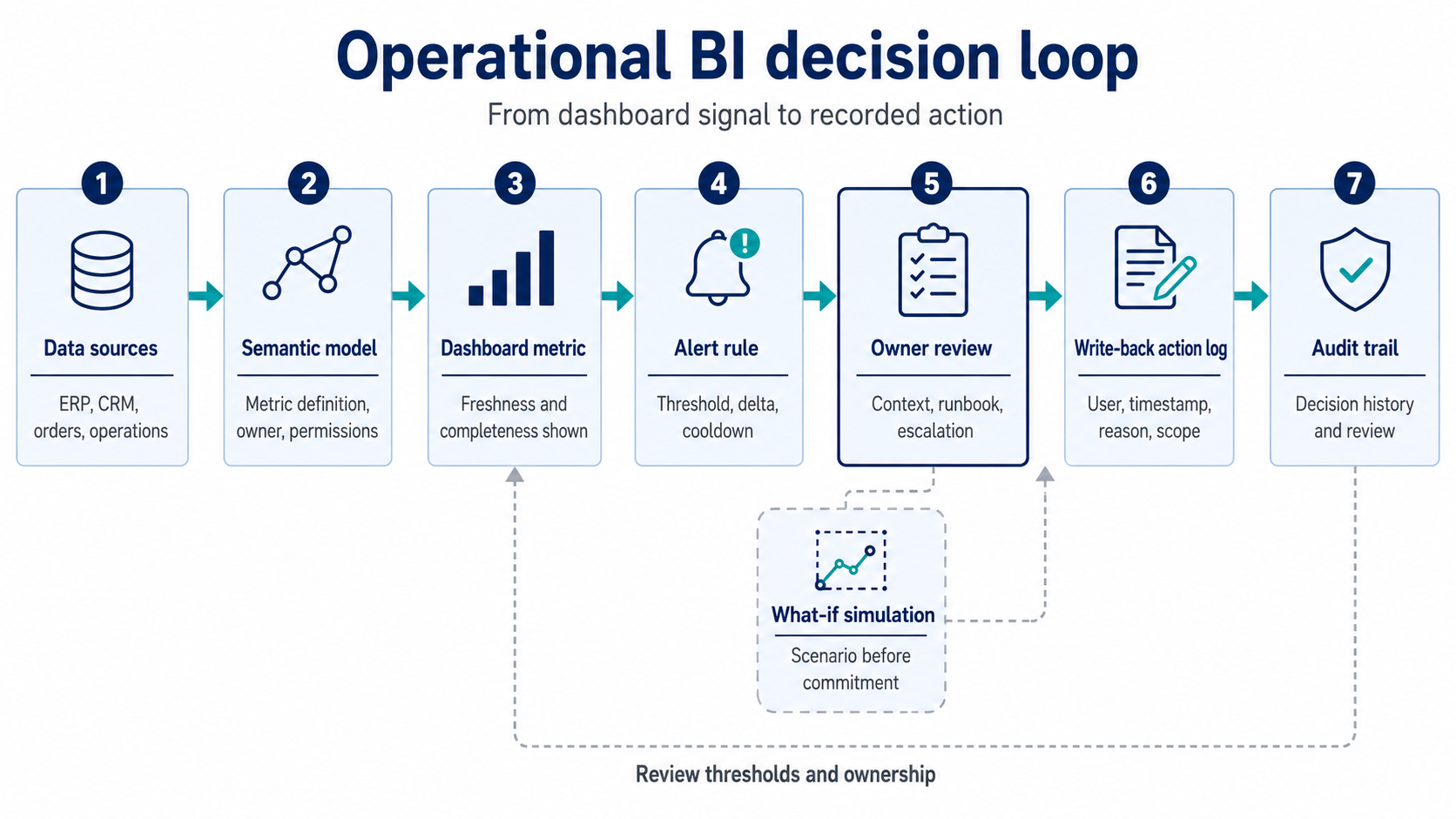
Operational BI works when dashboard signals move through a controlled decision loop: trusted metric, alert rule, owner review, what-if simulation, recorded action, and audit trail.
Operational BI examples by decision type
Operational BI should start where timing and accountability matter. E-commerce, retail, and manufacturing teams usually have good candidates because the same decisions repeat often and delays are visible.
For e-commerce and retail, returns, promotions, stock coverage, and margin protection are common starting points. A dashboard can alert a category owner when return rate rises above the agreed baseline for a specific product group. The owner reviews channel, campaign, SKU, and recent change notes, then records an action such as pausing the promotion, changing the creative, or escalating to supplier review.
This connects well with e-commerce and retail software delivery, because action tracking often touches more than BI. Promotion systems, ERP data, product catalogues, order flows, and finance reporting all need consistent identifiers. The BI workflow is only useful if the operational systems behind it can support the same business entities.
For manufacturing or CPG, first pass yield, downtime, maintenance actions, and schedule changes are better starting points. A supervisor may receive an alert when yield drops outside the accepted range for a line and shift. The dashboard shows the last load time, recent maintenance notes, production batch, and operator assignment. The supervisor records the action taken and the reason, so later reviews can compare action types against metric recovery.
Healthcare and fintech require stricter controls. In those environments, write-back from BI should rarely update core systems directly. A safer pattern is to record review status, exception handling, or escalation notes in a controlled table while operational changes stay inside approved transactional systems. Auditability, permissions, and data minimization need more attention than convenience.
The common rule across industries is simple: operational BI should support decisions that already exist. It should not invent a new workflow that business teams have no reason to follow.
How to measure whether operational BI is working
Operational BI works when it reduces decision latency, improves action traceability, and helps teams learn which alerts deserve attention. Dashboard views alone do not prove that decisions improved.
The measurement layer should focus on the decision loop:
The first review should happen after enough alert cycles to see a pattern. A single incident tells little. Repeated alert noise, missing write-back entries, or actions recorded by the wrong role tell the team where the design is weak.
Operational BI also needs a change log. If threshold logic changes, if the semantic model is updated, or if owners are reassigned, users should see it. Hidden changes damage trust faster than a dashboard bug because the user cannot tell whether the business changed or the logic changed.
The most valuable review question is operational: can the team reconstruct a decision without asking three people to search chat history? If the answer is yes, the system is doing useful work.
When operational BI is the wrong starting point
Operational BI should wait when the reporting foundation is unstable, the process owner is unclear, or the business decision is still too ambiguous to encode. Adding alerts and write-back too early creates a polished interface around weak logic.
There are several red flags. Metrics differ across dashboards. Data freshness is unknown. Users disagree on who owns the decision. Permissions are managed manually. The team cannot explain how a KPI is calculated. The operational system of record is unclear. In those conditions, write-back increases the number of places where inconsistency can live.
Another risk is over-automation. A BI alert should not trigger high-impact operational changes without human review unless the organization has already built validation, rollback, monitoring, and accountability around that action. For most mid-market BI teams, human-in-the-loop action recording is the right first step.
A good stopping rule is useful: if a decision cannot be described in one paragraph with owner, metric, trigger, action options, and escalation path, it is too early for operational BI. Start with definition and ownership. Add alerting after the metric is trusted. Add write-back after the action is clear.
Key takeaways
- Operational BI connects trusted metrics to alerts, responsible owners, recorded actions, and reviewable decision history.
- Write-back should start with action logging and audit trails before it touches operational systems directly.
- Alerts work only when the semantic model, refresh status, threshold logic, and ownership model are reliable.
- What-if analysis should remain clearly separated from committed write-back actions.
- A 30-day rollout is best treated as a narrow pilot around one decision, one metric, and one owner.
Operational BI succeeds when the decision loop is designed first
The useful version of operational BI starts with a real business decision and works backward. Which metric signals the issue? Who owns the response? What context do they need? What can they do? Where should that action be recorded? How will the team review whether the decision helped?
That sequence keeps the work grounded. Alerts without ownership become noise. Write-back without permissions becomes risk. What-if without clear separation from action becomes confusion. A dashboard can support faster decisions only when the data model, workflow, and responsibility model line up.
For Bluepes clients, this is usually a combined data and engineering task. BI specialists shape the semantic model and dashboard experience. Data engineers check ingestion, freshness, and completeness. Software engineers or platform specialists handle write-back, workflow integration, permissions, and audit trails where the BI tool alone is not enough.
If your BI environment already has trusted dashboards but decisions still disappear into chat, Bluepes can help define the operational BI loop, scope the first pilot, and identify which parts belong in Power BI, Amazon Quick Suite, the data warehouse, or a lightweight application layer. Review your operational BI decision workflow with Bluepes.
Summarize with AI
 ChatGPT
 Claude
 Gemini
 Grok
Grok Perplexity
FAQ











Interesting For You



BI operating model for mid-market analytics teams
A BI operating model gives mid-market companies a practical way to run analytics work without turning every dashboard request into a ticket queue. It defines who owns KPI logic, who changes the semantic model, how dashboard releases are reviewed, and what reliability level business users can expect from each report.
Read article


BI dashboard performance: modeling patterns for speed
The fastest fix is rarely a bigger warehouse or a new reporting tool. Slow dashboards usually come from avoidable design choices: unclear fact table grain, wide transactional tables reused for analytics, expensive calculations running at click time, weak filter design, and joins that multiply rows before the report even renders.
Read article


How to Optimize Amazon Redshift for Analytics Without Overprovisioning
A quarterly revenue dashboard takes four minutes to load. An analyst runs a join across two fact tables and the query sits in queue for six minutes before it starts executing. The BI lead’s response is usually the same: “Let’s add more nodes.” But the cluster already has spare capacity — the problem is how that capacity is being used.
Read article